
Skip to Main Content
Sam's Club
Sam's Club
All Departments
All Services
Customer reviews for SAMSUNG 85" Class U8000F Series 4K Crystal UHD Smart TV for
SAMSUNG 85" Class U8000F Series 4K Crystal UHD Smart TV
4.5 out of 5 stars
stars
3,307 ratings3,275 reviews
  1. 5 stars71% (2,353)
  2. 4 stars16% (517)
  3. 3 stars7% (218)
  4. 2 stars3% (100)
  5. 1 star4% (119)

Member photos

  • +1030 images
Sort by |
Showing 561-570 of 3,275 reviews
Jul 27, 2026
Reviewer name: Dvrah
2 out of 5 stars
2 out of 5 stars review

I yell at it frequently

[This review was collected as part of a promotion.] the overall picture quality of the TV is good but it's responsiveness and any usage of the Alexa feature is garbage the search feature in general is terrible the remote is ridiculous the remote is ridiculously sensitive if I leave it alone for even 5 Seconds it wants to put on some random show on regular television and it's just generally really annoying

Review from Samsung US
Helpful?3CTS2O15ZY1416007408101
Jun 15, 2026
Reviewer name: Happy
1 out of 5 stars
1 out of 5 stars review

I hate this TV. It's horrible.

[This review was collected as part of a promotion.] I hate this TV. I hate it. I hate it. I hate it. It always freezes it locks my cable box so it won't change channels. I have to turn off the TV and the cable box regardless of what I was watching lose everything I was watching. I hate it I hate it. I hate it.

Review from Samsung US
Helpful?3CTS2O15ZY1416007408101
reply from Samsung Advisor

Hi Happy, We appreciate you sharing the issues you’re experiencing when connecting your U8000F TV to your cable box. To ensure everything is set up correctly, we recommend using the Connection Guide, which provides step-by-step instructions for connecting external devices. Navigate to: Home > left directional key > Connected Devices > Connection Guide Also, please double-check that your cable box is powered on and that the HDMI cable is securely connected. To change input sources, go to: Connected Devices > Sources You can also run HDMI Troubleshooting, which checks the connection between your TV, HDMI cable, and external device. This takes approximately 2 minutes and can be found under: Connected Devices > Connection Guide > Video Device > HDMI Troubleshooting Finally, please ensure that the broadcast signal or network your cable box is connected to is functioning properly. If you continue to experience issues, don’t hesitate to reach out to Samsung Support at 1-800-SAMSUNG (8AM – 9PM EST Mon – Fri, 8AM – 6PM Sat – Sun), or reach us via text anytime. You can also visit ‘Support’ on our website for: • Live Chat • Manuals, Software, & Warranty Info ~ Samsung Advisor

Jun 5, 2026
Reviewer name: WeirdHarold
4 out of 5 stars
4 out of 5 stars review

Good but not Great

[This review was collected as part of a promotion.] This is a very typical mid-range TV from Samsung, the Picture quality is great as expected from a Samsung panel. However the sound quality and volume from the TV speakers is low and not great, also typical of most TV speakers. The Smart TV interface is okay, but hard to navigate and the system settings are now integrated into this interface and can be hard to find things till you figure out where they are. My only really serious gripe is that there is no Optical Audio on this TV and I couldn't hook it up to my existing sound bar system.

Review from Samsung US
Helpful?3CTS2O15ZY1416007408101
Jul 5, 2026
Reviewer name: TD customer
4 out of 5 stars
4 out of 5 stars review

Great picture, poor sound

[This review was collected as part of a promotion.] We love the picture but the sound is poor. This is our second Samsung in our home, both recently purchased. However, we had to purchase a Sono Soundbar to be able to hear the shows. The Samsung was too weak.

Review from Samsung US
Helpful?3CTS2O15ZY1416007408101
Jun 5, 2026
Reviewer name: Old man
1 out of 5 stars
1 out of 5 stars review

Ok but not good

[This review was collected as part of a promotion.] The remote is very bad and hard to operate. The screen layout makes it hard to understand and find what you are looking for. I have a 65" LG that is a lot easier to operate. Will sell this and buy another LG.

Review from Samsung US
Helpful?3CTS2O15ZY1416007408101
reply from Samsung Advisor

Hi Old man, Thank you for sharing your feedback with us. To help you get the most from your TV, you can download the full e-Manual and more by visiting Samsung’s website, then navigating to: Support > Manual & Software > TVs & Home Theater. From there, you can search for and select your U8000F TV model to view or download the available guides. The e-Manual & User Guide are also conveniently built into your TV: Settings > Support > Tips and User Guides. Your TV includes Learn Menu Screen, an accessibility feature that provides audio guidance for on-screen menus. When enabled, your TV will announce the name and function of each menu item as you scroll, without making any changes. This feature is particularly helpful for users who are visually impaired or new to Smart TV menus. To enable, go to: Settings > All Settings > General & Privacy > Accessibility > Learn Menu Screen. To exit, press the Return key twice. If you’d like more assistance with this feature, please reach Samsung Support at 1-800-SAMSUNG (8AM – 9PM EST Mon – Fri, 8AM – 6PM Sat – Sun). LiveChat agents are also available through the ‘Support’ link on our website. ~ Samsung Advisor

Jun 20, 2026
Reviewer name: Robert H 1967
5 out of 5 stars
5 out of 5 stars review

Great Features
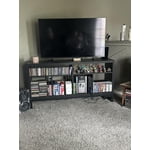
[This review was collected as part of a promotion.] I am enjoying my TV. I'm taking advantage of Samsung TV Plus which is part of the TV. I get several of my Favorite Channels on this service. I attached an indoor antenna and I am able to get 50 or more local channels that look great on the TV.

Review from Samsung US
Helpful?3CTS2O15ZY1416007408101
Jun 20, 2026
Reviewer name: GdMcintosh
5 out of 5 stars
5 out of 5 stars review

Amazing TV

[This review was collected as part of a promotion.] My 65 inch Samsung TV is absolutely amazing! The brightness level is unmatched. The colors are so vibrant and I love that I can adjust it to my liking. It fits so perfectly in my room. Its super easy to use. The resolution is amazing as well

Review from Samsung US
Helpful?3CTS2O15ZY1416007408101
Jul 2, 2026
Reviewer name: Andy
5 out of 5 stars
5 out of 5 stars review

Highly recommended!
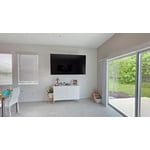
[This review was collected as part of a promotion.] Highly recommended! Just upgraded to a Samsung TV and the picture quality is on another level. The colors, brightness, and clarity are incredible. If you're thinking about getting a new TV, don't hesitate—it's worth every penny. Samsung really nailed it with this one! 👌✨ #Samsung #TopQuality #HighlyRecommended

Review from Samsung US
Helpful?3CTS2O15ZY1416007408101
Jun 6, 2026
Reviewer name: 808isBOB
5 out of 5 stars
5 out of 5 stars review

Amazing picture
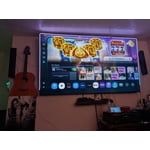
[This review was collected as part of a promotion.] Love the size, color and clarity. And the fact that I can easily mirror my devices and remote access my PC. Surprisingly light weight for how huge it is and with the TV housing constructed out of aluminum makes it light and durable. Nice work Samsung!

Review from Samsung US
Helpful?3CTS2O15ZY1416007408101
Jun 14, 2026
Reviewer name: Alex Fox
5 out of 5 stars
5 out of 5 stars review

Awesome TV for cloud gaming!
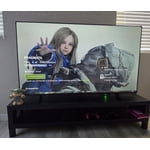
[This review was collected as part of a promotion.] This TV is a game-changer. The fact that you can just connect a DualSense controller and play modern games via GeForce Now without needing a PC or a console is mind-blowing. It works flawlessly. Highly recommend if you want to save space and money!

Review from Samsung US
Helpful?3CTS2O15ZY1416007408101









