Skip to Main Content
Sam's Club
Sam's Club
All Departments
All Services
Customer reviews for SAMSUNG 85" Class U8000F Series 4K Crystal UHD Smart TV for
SAMSUNG 85" Class U8000F Series 4K Crystal UHD Smart TV
4.5 out of 5 stars
stars
3,309 ratings3,277 reviews
  1. 5 stars71% (2,355)
  2. 4 stars16% (517)
  3. 3 stars7% (218)
  4. 2 stars3% (100)
  5. 1 star4% (119)

Member photos

  • +1031 images
Sort by |
Showing 2,641-2,650 of 3,277 reviews
May 1, 2026
Reviewer name: Superbuyer
4 out of 5 stars
4 out of 5 stars review

Good features

[This review was collected as part of a promotion.] Great resolution, easy to conect other devices. The speakers need more sound.

Review from Samsung US
Helpful?3CTS2O15ZY1416007408101
Apr 30, 2026
Reviewer name: Anonymous
5 out of 5 stars
5 out of 5 stars review

Great tv

[This review was collected as part of a promotion.] Loved the TV great picture n sound the picture is awesome

Review from Samsung US
Helpful?3CTS2O15ZY1416007408101
Feb 12, 2026
Reviewer name: Da 85
5 out of 5 stars
5 out of 5 stars review

Excellent tv

[This review was collected as part of a promotion.] Picture quality is excellent, thankful I brought this tv

Review from Samsung US
Helpful?3CTS2O15ZY1416007408101
Feb 17, 2026
Reviewer name: Doomstyker
3 out of 5 stars
3 out of 5 stars review

Was good when it worked
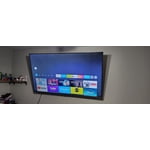
[This review was collected as part of a promotion.] Was good when it worked i moved and all these lines appeared my other tv was fine.

Review from Samsung US
Helpful?3CTS2O15ZY1416007408101
reply from Samsung Advisor

Hi Doomstyker, Thank you for sharing your experience with Samsung’s U8000F. If your TV is displaying lines on the screen, we recommend the following steps to help isolate the issue: 1. Check all input cable connections for any external devices (e.g., HDMI, streaming boxes, Blu-ray players) 2. Switch channels or inputs to see if the issue appears across all sources 3. Run a Picture Test to check for panel-related issues: Settings > Support > Device Care > Self Diagnosis > Picture Test 4. Perform a cold boot by holding the power button on your remote for about 10 seconds 5. Ensure your TV has the latest software installed: Settings > Support > Software Update It is also possible that the TV was damaged during transit, if care was not taken. For further assistance, please contact Samsung Support at 1-800-SAMSUNG, 8AM – 12AM EST, 7 days a week. LiveChat and additional support resources are also available through the Support link on our website. ~ Samsung Advisor

Feb 17, 2026
Reviewer name: Bigam519
5 out of 5 stars
5 out of 5 stars review

Great tv set up

[This review was collected as part of a promotion.] Great tv wouldn't get any other brand but samsung features are great pictures is fantastic

Review from Samsung US
Helpful?3CTS2O15ZY1416007408101
May 20, 2026
Reviewer name: Ed Samsung tv
5 out of 5 stars
5 out of 5 stars review

Home screen

[This review was collected as part of a promotion.] Very happy with my purchase o only wish that the Home Screen but I understand it

Review from Samsung US
Helpful?3CTS2O15ZY1416007408101
May 20, 2026
Reviewer name: Just me
1 out of 5 stars
1 out of 5 stars review

Ms

[This review was collected as part of a promotion.] Do not like because switched from 'cable ' Very difficult/ time consuming to learn

Review from Samsung US
Helpful?3CTS2O15ZY1416007408101
reply from Samsung Advisor

Hi Just me, We appreciate you sharing your experience. To help you get the most from your TV and remote functions, you can download the full e-Manual and more by visiting Samsung’s website then navigating to: Support > Manual & Software > TVs & Home Theater. From there, you can search for and select your U8000F TV model to view or download the available guides. The e-Manual & Remote Control Guide are also conveniently built into your TV: Settings > Support > Tips and User Guides. If you’d like more assistance with these features, please reach Samsung Support at 1-800-SAMSUNG (8AM – 9PM EST Mon – Fri, 8AM – 6PM Sat – Sun). LiveChat agents are also available through the ‘Support’ link on our website. ~Samsung Advisor

Mar 23, 2026
Reviewer name: New to tv
5 out of 5 stars
5 out of 5 stars review

Amazing tv

[This review was collected as part of a promotion.] Easy to set up and can connect to smart devices in house. Great picture and sound.

Review from Samsung US
Helpful?3CTS2O15ZY1416007408101
Feb 18, 2026
Reviewer name: YodaBoy97
5 out of 5 stars
5 out of 5 stars review

Amazing picture

[This review was collected as part of a promotion.] This tv has the best picture of any TV I have ever had

Review from Samsung US
Helpful?3CTS2O15ZY1416007408101
May 20, 2026
Reviewer name: Al357
5 out of 5 stars
5 out of 5 stars review

Quality Television

[This review was collected as part of a promotion.] A quality product and great viewing experience in our home

Review from Samsung US
Helpful?3CTS2O15ZY1416007408101