Skip to Main Content
Sam's Club
Sam's Club
All Departments
All Services
Customer reviews for SAMSUNG 65" Class U8000F Series 4K Crystal UHD Smart TV for
SAMSUNG 65" Class U8000F Series 4K Crystal UHD Smart TV
4.5 out of 5 stars
stars
1,462 ratings1,405 reviews
  1. 5 stars74% (1,079)
  2. 4 stars15% (218)
  3. 3 stars5% (75)
  4. 2 stars3% (47)
  5. 1 star3% (43)

Member photos

  • +373 images
Sort by |
Showing 951-960 of 1,405 reviews
Apr 22, 2026
Andy
1 out of 5 stars review

Great TV

[This review was collected as part of a promotion.] Everything is fine except the internet not working in this TV!?

Review from Samsung US
Helpful?23IWKCJCPHCF15992409490
reply from Samsung Advisor

Hi Andy, Thank you for sharing your experience with the internet connection on your Samsung U8000F TV. Whether you're using Wi-Fi or a wired (LAN) connection, there are a few steps you can take to help resolve the issue: 1. Power Cycle Your Equipment. Unplug both your TV and router/modem from the wall outlet. Wait at least 30 seconds, then plug them back in and allow both devices to fully restart. 2. Check the Network Status. On your TV, go to: Home > left directional key > Settings > All Settings > Connection > Network > Network Status. This will help determine if the issue lies with the network or the TV. 3. Try a Different Connection Type. If you're using Wi-Fi, try connecting an Ethernet (LAN) cable directly from your router to the TV to test the connection. If you're using a wired connection, try switching to Wi-Fi to see if the issue persists. 4. Reestablish the Network Connection. Go to: Settings > All Settings > Connection > Network > Open Network Settings, and follow the prompts to reconnect to your Wi-Fi or wired network. 5. Update Firmware. Software updates can often resolve network bugs. To check for the latest version: Settings > Support > Software Update > Update Now If these steps don't resolve the issue, we’d be happy to provide further assistance. Please call Samsung Support at 1-800-SAMSUNG, 8AM – 9PM EST Mon – Fri, 8AM – 6PM Sat – Sun. LiveChat is also available at the ‘Support’ link on our website. ~ Samsung Advisor

May 20, 2026
Dave
4 out of 5 stars review

It turns on

[This review was collected as part of a promotion.] It's an average TV I believe, nothing special about it.

Review from Samsung US
Helpful?23IWKCJCPHCF15992409490
May 12, 2026
Jncopipe3
5 out of 5 stars review

Easy setup with a great picture

[This review was collected as part of a promotion.] Great 70 inch TV for its price. It's bright, has a shap image, great for some gaming

Review from Samsung US
Helpful?23IWKCJCPHCF15992409490
May 22, 2026
PacG
5 out of 5 stars review

Love how clear the picture is
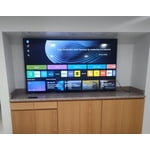
[This review was collected as part of a promotion.] This T.V turns my whole living room into the theater

Review from Samsung US
Helpful?23IWKCJCPHCF15992409490
May 18, 2026
Elijah
5 out of 5 stars review

Great TV

[This review was collected as part of a promotion.] Brightness is great, with vivid colors. Fast refresh. Amazing contrast and resolution.

Review from Samsung US
Helpful?23IWKCJCPHCF15992409490
May 3, 2026
LilGlrly
3 out of 5 stars review

Crystal uhd 2025

[This review was collected as part of a promotion.] Sound and picture are great, but the settings menu can be a bit tricky to navigate sometimes

Review from Samsung US
Helpful?23IWKCJCPHCF15992409490
reply from Samsung Advisor

Hi LilGlrly, We appreciate you sharing your user experience. To help you get the most from your TV, you can download the full e-Manual and more by visiting Samsung’s website then navigating to: Support > Manual & Software > TVs & Home Theater. From there, you can search for and select your U8000F TV model to view or download the available guides. The e-Manual and Remote Control Guide are also conveniently built into your TV: Settings > Support > Tips and User Guides If you need additional help, please contact Samsung Support at 1-800-SAMSUNG (8AM – 9PM EST Mon – Fri, 8AM – 6PM Sat – Sun). LiveChat agents are also available through the ‘Support’ link on our website. ~Samsung Advisor

May 11, 2026
No nickname
3 out of 5 stars review

Good

[This review was collected as part of a promotion.] It has great resolution but it sometimes lags when moving between apps.

Review from Samsung US
Helpful?23IWKCJCPHCF15992409490
reply from Samsung Advisor

Hi, We appreciate your feedback regarding response time. For optimal performance, please ensure your U8000F TV is running the latest firmware. You can check this by going to: Home > left directional key > Settings > Support > Software Update To further optimize performance, try running Device Care, which checks memory, clears unused cached data, and closes background apps: Home > left directional key > Settings > Support > Device Care > Start Device Care If issues continue, please reach Samsung Support at 1-800-SAMSUNG, available 8AM – 9PM EST Mon – Fri, 8AM – 6PM Sat – Sun. LiveChat is also available via the ‘Support’ link on our website. ~ Samsung Advisor

May 20, 2026
Ed Samsung tv
5 out of 5 stars review

Home screen

[This review was collected as part of a promotion.] Very happy with my purchase o only wish that the Home Screen but I understand it

Review from Samsung US
Helpful?23IWKCJCPHCF15992409490
May 11, 2026
Charlywentz
5 out of 5 stars review

Excellente view

[This review was collected as part of a promotion.] The performance it's perfect 👌 I definitely will get another one

Review from Samsung US
Helpful?23IWKCJCPHCF15992409490
May 11, 2026
Colin
5 out of 5 stars review

Love the 85 inch
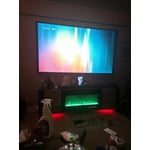
[This review was collected as part of a promotion.] Love the tv, great image, great sound, abd a great ui.

Review from Samsung US
Helpful?23IWKCJCPHCF15992409490