Skip to Main Content
Sam's Club
Sam's Club
All Departments
All Services
Customer reviews for SAMSUNG 58” Class U8000F Series 4K Crystal UHD Smart TV for
SAMSUNG 58” Class U8000F Series 4K Crystal UHD Smart TV
4.5 out of 5 stars
stars
2,510 ratings2,504 reviews
  1. 5 stars72% (1,812)
  2. 4 stars16% (396)
  3. 3 stars6% (153)
  4. 2 stars3% (70)
  5. 1 star3% (79)

Member photos

  • +753 images
Sort by |
Showing 1-10 of 2,504 reviews
Aug 23, 2025
Rose F
5 out of 5 stars review

Verified Purchase

Why did I wait so long

I love it! Perfect picture and all the apps it come with is awesome 👏

Helpful?1U5QA8D4IAB615677157353
Jul 31, 2025
Ted
5 out of 5 stars review

Verified Purchase

This has a very bright vivid picture

very bright and vivid picture however was disappointed I could not hook up my Bluetooth earphones because it does not have digital output in the back of the television however it does hook up Bluetooth to my fireplace which I’m happy

Helpful?1U5QA8D4IAB615677157353
Jul 8, 2026
Samsung forever
5 out of 5 stars review

Best TV live how I hook my speakers my phone to it

The brightness and contrast is the next I've ever had from all of my tvs over the years. I love how I'm able to quickly hook it up to my phone. My laptop. My speakers. Love how quickly the response to everything is is . Smooth fast and clear The contrast color sound etc stays the same over time never wears out . Over the 2 years I've had it is still the same as the day I bought it. Over 25 years I've bought nothing but Samsung and for the next 25 years I'm still only going to buy Samsung It's the best TV out there you get high quality without paying how prices. I recommend Samsung all day long

Review from Samsung US
Helpful?1U5QA8D4IAB615677157353
Jun 23, 2026
Mormoneygan
5 out of 5 stars review

Best TV I've owned yet!

I do love the product. Like all Samsung technologies, I love the linking options that are available. Like how my Samsung galaxy phone is connected and linked making options much more easier. I love all of the sound and display options, such as amplified surround sound, different color and contrast options, along with brightness. Depending on your home wifi network, the t.v is very fast responding, with reliable streaming on every app.

Review from Samsung US
Helpful?1U5QA8D4IAB615677157353
Jul 5, 2026
Kimj7448
5 out of 5 stars review

Love the colors and clarity!

I love this big television! For the first time in years, I no longer have to wear glasses or contacts to watch TV! The picture is so clear and bright. Now, when I watch sports, I can actually see and recognize which player has the ball without having to wait on the announcer to identify the player first! I also love all the different shows I can explore. I also love being able to throw my phone up on the screen and access all my apps as well. Thanks, Samsung for the wonderful experience!

Review from Samsung US
Helpful?1U5QA8D4IAB615677157353
Jul 5, 2026
Your Royal Highness
5 out of 5 stars review

There Just Is No Other Competition

This TV & all of my 6 TV's in my home are and have always been Samsung! They are the best by far as far as clarity, brightness, amazing contrast. This TV brings everything to the table with its quick responsiveness, the picture upscaling and uniformity. I have buying Samsung products for years, they are whom I trust who it comes to spending my monies. My entire is nothing but SAMSUNG!! You know, for the smartness and simplicity of life, IT'S SAMSUNG!

Review from Samsung US
Helpful?1U5QA8D4IAB615677157353
Jul 5, 2026
Sandi987
4 out of 5 stars review

I love the improved clarity in the new TV.

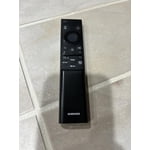
This is my 5th Samsung TV and I've loved them all. My only recommendation would be to restore the old remote as the new style remote is too small to read and lacks all the features of my other Samsung TV remotes. The picture is much improved as are all the new Samsung products.

Review from Samsung US
Helpful?1U5QA8D4IAB615677157353
Jul 5, 2026
DanaK
3 out of 5 stars review

One pixel always stays white. Pretty annoying

Not a bad TV, but it turns out there's *one* pixel in the middle of the screen that always stays white. It's not noticeable most of the time, but during darker scenes it's pretty annoying. I'd take the TV back for an exchange, but probably not worth the effort.

Review from Samsung US
Helpful?1U5QA8D4IAB615677157353
Jul 6, 2026
RKC716
3 out of 5 stars review

The user experience is not easy

It's too darn complicated! Every time I turn it on, I get the homepage, and have to go through various steps to get to my cable channels. I wish I could program the TV to automatically go to where I want it to when I turn it on. If there is already a way to do this, it's not intuitive enough for an average consumer to figure it out. It also feels like it takes different steps each time I turn on the TV to get to where I want to be. I'll commit to memory what to do, and the next time, that doesn't work, and I have to figure everything out again. It may be considered a "smart TV" because of the supposed easy connection to subscribed channels, but it's not an easy connection for me, and that's all that I care about! Either simplify the homepage or develop more user-friendly instructions on how to set it up.

Review from Samsung US
Helpful?1U5QA8D4IAB615677157353
Jun 29, 2026
MJMC
2 out of 5 stars review

Inconsistent

I currently have two, the oldest is fantastic, the newest is always starting on the China screen of teens dancing and singing. And it is so difficult to get it back on my MS Now channel with Direct TV! It is a crazy waste of time trying to get it back to the screen I last watched!!! And it is sooooooooo loud on the dancing/singing channel in Chinese language...

Review from Samsung US
Helpful?1U5QA8D4IAB615677157353
reply from Samsung Advisor

Hi MJMC, Thank you for your review. While your U8000F TV may currently default to Samsung TV Plus when powered on, you can customize what your TV does at startup by adjusting the Start Screen Options. To do this, navigate to: Settings > All Settings > Advanced Features > Start Screen Option and choose from the following: 1. Start with Smart Hub Home – Automatically launches Smart Hub when the TV is turned on. You can enable or disable this option based on your preference. 2. Autorun Multi View Casting – If you cast YouTube content from your mobile device, the TV will automatically display the content using Multi View. 3. Autorun Multi View Mirroring – When you screen mirror your mobile device, Multi View will automatically open to show your device’s screen. If you need help adjusting these settings or have any other questions, please contact Samsung Support at 1-800-SAMSUNG (8AM – 9PM EST Mon – Fri, 8AM – 6PM Sat – Sun). LiveChat agents are also available by clicking on the ‘Support’ link on our website. ~ Samsung Advisor