Skip to Main Content
Sam's Club
Sam's Club
All Departments
All Services
Customer reviews for SAMSUNG 83” Class S90FD Series 4K OLED Smart TV for
SAMSUNG 83” Class S90FD Series 4K OLED Smart TV
4.7 out of 5 stars
stars
1,786 ratings1,786 reviews
  1. 5 stars80% (1,435)
  2. 4 stars13% (230)
  3. 3 stars3% (56)
  4. 2 stars2% (38)
  5. 1 star2% (27)

Member photos

  • +676 images
Sort by |
Showing 231-240 of 1,786 reviews
Jul 6, 2026
Reviewer name: None
5 out of 5 stars
5 out of 5 stars review

Great purchase

[This review was collected as part of a promotion.] I love my new Samsung smart TV! There is definitely a learning curve, Alexa has helped with all my issues so far. The picture is very sharp and bright, even with night scenes, which I struggled to see with my old smart TV. Very please with this purchase.

Review from Samsung US
Helpful?3D37GPZDAAT215584057195
Jun 5, 2026
Reviewer name: tawcat
5 out of 5 stars
5 out of 5 stars review

Great as always

[This review was collected as part of a promotion.] We've owned Samsung TV's for years and this one does not disappoint. Great picture for sure. We do have a Samsung Sound Bar and Woofer which does makes a grand difference in sound. That said, sound from the TV proper is pretty darn good. Only thing I wish were easier was the set up to start on the ROKU app screen instead of the TV screen. And you can't install the ROKU app on the TV for some reason. But once all that was figured out the TV operates flawlessly. We highly recommend Samsung.

Review from Samsung US
Helpful?3D37GPZDAAT215584057195
Jul 6, 2026
Reviewer name: robylou
5 out of 5 stars
5 out of 5 stars review

Perfect picture

[This review was collected as part of a promotion.] Samsung is awesome. The picture quality is fantastic. The Contrast and Brightness is perfect. I didn't need to adjust anything but if you do it is very responsive. I am very glad that I stuck with Samsung, it is the best by far.

Review from Samsung US
Helpful?3D37GPZDAAT215584057195
Jul 19, 2026
Reviewer name: B Bradley
5 out of 5 stars
5 out of 5 stars review

⭐⭐⭐⭐⭐ Absolutely Stunning – The Best TV I've Ever

[This review was collected as part of a promotion.] The Samsung 83” OLED S90F 4K Vision AI has completely exceeded my expectations. From the moment I turned it on, I was blown away by the incredible picture quality. The OLED panel delivers perfect blacks, vibrant colors, and outstanding contrast that make movies, sports, and games feel incredibly lifelike. The massive 83-inch screen truly creates a cinematic experience right in my living room. If you're considering upgrading to a premium OLED TV, look no further. This television delivers breathtaking picture quality, outstanding performance, and an immersive viewing experience that's worth every penny. Whether you're a movie lover, sports fan, or gamer, the Samsung 83” OLED S90F is simply phenomenal. 10/10. Highly recommended!

Review from Samsung US
Helpful?3D37GPZDAAT215584057195
Jul 20, 2026
Reviewer name: Customer
2 out of 5 stars
2 out of 5 stars review

Complicated

[This review was collected as part of a promotion.] This is the most complicated TV's to operate I have ever owned. Everything wants me to create a password, and log in. The remote is especially complicated and difficult. I really hate the design and the solar cell feature.

Review from Samsung US
Helpful?3D37GPZDAAT215584057195
reply from Samsung Advisor

Hi, We appreciate you sharing your experience with the included remote. To help you get the most from your TV and remote functions, you can download the full e-Manual and more by visiting Samsung’s website then navigating to: Support > Manual & Software > TVs & Home Theater. From there, you can search for and select your S90F TV model to view or download the available guides. The e-Manual & Remote Control Guide are also conveniently built into your TV: Settings > Support > Tips and User Guides Learn TV Remote is another feature designed to help users become familiar with the layout and function of each button on the Samsung remote. When enabled, pressing any button (except the Power button, which will still turn off the TV) will prompt the TV to announce the button’s name and its purpose – without affecting TV operation. This teaching mode is especially useful for users who are visually impaired or new to Samsung remotes. To enable this feature, go to: Settings > All Settings > General & Privacy > Accessibility > Learn TV Remote. To exit, simply press the Return key twice. If you’d like more assistance with this feature, please reach Samsung Support at 1-800-SAMSUNG (8AM – 9PM EST Mon – Fri, 8AM – 6PM Sat – Sun). LiveChat agents are also available through the ‘Support’ link on our website. ~ Samsung Advisor

Jun 1, 2026
Reviewer name: Neff
5 out of 5 stars
5 out of 5 stars review

Best performance and unbeatable price.

[This review was collected as part of a promotion.] Upgraded from a 2021 Sony OLED due to needing a larger screen for my new living room. I was hesitant on switching brands not because I am loyal to a brand but due to loving everything about my experience with Sony. I am glad to say I very satisfied with my switch. The color volume and brightness where a big step up and the contrast did not suffer. The upscaling is also better, its sharper and smoother without having to add backlight flicker. Another beautiful thing was the 4 2.1 hdmi ports, I no longer have to choose or swap between devices to get the faster port. Best choice overall, and if you are on the fence about this one or LG, look no further and don't make the mistake. Get this OLED.

Review from Samsung US
Helpful?3D37GPZDAAT215584057195
Jun 5, 2026
Reviewer name: PrettyMaid
5 out of 5 stars
5 out of 5 stars review

Great picture

[This review was collected as part of a promotion.] The picture is so clear and colors are vibrant and crisp. Only thing I don't like is the main screen when I turn on the tv. There may be a way to set it up where it starts up with my DirectTV but I'm unaware of it. My previous Samsung didn't do this. Even when I have DirecTV set as my provider the start up screen has it in a small screen and you have to wait for it to switch to full screen. Also if I want to switch to use an app I have to sign in to my Samsung account each time and if I stay signed in the TV starts up with the Samsung TV channel which isn't what I want. Maybe one day I'll figure out how to set it up the way I want.

Review from Samsung US
Helpful?3D37GPZDAAT215584057195
May 30, 2026
Reviewer name: Itchyfingaz
5 out of 5 stars
5 out of 5 stars review

Excellent picture quality and simple setup!
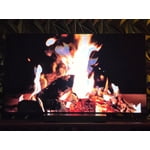
[This review was collected as part of a promotion.] The Samsung tv has excellent picture and works very well with my Xbox for enhanced gaming quality. I love the simple and also technical picture settings that are available to tweak to your personal preference.

Review from Samsung US
Helpful?3D37GPZDAAT215584057195
Jul 20, 2026
Reviewer name: Bighorse
5 out of 5 stars
5 out of 5 stars review

Great features

[This review was collected as part of a promotion.] This is a great way for entertainment, the motion is incredible, the brightness is fantastic with smoothness in transition from one picture to the next. Also, the contrast and upscaling is very forthcoming to a very modified version of modern television.

Review from Samsung US
Helpful?3D37GPZDAAT215584057195
Jun 3, 2026
Reviewer name: Pat B
5 out of 5 stars
5 out of 5 stars review

Great tv/Great name

[This review was collected as part of a promotion.] Great tv. Very easy to get up and running. Extremely well packaged. Just had to customize a few settings to hopefully prolong it's life. The solar remote takes a little getting used to but that's ok,works great. All in all it's an excellent OLED smart tv. My wife and I are very satisfied with the purchase.

Review from Samsung US
Helpful?3D37GPZDAAT215584057195