Skip to Main Content
Sam's Club
Sam's Club
Customer reviews for SAMSUNG 75" Class Q7FD Series 4K QLED Smart TV for
SAMSUNG 75" Class Q7FD Series 4K QLED Smart TV
4.7 out of 5 stars
stars2,353 ratings2,328 reviews
  1. 5 stars80% (1,877)
  2. 4 stars14% (331)
  3. 3 stars4% (84)
  4. 2 stars1% (20)
  5. 1 star2% (41)

Member photos

  • +698 images
Sort by |
Showing 91-100 of 2,328 reviews
May 14, 2026
RadDadOnline
5 out of 5 stars review

Great Upgrade!

[This review was collected as part of a promotion.] I upgraded my older FHD TV to this QLED model and I am NOT disappointed with the quality or resolution! The color palette, the vibrancy, everything about this picture is better! I am able to adjust the brightness and contrast settings to fit my needs, and to top it all off the Smart Things app makes me feel safe and secure within my Samsung account. Great option.

Review from Samsung US
Helpful?6RA5R2FUVYS415576170273
May 20, 2026
tallcharlie
3 out of 5 stars review

Interface too complicated and nonintuitive.

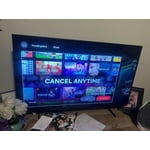
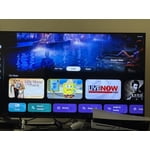
[This review was collected as part of a promotion.] The picture is clear, bright, and flawless. Audio is crisp and easily understood. The user interface is horrible! It's counter-intuitive, far too complicated, and opaque. Compared to previous interfaces, it's a total failure. It seems like someone at Samsung told the programmers to make the device as hard to use as possible, and they exceeded their assignment. For example, on previous models the Home screen featured a horizontal row of icons representing all channels, apps, and functions. The new one shows a horizontal list of streaming channels at the bottom under three buttons labeled "For You," "Live", and "Apps." So YouTube is right there, but Tubi, Peacock, and Sling are on another page. This is just another example of how often designers confuse overly complicated with easy to use and enjoyable.

Review from Samsung US
Helpful?6RA5R2FUVYS415576170273
reply from Samsung Specialist

We appreciate you sharing your user experience. To help you get the most from your TV, you can download the full e-Manual and more by visiting Samsung’s website then navigating to: Support > Manual & Software > TVs & Home Theater. From there, you can search for and select your TV model to view or download the available guides. The e-Manual and Remote Control Guide are also conveniently built into your TV: Settings > Support > Tips and User Guides If you need additional help, please contact Samsung Support at 1-800-SAMSUNG (8AM – 9PM EST Mon – Fri, 8AM – 6PM Sat – Sun). LiveChat agents are also available through the ‘Support’ link on our website. ~ Samsung Specialist

May 26, 2026
Treeotree
4 out of 5 stars review

Better than good!

[This review was collected as part of a promotion.] I absolutely love the t.v. I purchased. Great picture, features, all of the above. If I could say one thing for it to be better on is the response time on the OS of the t.v. Sometimes I would like to just change the channel in less then some seconds but the little lag it has to switch menus is time consuming.

Review from Samsung US
Helpful?6RA5R2FUVYS415576170273
May 19, 2026
Tredaizi
4 out of 5 stars review

Great TV to purchase, recommend it

[This review was collected as part of a promotion.] This TV was a purchase that I was hesitant about buying but tbh I got a great deal on it at the time. It has a great color with the resolution clear. It shows video console as clear bright and just beautifully! The weight of TV is extremely light to carry so that was plus.

Review from Samsung US
Helpful?6RA5R2FUVYS415576170273
May 23, 2026
Starfish
5 out of 5 stars review

Cutting edge technology

[This review was collected as part of a promotion.] Thank you for making excellent products. My refrigerator , range and tv . I have an older Samsung flat screen tv , it still works great. I moved it to the bedroom and bought a new one. Wow !!! I thought my old one was crisp and vivid , the new one is just amazing. Thank you all again. The remote control is solar powered . The color is so vibrant. Love all my Samsung products.

Review from Samsung US
Helpful?6RA5R2FUVYS415576170273
Jun 5, 2026
Edgar
1 out of 5 stars review

Stopped working after 2 days.
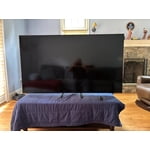
[This review was collected as part of a promotion.] The TV stopped working after 2 days, I followed the instructions on your website and only volume came back. So, I'll follow up on my review, when the service appointment is done to see if it's a quality product or not.

Review from Samsung US
Helpful?6RA5R2FUVYS415576170273
reply from Samsung Specialist

Thank you for your review. If there’s anything we can assist with, please don’t hesitate to call us at 1-800-SAMSUNG (8AM – 9PM EST Mon – Fri, 8AM – 6PM Sat – Sun), or reach us via text anytime. You can also visit ‘Support’ on our website for: • Live Chat • Manuals, Software, & Warranty Info ~ Samsung Specialist

May 20, 2026
PhilsE90M3
5 out of 5 stars review

Ease of use.

[This review was collected as part of a promotion.] I've had this particular model for just under a year. I previously had a smaller version same model etc. This one (65") I absolutely love how easy the remote is to use. Having the remote being solar and type C is amazing. The quality of the picture is great. So many presets as well as the ability to customize in so many ways. Overall I am a Samsung groupie. Laptop (Samsung), cellphone (Samsung), 42" TV (Samsung) and the 65" TV (Samsung). Samsung makes a superior product over any other brand. Prove me wrong!

Review from Samsung US
Helpful?6RA5R2FUVYS415576170273
May 21, 2026
PgsShoptalk
4 out of 5 stars review

A TV to Enjoy seeing the world!

[This review was collected as part of a promotion.] this TV This TV has family driver home great to have a TV man almost great to have a TV babe shows great to have a TV babe shows the reality of life ungrateful to Samsung car developing TV's red give us the joy of seeing things as they are the world needs more of this the color of the tea on the TV is very very very nice and and the color of the tea on the TV is very very nice and great I'm thankful again once again for the interface of how to take the balance and see the world through Samsung product thank you stop the TV if you like

Review from Samsung US
Helpful?6RA5R2FUVYS415576170273
Jun 5, 2026
Victor
5 out of 5 stars review

Have yet to use some of the features.

[This review was collected as part of a promotion.] Purchased a replacement for an older Samsung 75" TV (still working great!). Was surprised and pleased with the improvement in the sharpness of the picture, and even a bit better with the sound (without additional speaker system). Very easy software updates, and setup. I had it from box to setup complete in less than an hour. In the past I've had to access GOOGLE for instructions for setup. This one I just followed the menu & instructions.

Review from Samsung US
Helpful?6RA5R2FUVYS415576170273
May 20, 2026
Josh
3 out of 5 stars review

Great hardware. Awful software.

[This review was collected as part of a promotion.] The picture itself is very nice and crisp. Dark blacks, plenty of color/contrast options. However, the menu interface is awful. Non intuitive. No way to just disable the nonsense AI and it dumps ads all over your Home Screen. The layout and background in the Home Screen looks very dated and it is slow. Slow to turn on. Slow to load the Home Screen. Slow to switch channels when on air. Basically a great hardware experience mangled by awful software.

Review from Samsung US
Helpful?6RA5R2FUVYS415576170273
reply from Samsung Specialist

Thank you for sharing your feedback with us. To help you get the most from your TV, you can download the full e-Manual and more by visiting Samsung’s website, then navigating to: Support > Manual & Software > TVs & Home Theater. From there, you can search for and select your TV model to view or download the available guides. The e-Manual & User Guide are also conveniently built into your TV: Settings > Support > Tips and User Guides. Your TV includes Learn Menu Screen, an accessibility feature that provides audio guidance for on-screen menus. When enabled, your TV will announce the name and function of each menu item as you scroll, without making any changes. This feature is particularly helpful for users who are visually impaired or new to Smart TV menus. To enable, go to: Settings > All Settings > General & Privacy > Accessibility > Learn Menu Screen. To exit, press the Return key twice. If you’d like more assistance with this feature, please reach Samsung Support at 1-800-SAMSUNG (8AM – 9PM EST Mon – Fri, 8AM – 6PM Sat – Sun). LiveChat agents are also available through the ‘Support’ link on our website. ~ Samsung Specialist