Skip to Main Content
Sam's Club
Sam's Club
All Departments
All Services
Customer reviews for SAMSUNG 65" Class Q7FD Series 4K QLED Smart TV for
SAMSUNG 65" Class Q7FD Series 4K QLED Smart TV
4.6 out of 5 stars
stars
2,413 ratings2,342 reviews
  1. 5 stars77% (1,847)
  2. 4 stars15% (373)
  3. 3 stars4% (103)
  4. 2 stars1% (33)
  5. 1 star2% (57)
Sort by |
Showing 581-590 of 2,342 reviews
Jan 5, 2026
natesung
2 out of 5 stars review

Wifi issues

The TV has connectivity issues with our wifi. At times we have to turn the TV on, turn it off, then turn it back on to connect. It's annoying but fairly minor after we learned the trick vs trying to forget the network and then sign back on again every time.

Review from Samsung US
Helpful?1EU281TBRNQA15567708318
reply from Samsung Specialist

natesung, Thank you for sharing your experience with Wi-Fi connectivity. If your TV is having trouble connecting to the network, the following steps may help resolve the issue: Signal & Setup Tips: 1. Check TV-to-router distance – Your TV should be within 50 feet of the modem or access point for reliable signal strength. 2. Minimize interference – Turn off nearby wireless devices and make sure there are no physical barriers (stone walls, fireplaces, appliances) between the TV and router. Power Cycle Devices: 3. Restart both your TV and router – Unplug both devices for at least 30 seconds, then plug them back in and allow them to reboot fully. Connection Type: 4. Evaluate your connection method – o If using Wi-Fi, move your router closer to the TV and eliminate any obstructions. o For a more stable connection, we strongly recommend using a wired Ethernet cable. o If already using Ethernet, verify the cable is working by testing it with another device. Run Built-In Diagnostic Tools: 5. Network Test: Settings > Support > Device Care > Self Diagnosis > Smart Hub Connection Test 6. Wi-Fi Check: Settings > Support > Device Care > Self Diagnosis > Wi-Fi Last Resort: 7. Perform a Factory Reset (if issues persist): Settings > All Settings > General & Privacy > Reset > Factory Data Reset. Note that this will return all settings to their original defaults. If these steps don’t resolve the issue, please reach out to Samsung Support at 1-800-SAMSUNG, available 8AM – 12AM EST, 7 days a week. LiveChat support and additional help are available at the ‘Support’ link on our website. ~ Samsung Specialist

Mar 20, 2026
Kitty2
5 out of 5 stars review

TV is remarkable

[This review was collected as part of a promotion.] What can we say it is so clear & bright! We have viewed different types of shows from very old movies to current productions. Not once did we say that we regrete the purchase. The color is unbelievable from what we had. Love it!

Review from Samsung US
Helpful?1EU281TBRNQA15567708318
Feb 17, 2026
Young
4 out of 5 stars review

A good TV for the price.

[This review was collected as part of a promotion.] It's a TV with good performance for the price. The picture quality is good, and the screen is large and good. It's just that smart operation is more difficult than before. Older people are thought to be complex and have difficulties.

Review from Samsung US
Helpful?1EU281TBRNQA15567708318
Mar 23, 2026
Popkern
5 out of 5 stars review

The best tv I have ever owned

[This review was collected as part of a promotion.] Beautiful picture and sound quality. It's seriously unmatched. I have peeled many tvs over the years, but this is by far the best. It was pricey, but worth it. For those that want a true movie experience, and crystal clear show viewing, you need to buy it.

Review from Samsung US
Helpful?1EU281TBRNQA15567708318
Dec 21, 2025
Aegian132
5 out of 5 stars review

Real Step Up

[This review was collected as part of a promotion.] We upgraded our 9 year old Samsung 55" Curved SUHD to this model. I loved the 55" Curved TV, My wife came back with very poor vision on her last optometry appointment. This was a huge upgrade for Colors, text crispness, and has a very panametric fell to the view. It helps her Huge! We were still able to use our older Samsung HW550 Soundbar and it sounds like it was new. Thums up all around.

Review from Samsung US
Helpful?1EU281TBRNQA15567708318
Mar 13, 2026
SRATL
5 out of 5 stars review

I really enjoy this television

[This review was collected as part of a promotion.] After 5 months of use I am pleased with the television. It was very easy to setup and is intuitive and will automatically switch to the correct input when you turn a game console, DVD player or TV box (whichever you use). The resolution is excellent when watching fast paced sports like hockey. There's no lag glitch in the screen. The brightness and color are also good. I would buy this tv again but would get a bigger one. I recommend this tv.

Review from Samsung US
Helpful?1EU281TBRNQA15567708318
Mar 22, 2026
Meyou
3 out of 5 stars review

I expected more

[This review was collected as part of a promotion.] After a year having this tv, I have round circles in parallel patern and 6 rows on the screen also have turning on is also a issue. I have bought Samsung phones for over 8 years and kept every one after paid off. I would expected more from Samsung with there tv

Review from Samsung US
Helpful?1EU281TBRNQA15567708318
reply from Samsung Specialist

Meyou, We appreciate your review of Samsung’s Q7F TV. So we can better understand the issues you’re experiencing and provide you with troubleshooting assistance, please reach out to Samsung Customer Support at 1-800-SAMSUNG, available daily from 8AM - 12AM EST. You can also chat with a LiveChat agent by clicking the ‘Support’ link on our website for: • Live Chat • Manuals, Software, & Warranty Info • Creating a Service ticket ~ Samsung Specialist

Mar 24, 2026
Caretaker2
4 out of 5 stars review

Nice tv.

[This review was collected as part of a promotion.] The brightness is pretty good, i would say about 9/10. The color is really nice 10/10. The contrast i would say is a bit lower because of the black so i would rate it about 8 out of 10. The interface gives me all the hdmi and usb plus antenna connection i need so i would say 10/10. Now for the resolution I'm not so sure about the motion blur that i see a lot of. It is better than my older Samsung tv but i would think by now they would have true, real, 240 motion instead of the same old 120 motion. We can fly to mars but we cant get real 240 motion on a great brand like Samsung. I have my phone and watch that are Samsung also i am very happy with but like the tvs they are needing a new face-lift and software change.

Review from Samsung US
Helpful?1EU281TBRNQA15567708318
Feb 5, 2026
Bruce
3 out of 5 stars review

Hardware is terrific! Software, not so much.

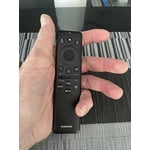
[This review was collected as part of a promotion.] The TV is wonderful. Sharp picture and a great view. Obtaining and using apps, however, is not intuitive. Also fast forwarding and rewinding using the provided remote does not show what is being skipped over maki it difficult to, for example, fast forward through the opening credits because you cannot see when they end. Also, signing into an app through our service provider is not an option and is very inconvenient. If fact, that is so inconvenient I would not have bought the tv had I known that. Must be a problem with the software.

Review from Samsung US
Helpful?1EU281TBRNQA15567708318
reply from Samsung Specialist

Bruce, We appreciate you sharing your experience. To help you get the most from your TV and remote functions, you can download the full e-Manual and more by visiting Samsung’s website then navigating to: Support > Manual & Software > TVs & Home Theater. From there, you can search for and select your TV model to view or download the available guides. The e-Manual & Remote Control Guide are also conveniently built into your TV: Settings > Support > Tips and User Guides. For additional guidance, your TV also includes Accessibility features designed to assist with navigation and remote use. • Learn Menu Screen provides audio guidance for on-screen menus by announcing the name and function of each item as you scroll – without making any changes. This is especially helpful for users who are visually impaired or new to Smart TV menus. Enable via: Settings > All Settings > General & Privacy > Accessibility > Learn Menu Screen. To exit, press the Return key twice. • Learn TV Remote helps users become familiar with the layout and function of each button on the Samsung remote. Pressing a button (other than Power) will prompt the TV to announce its name and purpose, again without affecting TV operation. Enable via: Settings > All Settings > General & Privacy > Accessibility > Learn TV Remote. To exit, press the Return key twice. If you’d like more assistance with these features, please reach Samsung Support at 1-800-SAMSUNG, available 8AM – 12AM EST, 7 days a week. LiveChat agents are also available through the ‘Support’ link on our website. ~ Samsung Specialist

Feb 20, 2026
LatchUpLab
4 out of 5 stars review

Good TV, average PC monitor

[This review was collected as part of a promotion.] This is a good TV with lots of features, but the HDMI connectivity for PCs is somewhat lacking in that if the PC is not active it can be difficult to connect it to the monitor. By this, I mean that if the PC is hibernating and not emitting HDMI, the TV will not recognize it when it comes online.

Review from Samsung US
Helpful?1EU281TBRNQA15567708318