Skip to Main Content
Sam's Club
Sam's Club
All Departments
All Services
Customer reviews for SAMSUNG 65" Class Q7FD Series 4K QLED Smart TV for
SAMSUNG 65" Class Q7FD Series 4K QLED Smart TV
4.6 out of 5 stars
stars
3,817 ratings3,743 reviews
  1. 5 stars77% (2,949)
  2. 4 stars15% (555)
  3. 3 stars4% (167)
  4. 2 stars1% (56)
  5. 1 star2% (90)

Member photos

  • +1152 images
Sort by |
Showing 2,771-2,780 of 3,743 reviews
Feb 17, 2026
Reviewer name: Bdry
5 out of 5 stars
5 out of 5 stars review

Great feature

[This review was collected as part of a promotion.] Real reliable awesome picture and sound. One of the best tvs I've had in years

Review from Samsung US
Helpful?1EU281TBRNQA15567708318
Mar 23, 2026
Reviewer name: Franksplace07
5 out of 5 stars
5 out of 5 stars review

Great features great picture
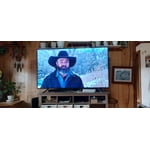
[This review was collected as part of a promotion.] great TV great picture really like to set up and menu

Review from Samsung US
Helpful?1EU281TBRNQA15567708318
Mar 23, 2026
Reviewer name: Julz
5 out of 5 stars
5 out of 5 stars review

Nice

[This review was collected as part of a promotion.] Speakers could be better. But all around good tv..

Review from Samsung US
Helpful?1EU281TBRNQA15567708318
Apr 5, 2026
Reviewer name: Geekof the week
2 out of 5 stars
2 out of 5 stars review

Ok but could be way better

[This review was collected as part of a promotion.] years I thought it would be and it's kind of choppy sometimes like it doesn't back up enough

Review from Samsung US
Helpful?1EU281TBRNQA15567708318
reply from Samsung Specialist

We appreciate your feedback on the picture quality of Samsung’s Q7F TV. If the image doesn’t quite match your preferences, there are several adjustments you can make to better suit your viewing environment and content type. First, please ensure your TV is running the latest firmware, as updates may include important picture quality enhancements. Go to: Home > Left directional button > Settings > Support > Software Update > Update Now To explore picture mode options, navigate to: Home > Left directional button > Settings > All Settings > Picture > Picture Mode. Options include: • Standard – Ideal for general viewing • Dynamic – Brighter and more vibrant for well-lit spaces • Eco – Optimized for energy efficiency • Movie – Best for viewing in low light • Filmmaker Mode – Preserves the content creator’s intent and disables motion smoothing for supported content You can further customize your image by going to: Settings > All Settings > Picture > Expert Settings, where you can adjust Brightness, Contrast, Color Tone, Sharpness, Contrast Enhancer and more. If you’d like help finding the best picture settings for your preferences, please don’t hesitate to contact Samsung Support at 1-800-SAMSUNG (8AM – 9PM EST Mon – Fri, 8AM – 6PM Sat – Sun). You can also LiveChat with an agent or explore additional resources on our website by clicking the ‘Support’ link. ~ Samsung Specialist

Feb 19, 2026
Reviewer name: Anonymous
1 out of 5 stars
1 out of 5 stars review

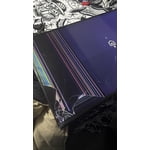
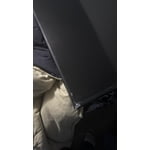
Broken tv

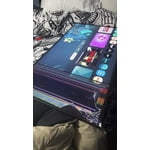
[This review was collected as part of a promotion.] When I receive my TV, it was broken. The corner was broken and the TV is not a full screen.

  • +1 image
Review from Samsung US
Helpful?1EU281TBRNQA15567708318
reply from Samsung Specialist

Hi there, We’re sorry to hear that your TV arrived with damage. While every unit is packaged carefully for transit, incidents can still occur during handling and delivery. Please reach out to our support team as soon as possible so we can review your case and guide you through the steps to get this resolved quickly. At your earliest convenience, please contact us at 1-800-SAMSUNG, available daily from 8AM - 12AM EST. You can also chat with a LiveChat agent by clicking the ‘Support’ link on our website for: • Live Chat • Manuals, Software, & Warranty Info • Creating a Service ticket ~ Samsung Specialist

May 11, 2026
Reviewer name: Larry
5 out of 5 stars
5 out of 5 stars review

Samsung smart tv

[This review was collected as part of a promotion.] 2nd samsung after 17 yr frist one still works 55 in 1080p 120 refresher rate

Review from Samsung US
Helpful?1EU281TBRNQA15567708318
Feb 17, 2026
Reviewer name: Estesdt
5 out of 5 stars
5 out of 5 stars review

Great view

[This review was collected as part of a promotion.] The resolution on the tv is the best I've ever had or seen. Great purchase!!!

Review from Samsung US
Helpful?1EU281TBRNQA15567708318
May 11, 2026
Reviewer name: JamesB
5 out of 5 stars
5 out of 5 stars review

Great picture

[This review was collected as part of a promotion.] It works good and love it. Got it for my birthday.

Review from Samsung US
Helpful?1EU281TBRNQA15567708318
Mar 23, 2026
Reviewer name: TV Nut
5 out of 5 stars
5 out of 5 stars review

Great Features

[This review was collected as part of a promotion.] I love this TV. Never had one as clear and vibrant colors. Excellent buy

Review from Samsung US
Helpful?1EU281TBRNQA15567708318
May 20, 2026
Reviewer name: robert
3 out of 5 stars
3 out of 5 stars review

touble downloading

[This review was collected as part of a promotion.] I am having trouble downloading say if load HBO. and try to scoll down it will no scroll

Review from Samsung US
Helpful?1EU281TBRNQA15567708318
reply from Samsung Specialist

We appreciate you taking the time to let us know about your experience. So that we can better troubleshoot this issue and provide steps towards a solution, please contact Samsung Support at 1-800-SAMSUNG (8AM – 9PM EST Mon – Fri, 8AM – 6PM Sat – Sun), or visit our website for LiveChat. ~ Samsung Specialist