Skip to Main Content
Sam's Club
Sam's Club
All Departments
All Services
Customer reviews for SAMSUNG 65" Class S90FD Series 4K OLED Smart TV for
SAMSUNG 65" Class S90FD Series 4K OLED Smart TV
4.7 out of 5 stars
stars
703 ratings661 reviews
  1. 5 stars79% (558)
  2. 4 stars13% (93)
  3. 3 stars4% (27)
  4. 2 stars2% (15)
  5. 1 star1% (10)

Member photos

  • +213 images
Sort by |
Showing 291-300 of 661 reviews
Jun 20, 2026
Reviewer name: Glenn
4 out of 5 stars
4 out of 5 stars review

Mostly good

[This review was collected as part of a promotion.] The video is great. Clear as a bell. But the audio goes up and down between channels, during commercials, and even during the news. Can't fix it

Review from Samsung US
Helpful?4UOK28GQVEHZ15549550113
Aug 7, 2026
Reviewer name: boob tube bobby
5 out of 5 stars
5 out of 5 stars review

Nice!

[This review was collected as part of a promotion.] so far impressed however not sure how OLED is superior to my 20 yr old LED not so smart tV is much worse where new LED tv same size is 1/3 the price?

Review from Samsung US
Helpful?4UOK28GQVEHZ15549550113
Jul 27, 2026
Reviewer name: OfficeTv
4 out of 5 stars
4 out of 5 stars review

Easily connects to my Galaxy s24!

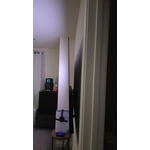
[This review was collected as part of a promotion.] Love the TV! It's on the wall and can be moved and have it's angle changed. Good picture and sound!

Review from Samsung US
Helpful?4UOK28GQVEHZ15549550113
Aug 5, 2026
Reviewer name: Older
4 out of 5 stars
4 out of 5 stars review

Easy setup for a non-tech person

[This review was collected as part of a promotion.] I appreciate the easy set up of my Samsung TV. I also like that you can easily update more then 1-TV making it easy for a older less tech person. The picture quality is wonderful.

Review from Samsung US
Helpful?4UOK28GQVEHZ15549550113
Jun 29, 2026
Reviewer name: Avg_TechGuy
5 out of 5 stars
5 out of 5 stars review

Awesome Tech

[This review was collected as part of a promotion.] The TV's display was very bright and the colour was very punchy when I dialed in my personal settings. Kind of regret not getting bigger than the 55"

Review from Samsung US
Helpful?4UOK28GQVEHZ15549550113
Jun 22, 2026
Reviewer name: Bren
5 out of 5 stars
5 out of 5 stars review

Best ever TV

[This review was collected as part of a promotion.] Best vision I've ever had on a TV. Colors are clear and bright. Have had no trouble with this TV

Review from Samsung US
Helpful?4UOK28GQVEHZ15549550113
Jun 22, 2026
Reviewer name: Frank535
5 out of 5 stars
5 out of 5 stars review

Great product

[This review was collected as part of a promotion.] The Samsung Tv is great quality and provide very great visual landscape. The TV is responsive with the AI button. It provides great feedback and information.

Review from Samsung US
Helpful?4UOK28GQVEHZ15549550113
Jul 6, 2026
Reviewer name: TVLover
3 out of 5 stars
3 out of 5 stars review

Could be easier to operate

[This review was collected as part of a promotion.] I do not like the fact that it will turn on by itself, I have attempted to trun off every feature in order to make the tv stay off when I turn it off.

Review from Samsung US
Helpful?4UOK28GQVEHZ15549550113
reply from Samsung Advisor

Hi TVLover, Thanks for sharing your experience. If your TV is powering on by itself, there are a few settings and external triggers to review: 1. Power On with Mobile – Your TV may be connected to the SmartThings app or other networked devices. To stop wake signals, turn this feature off: Settings > All Settings > Connection > Network > Expert Settings > Power On with Mobile = Off 2. Check for Active Timers – Go to Settings > All Settings > General & Privacy > System Manager > Time > Timer Settings, then disable any On Timers or Sleep Timers 3. Anynet+ (HDMI-CEC) – If your TV is connected to external HDMI devices, one of them may be triggering power-on behavior. To disable this feature: Settings > All Settings > General & Privacy > External Device Manager > Anynet+ (HDMI-CEC) = Off 4. Software Update – Make sure your TV is up to date: Settings > Support > Software Update > Update Now If you’ve ruled out all the above and your TV still powers on unexpectedly, try unplugging it for 30 seconds. Should the issue continue, please call Samsung Support at 1-800-SAMSUNG, (8AM – 9PM EST Mon – Fri, 8AM – 6PM Sat – Sun). LiveChat is also available via the ‘Support’ link on our website. ~ Samsung Advisor

Aug 5, 2026
Reviewer name: Nancy
5 out of 5 stars
5 out of 5 stars review

AWESOME TV!!!

[This review was collected as part of a promotion.] This TV Is awesome The picture quality is beyond Any other TV I've ever had the responsiveness to the remote is perfect I would recommend this TV to anyone .

Review from Samsung US
Helpful?4UOK28GQVEHZ15549550113
Jul 1, 2026
Reviewer name: SBJohnny
5 out of 5 stars
5 out of 5 stars review

OLED = WOW

[This review was collected as part of a promotion.] Super bright and clear screen. It's honestly the nicest television I've ever owned. I can't believe I waited this long to take the OLED dive.

Review from Samsung US
Helpful?4UOK28GQVEHZ15549550113