Join Now
Skip to Main Content
Sam's Club
Sam's Club
All Departments
All Services
Customer reviews for SAMSUNG 55" Class U8000F Series 4K Crystal UHD Smart TV for
SAMSUNG 55" Class U8000F Series 4K Crystal UHD Smart TV
4.5 out of 5 stars
stars
2,030 ratings1,961 reviews
  1. 5 stars72% (1,458)
  2. 4 stars15% (311)
  3. 3 stars6% (118)
  4. 2 stars3% (69)
  5. 1 star4% (74)

Member photos

  • +590 images
Sort by |
Showing 801-810 of 1,961 reviews
May 20, 2026
Reviewer name: MrVic
5 out of 5 stars
5 out of 5 stars review

big tv

[This review was collected as part of a promotion.] Really, really nice. bright and sharp picture. how simple the remote is, but it works...for my space the 75 inch fits good.

Review from Samsung US
Helpful?43WYLKDSIONN15546751433
Jun 6, 2026
Reviewer name: Vall
2 out of 5 stars
2 out of 5 stars review

Tv

[This review was collected as part of a promotion.] It's a television. The picture is rather flat and no matter how I adjust the picture it's to dark. But what am I gonna do about it. And I detest AI!

Review from Samsung US
Helpful?43WYLKDSIONN15546751433
reply from Samsung Advisor

Hi Vall, We’re sorry to hear you’re not fully satisfied with the picture quality on your Samsung U8000F TV. If the image appears too dark, we suggest disabling certain energy-saving features, which can automatically adjust brightness and affect how the screen looks. Go to: Settings > All Settings > General & Privacy > Power and Energy Saving, then turn off Brightness Optimization, Energy Saving Solution, Motion Lighting, and/or Contrast Enhancer. You can also adjust the Picture Mode to better suit your environment: Settings > All Settings > Picture > Picture Mode • Standard – Default mode for general viewing • Dynamic – Brighter and clearer, ideal for well-lit rooms • Movie – Best for dark room viewing • Eco – Energy-saving mode • Filmmaker Mode – Preserves content as intended by creators To fine-tune brightness, go to: Home > left directional key > Settings > All Settings > Picture > Expert Settings, then adjust the Brightness level (0–50) to your preference. Lastly, please make sure your TV is running the latest firmware: Home > Home > left directional key > Settings > Support > Software Update > Update Now We hope these tips help improve your viewing experience. If you need further support, feel free to contact us at 1-800-SAMSUNG (8AM – 9PM EST Mon – Fri, 8AM – 6PM Sat – Sun). LiveChat is also available via the ‘Support’ link on our website. ~ Samsung Advisor

Jun 1, 2026
Reviewer name: Kito1385
5 out of 5 stars
5 out of 5 stars review

Amazing picture!

[This review was collected as part of a promotion.] Our TV is amazing! The menu loads a little slower than we would like but the picture is great! Having free samsung TV is also a great perk!

Review from Samsung US
Helpful?43WYLKDSIONN15546751433
Jun 5, 2026
Reviewer name: iversonhof
3 out of 5 stars
3 out of 5 stars review

SLOWEST TV

[This review was collected as part of a promotion.] This TV is terrible. I think its probably the worst TV I got. Its so slow like it 20 years old. After this TV I may not buy another samsung.

Review from Samsung US
Helpful?43WYLKDSIONN15546751433
reply from Samsung Advisor

Hi iversonhof, We appreciate your feedback regarding response time. For optimal performance, please ensure your TV is running the latest firmware. You can check this by going to: Home > left directional key > Settings > Support > Software Update To further optimize performance, try running Device Care, which checks memory, clears unused cached data, and closes background apps: Home > left directional key > Settings > Support > Device Care > Start Device Care If issues continue, please reach Samsung Support at 1-800-SAMSUNG (8AM – 9PM EST Mon – Fri, 8AM – 6PM Sat – Sun). LiveChat is also available via the ‘Support’ link on our website. ~ Samsung Advisor

Jun 29, 2026
Reviewer name: Melo
4 out of 5 stars
4 out of 5 stars review

Great TV for a great price

[This review was collected as part of a promotion.] Great value. Easy setup. Good picture. Ok sound, needs a bit more umf. Good wifi connection and channel options.

Review from Samsung US
Helpful?43WYLKDSIONN15546751433
Jul 18, 2026
Reviewer name: Rollin_Stoned
5 out of 5 stars
5 out of 5 stars review

Best Gaming TV

[This review was collected as part of a promotion.] This tv is amazing. Especially the game mode. It adjusts to your gaming making g your gaming experience much better.

Review from Samsung US
Helpful?43WYLKDSIONN15546751433
Jul 23, 2026
Reviewer name: Bebs
5 out of 5 stars
5 out of 5 stars review

Great viewing

[This review was collected as part of a promotion.] Love the size good contrast n sound system Highly recommended n I think I got it with a good offer too

Review from Samsung US
Helpful?43WYLKDSIONN15546751433
Apr 5, 2026
Reviewer name: FiliTechrev
5 out of 5 stars
5 out of 5 stars review

Great resolution for an awesome viewing

[This review was collected as part of a promotion.] Brightness perfect contrast with the right refresh rate for a great resolution and awesome viewing experience

Review from Samsung US
Helpful?43WYLKDSIONN15546751433
Jun 2, 2026
Reviewer name: Jaemoson
5 out of 5 stars
5 out of 5 stars review

Love this TV

[This review was collected as part of a promotion.] I enjoy lots of things about this tv, the programming on the regular channels, the apps to use prime etc, the games like the six and ripplash, waiting for more games to come out.

Review from Samsung US
Helpful?43WYLKDSIONN15546751433
Apr 30, 2026
Reviewer name: Jrod
4 out of 5 stars
4 out of 5 stars review

Easy to use

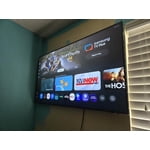
[This review was collected as part of a promotion.] TV is great the only thing I wish that could be done different was maybe on the home screen I hate seeing displays for all the apps

Review from Samsung US
Helpful?43WYLKDSIONN15546751433