Skip to Main Content
Sam's Club
Sam's Club
All Departments
All Services
Customer reviews for SAMSUNG 43" Class U8000F Series 4K Crystal UHD Smart TV for
SAMSUNG 43" Class U8000F Series 4K Crystal UHD Smart TV
4.5 out of 5 stars
stars
3,746 ratings3,647 reviews
  1. 5 stars71% (2,668)
  2. 4 stars15% (575)
  3. 3 stars6% (240)
  4. 2 stars3% (126)
  5. 1 star4% (137)

Member photos

  • +1153 images
Sort by |
Showing 921-930 of 3,647 reviews
Sep 6, 2026
Reviewer name: Jerro
5 out of 5 stars
5 out of 5 stars review

Love the view!

[This review was collected as part of a promotion.] We bought two new TV's and are very pleased, thank you! We had our old TV's for 19 years so wow what an upgrade for us. We love our new TV's. The clarity of the screens and the sound are incredible.

Review from Samsung US
Helpful?22SEGSGR5O6Z15524966302
Jun 5, 2026
Reviewer name: Rharris
1 out of 5 stars
1 out of 5 stars review

Terrible picture quality

[This review was collected as part of a promotion.] the picture quality on this television it makes everything appear as if it is a low budget movie I'm not understanding why it looks that way it didn't look that way at the store but by far is the worst quality picture out of all the televisions that I own I will not buy a Samsung television again

Review from Samsung US
Helpful?22SEGSGR5O6Z15524966302
reply from Samsung Advisor

Hi Rharris, We appreciate your feedback on the picture quality of Samsung’s U8000F TV. If the image doesn’t quite match your preferences, there are several adjustments you can make to better suit your viewing environment and content type. First, please ensure your TV is running the latest firmware, as updates may include important picture quality enhancements. Go to: Home > Left directional button > Settings > Support > Software Update > Update Now To explore picture mode options, navigate to: Home > Left directional button > Settings > All Settings > Picture > Picture Mode. Options include: • Standard – Ideal for general viewing • Dynamic – Brighter and more vibrant for well-lit spaces • Eco – Optimized for energy efficiency • Movie – Best for viewing in low light • Filmmaker Mode – Preserves the content creator’s intent and disables motion smoothing for supported content You can further customize your image by going to: Settings > All Settings > Picture > Expert Settings, where you can adjust Brightness, Contrast, Color Tone, Sharpness, Contrast Enhancer and more. If you’d like help finding the best picture settings for your preferences, please don’t hesitate to contact Samsung Support at 1-800-SAMSUNG (8AM – 9PM EST Mon – Fri, 8AM – 6PM Sat – Sun). You can also LiveChat with an agent or explore additional resources on our website by clicking the ‘Support’ link. ~ Samsung Advisor

Mar 23, 2026
Reviewer name: Mike
5 out of 5 stars
5 out of 5 stars review

Awesome TV for a long lasting time also!
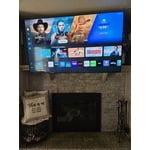
[This review was collected as part of a promotion.] This is awesome tv. It has never went bad on us. It also works really well. We only use it with the apps installed into it so they use Internet only and quite a little internet they use. We watch TV all day it looks crystal clear and they last a long time!

Review from Samsung US
Helpful?22SEGSGR5O6Z15524966302
Jun 27, 2026
Reviewer name: Girlfriend
5 out of 5 stars
5 out of 5 stars review

My t v in my bedroom

[This review was collected as part of a promotion.] I love my TV I feel like I'm at the movies, and every time people come in the apartment that says, oh, there's a giant TV in the bedroom that's fantastic and I just can't help it. I enjoy all the movies in the bright, and I feel like I'm in my personal dream world when I'm looking at TV Samsung sure know how to make a great TV keep doing the job.

Review from Samsung US
Helpful?22SEGSGR5O6Z15524966302
Sep 20, 2026
Reviewer name: bzly
5 out of 5 stars
5 out of 5 stars review

Great tv

[This review was collected as part of a promotion.] Clear picture and vibrant color with a variety of settings make viewing on my Samsung pleasurable. I am able to program comcast in and a number of apps.

Review from Samsung US
Helpful?22SEGSGR5O6Z15524966302
Nov 5, 2026
Reviewer name: Sambuca
5 out of 5 stars
5 out of 5 stars review

No regrets

[This review was collected as part of a promotion.] Purchased it for Mom, she is very pleased because for an 80 y/o woman who knows basic English, using the tv is not problem at all, image and overall performance is what we expected from a Samsung TV

Review from Samsung US
Helpful?22SEGSGR5O6Z15524966302
Jun 10, 2026
Reviewer name: Meyermama6
5 out of 5 stars
5 out of 5 stars review

Great television

[This review was collected as part of a promotion.] this television is excellent . the resolution is fantastic and easy to use . I am very pleased with my purchase as I am also a Samsung phone user .

Review from Samsung US
Helpful?22SEGSGR5O6Z15524966302
Jul 27, 2026
Reviewer name: Swampman
5 out of 5 stars
5 out of 5 stars review

Awesome TV

[This review was collected as part of a promotion.] The picture is crystal clear and sound is exceptional. The best bang for your buck on the market. The remote can be used universally between Samsung televisions.

Review from Samsung US
Helpful?22SEGSGR5O6Z15524966302
Apr 20, 2026
Reviewer name: New TV
5 out of 5 stars
5 out of 5 stars review

Superb

[This review was collected as part of a promotion.] Great television. Great color. Great sound. Great settings to personalize. Great size. Great contrast. Beautiful resolution.

Review from Samsung US
Helpful?22SEGSGR5O6Z15524966302
Jun 20, 2026
Reviewer name: Bill
5 out of 5 stars
5 out of 5 stars review

Easy Setup!

[This review was collected as part of a promotion.] TV was easy to unpack through setup. Selling point was the audio output because we use a receiver for surround sound. This is our third Samsung and they all have been great.

Review from Samsung US
Helpful?22SEGSGR5O6Z15524966302