Skip to Main Content
Sam's Club
Sam's Club
All Departments
All Services
Customer reviews for SAMSUNG 43" Class U8000F Series 4K Crystal UHD Smart TV for
SAMSUNG 43" Class U8000F Series 4K Crystal UHD Smart TV
4.5 out of 5 stars
stars
3,761 ratings3,662 reviews
  1. 5 stars71% (2,681)
  2. 4 stars15% (576)
  3. 3 stars6% (241)
  4. 2 stars3% (126)
  5. 1 star4% (137)

Member photos

  • +1173 images
Sort by |
Showing 3,241-3,250 of 3,662 reviews
Oct 4, 2025
Reviewer name: Samsunglovers
5 out of 5 stars
5 out of 5 stars review

Every TV in our gone is Samsung

[This review was collected as part of a promotion.] We absolutely love all 5 of our Samsung TV from the smallest one in outer daughters room to the our 72 in in the living room we absolutely love Samsung ❤️ the are user friendly amazing picture! Nothing bad to say about them at all!

Review from Samsung US
Helpful?22SEGSGR5O6Z15524966302
Oct 16, 2025
Reviewer name: JWEibeck
5 out of 5 stars
5 out of 5 stars review

Awesome Viewing Once Again
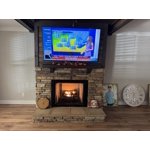
[This review was collected as part of a promotion.] This Samsung TV is the first “Smart” TV we have ever owned and the first new TV we have purchased in over 12 years. We love the fact that it has an awesome view, is very lightweight and thin, making it easy to mount above our fireplace. Oh, and in conjunction with our WiFi, it haas thousands of free channels!

Review from Samsung US
Helpful?22SEGSGR5O6Z15524966302
Oct 19, 2025
Reviewer name: Harvowallbanger
3 out of 5 stars
3 out of 5 stars review

Good family TV

[This review was collected as part of a promotion.] If you're looking for a capable 4K TV at a good value — for streaming movies/TV shows, family use, and casual gaming — the U8000F is a smart choice. It strikes a nice balance between features and cost. However, if your priorities are ultra-smooth gaming (120Hz+), standout HDR brightness, or top-tier contrast (for a dedicated home theatre feel), you might want to spend a bit more and go up to a higher tier model.

Review from Samsung US
Helpful?22SEGSGR5O6Z15524966302
reply from Samsung Advisor

Hi Harvowallbanger, We appreciate your feedback on the U8000F TV. If you are looking for a TV with 120Hz, we recommend the Q8F Series and above. If you ever have questions or need support, we’re here to help. Call us at 1-800-SAMSUNG, available from 8AM - 12AM EST, seven days a week. You can also connect with a LiveChat agent by clicking the ‘Support’ link on our website. ~ Samsung Advisor

Sep 5, 2025
Reviewer name: Mpracer29
3 out of 5 stars
3 out of 5 stars review

Great picture, quality questionable

[This review was collected as part of a promotion.] We typically use the tv for watching tv and movies when we are in the bedroom at night or in the morning. The picture quality is good. The issue with the TV is the Samsung software is slow. The settings menu opens slow. I also had the TV for 2 months and had to have the main board replaced. The settings and menus are straight forward and the online features are great. You can download your streaming apps.

Review from Samsung US
Helpful?22SEGSGR5O6Z15524966302
reply from Samsung Specialist

Mpracer29, We appreciate you sharing your experience you went through to have your TV serviced, but I hope your TV is now performing as expected. For optimal performance, we ask that you please ensure you've got the latest firmware version installed on your TV. You can check this by going to: Home > Menu > Settings > Support > Software Update. You may also want to further optimize performance with the self-diagnostic tool, which checks memory, frees up unused cached memory, and closes background apps. Go to: Home > Menu > Settings > Support > Device Care > Start Device Care I hope these tips help. You can always contact us for further help at 1-800-SAMSUNG, 8AM - 12AM EST, 7 days a week. Our LiveChat agents are also available by clicking on the ‘Support’ link on our website. ~ Samsung Specialist

Jun 7, 2025
Reviewer name: Dirtybirdsoaps
4 out of 5 stars
4 out of 5 stars review

Great tv with a few flaws
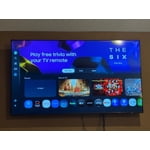
[This review was collected as part of a promotion.] This is a great tv. The clarity of the picture is absolutely amazing. There's no shadowing, the color booster makes the images bright and colorful and the picture is crisp and clear. The Crystal Processor 4K gives a good 4K image that makes for a great movie experience. The only downfalls I found about this tv is there aren't many HDMI ports. The one on the back of the tv is pretty useless if you wall mount your tv. We had to adjust it in just the right spot that it wouldn't interfere with the wall mount. The HDMI still pushes into the wall and pushes the tv out a little but at least it's useable now, and there is no optical cord input for us to connect our soundbar. Luckily our soundbar has Bluetooth but this would have been a big issue for us a few years ago because internet wasn't available in our area back then. If you have many devices like Blu ray players, gaming systems and such it's a little difficult because of limited ports but the clarity of the picture does make up for it. I'm also not a fan of the Samsung program on the tv. It's difficult for me to navigate to where I want to be. If I go to my recents and click on what I was watching it will start playing in the tiny frame and rarely opens to a larger frame for me. I'll have to exit out to something else then go back in and that usually works. The Motion Xcelerator 60Hz does a good job for fast movements but there is definitely room for improvement. If you're a gamer, this tv might be lacking.

Review from The Insiders
Helpful?22SEGSGR5O6Z15524966302
May 17, 2025
Reviewer name: Samsungfan
5 out of 5 stars
5 out of 5 stars review

I will always buy Samsung!

[This review was collected as part of a promotion.] My old Samsung was from 2011 and still worked. It had a scratch on the screen and I wanted a "smart" TV so I didn't have to buy accessories for streaming. This TV is perfect. I am able to stream from any of my streaming accounts. Its pretty quick to load when you open the app. You can personalize the homescreen. You can play games and watch YouTube. The TV is synced with my phone so I can view things I had already looked up on my phone on YouTube. I can also control the TV from my phone with smartThings. No need to search for the remote as long as you have your phone nearby.

Review from Samsung US
Helpful?22SEGSGR5O6Z15524966302
Nov 16, 2025
Reviewer name: Popcorn
5 out of 5 stars
5 out of 5 stars review

I like being able to link my S25 Ultra to my TV

[This review was collected as part of a promotion.] This is a great TV it works wonderfully, I link all my services to the TV and can seamlessly for the most part do everything on my phone through the TV. I am learning the new technology to be able to make my time and usage of technology more efficient.

Review from Samsung US
Helpful?22SEGSGR5O6Z15524966302
Jul 1, 2025
Reviewer name: Stubby
2 out of 5 stars
2 out of 5 stars review

Do not buy a samsung

Do not buy a Samsung. I should have listened to people but I didn't. I will never buy a Samsung tv. Every tv in my house will connect to a network just fine but this tv always says not connected to a network and then always says check your internet provider. It's not my internet it's the tvs. It's also lags when trying to do the volume or navigate the guide. I've changed the picture several times and anything with a dark scene in a tv program is very hard to see. Very dark picture. But the network thing is very true if you read reviews.

Review from Samsung US
Helpful?22SEGSGR5O6Z15524966302
reply from Samsung Specialist

Stubby, Thank you for sharing your experience with the internet connection on your Samsung U8000F TV. Whether you're using Wi-Fi or a wired (LAN) connection, there are a few steps you can take to help resolve the issue: 1. Power Cycle Your Equipment. Unplug both your TV and router/modem from the wall outlet. Wait at least 30 seconds, then plug them back in and allow both devices to fully restart. 2. Check the Network Status. On your TV, go to: Home > left directional key > Settings > All Settings > Connection > Network > Network Status. This will help determine if the issue lies with the network or the TV. 3. Try a Different Connection Type. If you're using Wi-Fi, try connecting an Ethernet (LAN) cable directly from your router to the TV to test the connection. If you're using a wired connection, try switching to Wi-Fi to see if the issue persists. 4. Reestablish the Network Connection. Go to: Settings > All Settings > Connection > Network > Open Network Settings, and follow the prompts to reconnect to your Wi-Fi or wired network. 5. Update Firmware. Software updates can often resolve network bugs, as well as image quality and overall performance. To check for the latest version: Settings > Support > Software Update > Update Now If the image appears too dark, we suggest disabling certain energy-saving features, which can automatically adjust brightness and affect how the screen looks. Go to: Settings > All Settings > General & Privacy > Power and Energy Saving, then turn off Brightness Optimization, Energy Saving Solution, Motion Lighting, and/or Contrast Enhancer. You can also adjust the Picture Mode to better suit your environment: Settings > All Settings > Picture > Picture Mode • Standard – Default mode for general viewing • Dynamic – Brighter and clearer, ideal for well-lit rooms • Movie – Best for dark room viewing • Eco – Energy-saving mode • Filmmaker Mode – Preserves content as intended by creators To fine-tune brightness, go to: Home > left directional key > Settings > All Settings > Picture > Expert Settings, then adjust the Brightness level (0–50) to your preference. We hope these tips help improve your experience. If you need further support, feel free to contact us at 1-800-SAMSUNG, 8AM – 12AM EST, 7 days a week. LiveChat is also available via the ‘Support’ link on our website. ~ Samsung Specialist

Oct 15, 2025
Reviewer name: KenU8000F43
3 out of 5 stars
3 out of 5 stars review

What we didn't know about this flatscreen

[This review was collected as part of a promotion.] We were shocked to see (after we set it up, of course) that there are NO audio outputs, specifically optical digital, on the back of this model! Now what? How to hookup our sound bar, other external outputs like wireless headphones. No external controls to change channels, volume, ect. Just all thru the remote...guess we're old school but, it sure would be of help! Picture not as vivid as QLED. Thinking of putting this set up for sale.

Review from Samsung US
Helpful?22SEGSGR5O6Z15524966302
reply from Samsung Advisor

Hi KenU8000F43, We appreciate your feedback on the U8000 TV available outputs and design. Your opinion is important to us and will be shared with our internal teams. Please know your TV has HDMI inputs and is Bluetooth-enabled. If you ever have questions or need support, we’re here to help. Call us at 1-800-SAMSUNG, available from 8AM - 12AM EST, seven days a week. You can also connect with a LiveChat agent by clicking the ‘Support’ link on our website. ~ Samsung Advisor

Jul 30, 2025
Reviewer name: MrVhee12
4 out of 5 stars
4 out of 5 stars review

Beautiful Product from Samsung

[This review was collected as part of a promotion.] Samsung has always been my go to for electronics. The 8000 series did not disappoint. Picture quality is superb, sound is amazing and the new slim, sexy remote is easy to use. I enjoy all of the features, Samsung plus ➕️ and lots more. Overall, it's a well improved television. I would recommend it to anyone.

Review from Samsung US
Helpful?22SEGSGR5O6Z15524966302