Skip to Main Content
Sam's Club
Sam's Club
All Departments
All Services
Customer reviews for SAMSUNG 43" Class U8000F Series 4K Crystal UHD Smart TV for
SAMSUNG 43" Class U8000F Series 4K Crystal UHD Smart TV
4.5 out of 5 stars
stars
3,761 ratings3,662 reviews
  1. 5 stars71% (2,681)
  2. 4 stars15% (576)
  3. 3 stars6% (241)
  4. 2 stars3% (126)
  5. 1 star4% (137)

Member photos

  • +1173 images
Sort by |
Showing 2,521-2,530 of 3,662 reviews
Jun 1, 2026
Reviewer name: Yupikmama
5 out of 5 stars
5 out of 5 stars review

Easy to maneuver

[This review was collected as part of a promotion.] In today's busy life having a TV that is easy to learn and friendly to use.

Review from Samsung US
Helpful?22SEGSGR5O6Z15524966302
Apr 20, 2026
Reviewer name: Warpaint58
4 out of 5 stars
4 out of 5 stars review

Great picture

[This review was collected as part of a promotion.] Love the brightness and colors! One of the better looking displays

Review from Samsung US
Helpful?22SEGSGR5O6Z15524966302
Jul 27, 2026
Reviewer name: Jadefader
5 out of 5 stars
5 out of 5 stars review

Best universal TV

[This review was collected as part of a promotion.] Best brightness and contrast also responsiveness and upsaling

Review from Samsung US
Helpful?22SEGSGR5O6Z15524966302
Apr 9, 2026
Reviewer name: Tony
4 out of 5 stars
4 out of 5 stars review

Samsung makes good products

[This review was collected as part of a promotion.] Basically a giant computer screen for me but Samsung products are just fire

Review from Samsung US
Helpful?22SEGSGR5O6Z15524966302
May 11, 2026
Reviewer name: Yas01
3 out of 5 stars
3 out of 5 stars review

Slow

[This review was collected as part of a promotion.] The TV is slow. It lags a lot and does not want to log in fast or get out of apps.

Review from Samsung US
Helpful?22SEGSGR5O6Z15524966302
reply from Samsung Advisor

Hi Yas01, We appreciate your feedback regarding response time. For optimal performance, please ensure your U8000F TV is running the latest firmware. You can check this by going to: Home > left directional key > Settings > Support > Software Update. To further optimize performance, try running Device Care, which checks memory, clears unused cached data, and closes background apps: Home > left directional key > Settings > Support > Device Care > Start Device Care If issues continue, please reach Samsung Support at 1-800-SAMSUNG, available 8AM – 9PM EST Mon – Fri, 8AM – 6PM Sat – Sun. LiveChat is also available via the ‘Support’ link on our website. ~ Samsung Advisor

Jun 20, 2026
Reviewer name: Guille
5 out of 5 stars
5 out of 5 stars review

It has it all. There is no other brand for me.
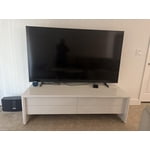
[This review was collected as part of a promotion.] Samsung for me is a matter of excellence. I have tried other tv's and the best one is Samsung.

Review from Samsung US
Helpful?22SEGSGR5O6Z15524966302
Jun 20, 2026
Reviewer name: Scubadiver1969
1 out of 5 stars
1 out of 5 stars review

Not worth the money

[This review was collected as part of a promotion.] Poor picture quality and very poor sound quality. Not worth the money. Sorry I bought this brand.

Review from Samsung US
Helpful?22SEGSGR5O6Z15524966302
reply from Samsung Advisor

Hi Scubadiver1969, It’s unfortunate to hear you’re not fully satisfied with your U8000F TV’s image quality. Below are a few settings that I recommend adjusting: Go to Home > Settings > All Settings > Picture > Picture Mode and select the mode that best fits your usage: 1) Standard: Default mode suitable for general viewing environments. 2) Natural: Reduces eye strain for a comfortable viewing experience. 3) Movie: Most suitable for watching TV or movies in a dark room. 4) Dynamic: Makes the picture brighter and clearer in bright viewing environments. 5) Filmmaker Mode: You can watch the source content (e.g., movie) as it is. If the image is defined as Filmmaker Mode, it will automatically switch to Filmmaker Mode while watching. You can also go to Settings > All Settings> Picture > Expert Settings > to manually fine-tune your image. Several Sound Modes are likewise available to meet your personal preferences: Home > Settings > All Settings> Sound > Sound Mode. If you need additional support, Samsung is here to help. Please call us at 1-800-SAMSUNG (8AM – 9PM EST Mon – Fri, 8AM – 6 PM Sat – Sun), or reach us via text 24/7. You can also visit ‘Support’ on our website for: • Live Chat • Manuals, Software, & Warranty Info ~ Samsung Advisor

May 20, 2026
Reviewer name: BevieTV
5 out of 5 stars
5 out of 5 stars review

Love it!

[This review was collected as part of a promotion.] So easy to set up and a perfect addition to “My Happy Place” sunroom.

Review from Samsung US
Helpful?22SEGSGR5O6Z15524966302
Jun 5, 2026
Reviewer name: Bills
5 out of 5 stars
5 out of 5 stars review

Great picture

[This review was collected as part of a promotion.] Another great samsung product! Is there anything Samsung can't make great!

Review from Samsung US
Helpful?22SEGSGR5O6Z15524966302
Jun 20, 2026
Reviewer name: Todd b
5 out of 5 stars
5 out of 5 stars review

It has a very nice clear picture and great colors
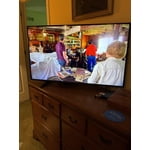
[This review was collected as part of a promotion.] Great picture and color I'm very happy with this purchase

Review from Samsung US
Helpful?22SEGSGR5O6Z15524966302