Skip to Main Content
Sams Club
Sams Club
Customer reviews for Samsung 1.1 cu. ft. Over-the-Range Microwave for
Samsung 1.1 cu. ft. Over-the-Range Microwave

Member photos

  • +22 images
Sort by |
Showing 51-60 of 90 reviews
Jan 31, 2026
Switching to lg
1 out of 5 stars review

Terrible, AWFUL

Lasted about a year and blew a fuse. Then we had it serviced and still doesn’t work. DO NOT BUY!

Review from Samsung US
Helpful?0X9WWKQL7YNB15467309644
reply from Samsung Care

Greetings, We understand how important it is to have a reliable appliance at home. Let us help you with your microwave. Please feel free to reach us via the options below, as we look forward to assisting you in setting up service for your microwave. 1. Facebook Messenger: http://m.me/samsungsupport 2. Twitter: https://twitter.com/messages/compose?recipient_id=18768513 3. Samsung Community: https://us.commuity.samsung.com/t5/Samsung-Community/ct-p/us Please provide us with this reference number (1152002189) to help our team pull up your information when you message us. Thank you. -Ricardo

Oct 10, 2025
Abhishek
2 out of 5 stars review

Good Product

The product is excellent and has great features!! No. 1 @ Microwaves :-)

Review from Samsung US
Helpful?0X9WWKQL7YNB15467309644
reply from SEA Care

Abhishek, we are glad to know you love the product and its features. Should you need support in the future, please don't hesitate to reach out to us at www.Samsung.com or by calling 1-800-7267864 (1800-SAMSUNG). Have a great day. ^Camille

Jul 20, 2023
BarrySU
3 out of 5 stars review

Adequate basic MW but there are problems

I have had this microwave for 8 months or so and there are 3 things that annoy me. 1. Clock Does not automatically sync even though the MW is connected to my network 2. Fan makes a lot of noise but water vapor from steaming pots never really gets drawn through the filters. I do not have this exhausted outside. I just use the internal path where the fan blows out the top. 3. How about a real manual for my specific MW! Trying to figure out the reheat, auto-cook etc sequence is really annoying. …and why isn’t there an reheat for 1 piece of pizza? You can only do an auto-reheat for 2 pieces?

Review from Samsung US
Helpful?0X9WWKQL7YNB15467309644
reply from Samsung Care

Greetings! Thank you for your review of your Samsung microwave model. The clock on this microwave model is more on the analog side and is manually set. I will be sure to provide what you have mentioned here to our product team for current and future product development about the clock's capabilities of syncing when the microwave is connected to the SmartThings app. I have shared a Samsung link below that can help with your experience with the vent fan when it is running. Samsung microwave is making unusual noises: https://www.samsung.com/us/support/troubleshooting/TSG01001968/ The vent fan is weak on Samsung over-the-range microwave: https://www.samsung.com/us/support/troubleshooting/TSG01202710/ On your request, I have shared this model's user manual link below. You may turn to page 22 for the reheat feature and page 18 for the auto cook feature. https://downloadcenter.samsung.com/content/UM/202108/20210809102941554/ME11A7510D_00_EN_MES_CFR_210728.pdf If you have other Samsung products and wish to get a copy of their user manual, please visit the link shared below. https://www.samsung.com/us/support/downloads/ Should you need more assistance with this over-the-range microwave, please feel free to get back to us via the following options: 1. Facebook Messenger: http://m.me/samsungsupport 2. Twitter: https://twitter.com/messages/compose?recipient_id=18768513 3. Samsung Community: https://us.community.samsung.com/t5/Samsung-Community/ct-p/us When you message us, please provide us with this reference number 1146060954 to help our team pull up your information. Leo

May 6, 2023
Anonymous
5 out of 5 stars review

Awesome Microwave !!

[This review was collected as part of a promotion.] I purchased this microwave a couple months back and I was finally able to get it hung above my stove and let me tell ya this thing cooks ! It was easy to install, and it's very easy to maintain. It cooks awesome and the food does not taste like it's been cooked in a microwave. I had no problems getting it to hook up to my wifi and it's very user friendly. Overall I am very happy with my microwave and would most definitely recommend it to anyone.

Review from Samsung US
Helpful?0X9WWKQL7YNB15467309644
May 19, 2023
BKNE
4 out of 5 stars review

A better option for taller people!

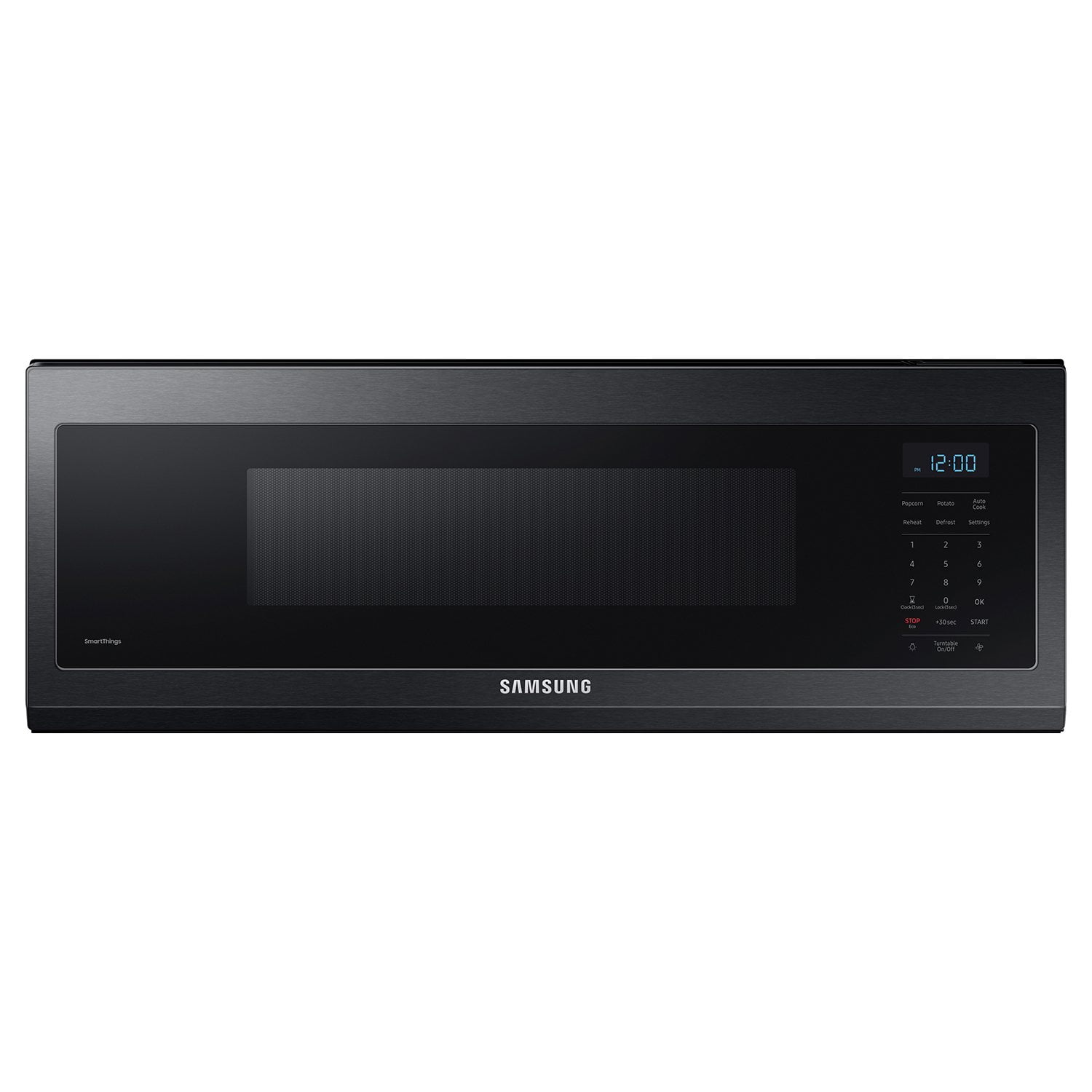
Its overall a great microwave. We purchased a gas range and decided on a microwave at the same time. If you think about it, how big are the things most people put in the microwave? A plate of something, maybe a large-ish bowl to melt something like chocolate (and yes I know there are other ways to do it in the stove that will yield better results not everyone will know that). This thing is so great to be able to see your stovetop so much easier if you are taller (I'm 6' 2") and all the other microwaves Samsung sells were equal to if not larger than our current microwave at the time. Excellent buy for taller people. If you currenty have your microwave above your stove and it's the normal size chonkier microwave, you gotta stand back a bit or slightly tilt your head. Worse if you have glasses. Yeah I know. First, world problems. I like this microwave. HOWWWEVER! The one and onnnny reason I subtracted a star is because the panel is hard to see in low light. I wish it was just even barely lit. Something to make to panel easier to see because it's also shiny and reflective.

Review from Samsung US
Helpful?0X9WWKQL7YNB15467309644
Nov 18, 2024
JGROVER
2 out of 5 stars review

Poor features

Issues with the microwave: 1. The door has to be pulled out to open it, there is no ‘open’ button. Worried the microwave may come off the wall. 2. Button on the panel are not lighted so difficult to see at nite even with kitchen lights on. Flash lite gas to be used. Company needs to improve on these difficult features.

Review from Samsung US
Helpful?0X9WWKQL7YNB15467309644
reply from Samsung Care

Hi There, Thank you very much for your review on one of our products. Should you need support in the future, please don't hesitate to reach out to us at www.samsung.com or by calling 1-800-7267864 (1800-SAMSUNG). Have a great day! -Ricardo

Mar 17, 2025
Mare
2 out of 5 stars review

Fan button in a bad spot

I bought this microwave in 2023, alone with the Bespoke induction range and dishwasher. I have to say that the button for the fan is near where you open the door, the problem is the fan turns on often when opening the door. It is annoying. Bad design I guess.

Review from Samsung US
Helpful?0X9WWKQL7YNB15467309644
reply from SEA Care

Mare, sharing your observation about the microwave's fan button near the door's opening matters. We appreciate your input. I will forward your suggestion to our engineering team to see if adjusting the button's location could be an option for future models. If you need support in the future, please don't hesitate to reach out to us at www.Samsung.com or by calling 1-800-7267864 (1800-SAMSUNG). Have a great day. ^Camille

Aug 23, 2024
Becky
2 out of 5 stars review

Great - Until it Wasn't

Loved this microwave until it started to act up -just a month over the 1-year warranty. They would not budge on the one-year. The display clock/timer began to malfunction. Thing is it happened prior to the one-year but we just thought it was a glitch and unplugged it and plugged it back in. Now, it happens on a regular basis regardless of unplugging and plugging back in. Very disappointing. Samsung should stick to making electronics and stay away from appliances.

Review from Samsung US
Helpful?0X9WWKQL7YNB15467309644
reply from SEA CARE

We understand how disappointed you are with the microwave's condition. Let's go ahead and address this right away, Becky. Below is a recommended troubleshooting link to help the microwave's display work at its best. Microwave control panel does not respond: https://www.samsung.com/us/support/troubleshooting/TSG01001961/ Should you require further assistance, please feel free to get back to us via the following options: 1. Facebook Messenger: http://m.me/samsungsupport 2. Twitter: https://twitter.com/messages/compose?recipient_id=18768513 3. Samsung Community: https://us.community.samsung.com/t5/Samsung-Community/ct-p/us When you message us, please provide us with this reference number 1147471646, to help our team pull up your information. Have a great day! ^Chrystel

Nov 22, 2023
Wanderlustnyc
3 out of 5 stars review

Clock doesn't work but heats up ok....

Just got the microwave installed. Seems everyone is right about the clock. It doesn't give the option to set to PM. I've used at least owned and used 20 ++ microwaves throughout my lifetime and this is the only microwave that gives me trouble. I did heat up soup and that worked well. I hope this microwave functions and lasts. Fingers crossed. I also purchased the induction oven but haven't installed yet. Hope these appliances last.....

Review from Samsung US
Helpful?0X9WWKQL7YNB15467309644
reply from SEA Care

Hello there, Thank you for sharing your observation regarding the clock. Let us help you with this. Please choose the clock icon to change the clock setting to AM or PM. Please see page 12 under the "Set Time" section of the manual for more details. Manual https://downloadcenter.samsung.com/content/UM/202308/20230814102010627/Full_ME11A7510D_DE68_04568C_02_EN_MES_CFR.pdf Should you need more assistance, please feel free to get back to us via the following options: 1. Facebook Messenger: http://m.me/Samsungsupport 2. Twitter: https://twitter.com/messages/compose?recipient_id=18768513 3. Samsung Community: https://us.community.Samsung.com/t5/Samsung-Community/ct-p/us When you message us, please provide us with this reference number (1146555115) to help our team pull up your information. Have a great day. ^Camille

Mar 27, 2025
Mark D
2 out of 5 stars review

Sleek design, clunky functionality

I bought this microwave for its sleek design, it's modern looks ,it was on sale and I needed a microwave. First off I would recommend that you have this professionally installed by Samsung team because we did it ourselves and it's quite a project and can take a lot of time so it's well worth the money to have installed by them. So once it was installed and up and running, here or some things to consider. The digital keypad lettering is a muted grey color on a dark background. You have to have a somewhat bright room to see the keypad "buttons. " It would have been nice to have a keypad that lit up once it was touched. Because the microwave is mounted high and the door handle is on the right, I open the door with my right hand since there is no button to press to open door. The door handle is disguised on the right side, the thing I noticed is when I close the door naturally with my left hand my fingers would often time touch one or two of the 3 bottom buttons , which are either the task lights, the turntable off/on button or the fan button. I don't so much mind accidentally touching the light button but when I hit the turniable off/on and the fan button that's is really more annoying because I don't know that I've turned off the turntable feature, which I prefer the turning feature to be always on. If your fingers accidentally touch the fan button it comes on at the maximum fan speed and it is loud. Some of you may be familiar with the 30 second instant microwaving feature. On most microwave ovens, when you press the 30 sec button your food starts to cook immediatlely. On this microwave you have to also hit the start button to cook your food and that's just an extra unnecessary step in my opinion. If you have to defrost something in this microwave, you will need to open up your Smarthings App because there is no power level button on the microwave keypad to allow you defrost frozen food at a specific power level/%, however this can be.accomplished in the Smarthings App. Once you set the desirwd defrost program and send it over via wifi to the microwave oven you still have to go to the oven and push the start button which to me seems to defeat the purpose of the app if I'm have to walk back over just to push the start button. It would be awesome if they had a "Start" button in the Smarthings app.

Review from Samsung US
Helpful?0X9WWKQL7YNB15467309644
reply from SEA Care

Hi Mark D, Thank you very much for your interest in our products. Rest assured that we are working to improve our products and services with the help of your reviews. Should you need more assistance, please feel free to get back to us via the following options: 1. Facebook Messenger: http://m.me/Samsungsupport 2. Twitter: https://twitter.com/messages/compose?recipient_id=18768513 3. Samsung Community: https://us.community.Samsung.com/t5/Samsung-Community/ct-p/us When you message us, please provide us with this reference number (1148671562) to help our team gather your information. Have a great day. ^Charles