
 Member ratings & reviews for
Member photos




 +12 images
Overall pretty good, good value.
Went with an ecotank when my once-faithful Canon gave it up. Was tired of costly and tiny ink tanks. Like the printer quite a lot, but a couple of quibbles - a sense of flimsiness in the paper trays - a concern in a busy studio. There is no secondary paper path/rear tray, so you have to swap out and reset the paper type and settings every time. Also a little annoying that the paper choices in the Mac driver and the printer's internal paper settings do not correspond.
Can't wait to save on ink costs!
My old HP printer had been bleeding me dry with ink costs. If this printer lives up to it's ink saving reputation I will be thrilled. I've only been using it about 2 weeks. Print quality is every bit as good as my old HP Deskjet. I still can't get the scan button to work but will trouble shoot that later. I'm also still trying to figure out a way to automatically crop scanned photos without having to specify exact size and orientation of the picture before I scan them. All this I will sort out in time.
The Epson ET-3750 is a great all-in-one printer
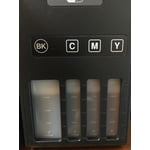
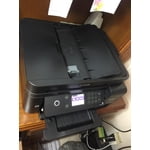
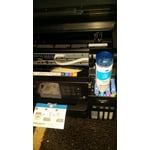
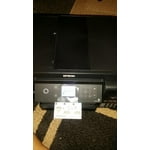
The installation and setup of the printer was fast simple on both Windows PCs and Android Phones. The process only takes a few minutes, and the display walks you through the process very clearly. Upon first impression, the printer has a nice interface and control buttons. It's very simple to navigate and understand, and the buttons / actions are very responsive and it moves through the screen and menus without any lag. The web control panel interface of the printer is also pretty easy to understand and navigation is very quick. You can configure a lot more details of the networking as well as monitor ink levels, hardware status, and detailed page count statistics. The Epson Windows print driver also has several useful print presets (fast, grayscale, double-sided, high-quality, etc.) and several other useful settings (page offsets, rendering, watermarks). The quantity of up to 14,000 black / 11,200 pages color with the included ink is incredible. The included bottles of ink to fill up the tanks were simple to operate and well designed so they didn't spill a drop, and the package includes another set of bottles to refill when needed. It's definitely a relief to not have to worry about replacing small ink cartridges so often, as well as dealing with chipped usage counters and cartridge defects. One of the greatest aspects of the printer is the auto-duplex printing (configurable setting). It was amazing how well it would print the first page and re-feed the same paper to print the back. I already use this feature more than I thought I would. The build quality is solid, the trays open and slide with ease. It's nice size for a high-end all-in-one printer. The top feeder folds open easily to use for scanning or copying, and it closes neatly when not in use. The flatbed scan/copy cover doesn't stay up too well if not all the way open or close down gently. Pros: * Printing quality is very good. * Print speed is adequate. * The auto-duplex printing is awesome and is a great paper saver. * The gigantic ink tanks and included refill tanks are a huge value. * Works with Google Cloud Print. * Can print / scan from Android/iOS Apps. * Wired / Wireless Network printing. Cons: * Not a super quiet * Scanning lid open / close is not as smooth as I would expect. This is a review for the Epson WorkForce ET-3750 EcoTank All-in-One Printer that I received free of charge to do a beta test and review.
Love the ink feature - difficulty stay on network
We bought this printer because of the eco-tank. That has worked out incredibly well and we full recommend that feature. However, we have had some difficulty keeping it on the network. I have a MAC and my husband has a Windows PC. Seems like setting up the Epson not on AirPrint (to allow for the MAC), makes it hard for the MAC to find. Finally I set it up as an IP printer, with a dedicated IP address and wired. This seems the most stable configuration. I did update to macOS 10.14 and have to download new drivers, but I believe that is a normal issue.
Vibrant Printing
I bought this printer a few months ago and am so glad I did. I love the deep wells for ink and how I don't have to worry about refilling very often. The capability to see ink levels is wonderful. This machine prints beautifully with very vibrant colors.
Guilt free printing
The Epson Workforce ET-3750 is a wonderful printer. The printer is slick and black, with an lcd screen that is very intuitive to navigate, though it is not touch screen and I almost always automatically assume it is. The paper tray opens to the front so you don't have to be concerned with additional space and it is easy to set it on a shelf. It is not very loud and it reasonably fast (though not as fast as a BW laser printer). Connecting to it was very easy from my computer and my phone, and now that it is setup I can click print from anywhere. This has come in more handy than I expected. Once you have this ability then suddenly you realize what you've been missing out on. It prints very nicely in color with sharp bright images. I am very happy with the quality of it and its performance. A few notes about the ink- It comes with 2 sets of ink. So basically you have a backup set of each color. Each one is individually wrapped so they shouldn't cause any problems while storing. Loading the ink was quite easy. I was nervous, I wont like. I expected it to be at least a tad messy but it wasn't. Each bottle nozzle fits like a puzzle into the appropriate tank in the printer and then you hear "glug glug glug" and see the tank fill with ink. When you do this for the first time there will be some left in the bottles. This is because AFTER you pour the ink and BEFORE you hook it up to a computer, you have to turn it on and let it gobble some of the ink down. Then you top it off with the remaining ink.The ink provided is a perfect amount to fill the entire thing up. My favorite part about this printer is that I feel absolutely no guilt when I print something. Before this, I would be frugal with printing things, especially anything in color. If you have a mother/ father/ partner/ spouse or any other form of Helicopter Printer Boss that constantly tells you not to waste the ink then you know what I'm talking about. Now, I just hit print when I need and my husband says nothing. That's a winner. This is a review for the EpsonWorkForce ET-3750 EcoTank All-in-One Printer that I received free of charge to do a beta test and review.
EcoTank Concept is Excellent
Only reason for missing star is the lack of full Linux support. Ink installation is extremely easy and non-messy. Default printing is more crisp than my old HP, but that may be how one saves on ink. The print to and print from the Cloud are interesting features that work fine even though I cannot see myself using them much. I have the machine cable-connected to my DSL base modem and computers connect using wifi.
Easy Installation just purchased
I read many reviews before purchasing this printer. I saw both good and bad reviews regarding the difficulty of installation. For me, installation was really easy, it just takes some minutes to communicate with the wireless network and get set up. I have not printed anything other that test pages but so far the quality is good. After I use it longer I can provide another review.
Great Printer!!
I have used it for over five weeks now and ink consumption is minimal compared to my other Epson products (WF 3640 and WF 3720). In addition to the ink cost savings the print quality is better. The only setback compared to the other printers is the paper tray limited capacity.
Great primary printer.
I have two printers; one is an old Brother black and white that I only use for speeches and large volume black and white print jobs. The Epson is my choice for color, scanning and ocassionaly I copy with it. It has been reliable, with exceptional quality with both. I have to get the Epson color photo paper so I can't rate it as excellent until I try it with that. I used some one year old "Cannon" photo paper and results were less than desirable; but I don't know if that old paper was proprietary just for "Cannon" copiers.