Skip to Main Content
Sam's Club
Sam's Club
Member ratings & reviews for
Epson WorkForce ET-3750 Special Edition EcoTank All-in-One Printer with Bonus Black Ink
4.2 out of 5 stars
stars1,155 ratings1,126 reviews
  1. 5 stars57% (657)
  2. 4 stars21% (244)
  3. 3 stars11% (122)
  4. 2 stars5% (60)
  5. 1 star6% (72)

Member photos

  • +12 images
Sort by |
Showing 271-280 of 1,125 reviews
Jul 26, 2019
Unhappy Camper
3 out of 5 stars review

So-So Printer

Love the Eco-Tank feature. Great prints of photos on photo paper. Very noisy operation. Operation could ONLY have been the product of engineers who love complexity. There is NOTHING intuitive about this machine's operation and it takes 5-10 steps just to print a page of text. The online manual is 50+ pages long and WILL get you where you want to go, but you have to (at least initially) look up every operation and follow the manual explicitly. NOTHING is easy to do.

Review from epson.com
Helpful?5HORJINKF4CN15315553577
Feb 18, 2020
Jetson
5 out of 5 stars review

Excellent printer

Bought this printer to replace an aging Canon photo printer. This printer was super easy to setup and the wireless connection is superior than my old Canon. I've ran approx 300 pages through it with no problem. Looking forward to many years of service.

Review from epson.com
Helpful?5HORJINKF4CN15315553577
Feb 20, 2020
JonK
4 out of 5 stars review

Love the ink tanks, but controls are cumbersome

After years with an HP all-in-one printer, and untold numbers of ink cartridges, I opted to replace the old unit with the ET-3750. I am very happy with the amount of ink and foolproof approach of filling of the tanks. But, the controls of the unit are lacking and cumbersome, at best, especially for a printer at this price point.

Review from epson.com
Helpful?5HORJINKF4CN15315553577
Nov 18, 2019
Smiles
3 out of 5 stars review

Nice

I've been using this printer about a month. I like the compact size and that the top loader is closeable - protects mechanism from dust. The paper tray is nice if you use mainly one kind of paper. I print lables one sheet at a time, and that's a pain with this paper tray.

Review from epson.com
Helpful?5HORJINKF4CN15315553577
Nov 6, 2019
Sjanderson6
4 out of 5 stars review

Excited to get new printer….once I got it installed

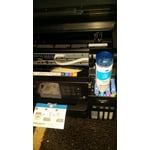
My 3 year old Epson 2550 worked great for almost 3 years but then needed replacing. I was so happy with it, not having to replace ink cartridges that I wanted another one. This time I got the upgraded model. It was a bit challenging to connect to my Mac and my husband's PC, but I finally got it done. I also am not sure why the scanner when open doesn't stay open like the photo shows, but I was able to install the ink and it's much easier than the old model.

Review from epson.com
Helpful?5HORJINKF4CN15315553577
Oct 31, 2019
Queeksdraw
5 out of 5 stars review

Easy Installation

Just installed our Epson ET 3760, installation went well, however, it took some time to go through all the necessary steps but patience paid off. Have not set up wireless operation yet as the main computer is hard wired via USB (be sure to buy the cable!!!). Print quality is top notch I tested both print from computer and the copier function. This is day one so I have to see how things go...so far so good.

Review from epson.com
Helpful?5HORJINKF4CN15315553577
Nov 13, 2017
Kish
5 out of 5 stars review

Great Prints!

Unboxing –Upon opening the box, it was clear that it would not require a lot of work to get it set up. The quick start guide helped me a lot in following the easy directions for set up. I chose the USB set up option to start. The hardest part of getting the Printer set up for initial usage was the filling and re-charging of the Ink. I had never seen ink in this form and was curious how it worked. Filling the tanks was relatively simple, and not at all messy as I imagined it would be! Once everything was set I started to print. Initially the sound of the printer scared me but I got used to it after a day. It prints amazingly fast, very good in color and appears to not use that much ink. I've been using the printer printing BW and Color prints for about 2 weeks now and it doesn't appear that much ink has been used at all. The command screen was a bit small and I kept assuming it was touch screen but it was not. This is the only drawback I experienced to using the printer. On week 2 I decided to try the WIFI set up in addition to the Mobile printing. The WIFI set up was faster than the USB set up, and since the Ink was already charged I printed immediately. If the printer and my other mobile devices are on the same WIFI network, I can print from anywhere in the house from my laptop, tablet or iPhone. The Epson iPrint App works great as well and I was able to send a picture I had stored in my phone directly to the printer for printing. I also set up the email to print function which I found to be extremely useful for times when I am away from home but need to print something later and do not wish to set myself a reminder to do so. Overall this printer is top of the line, and with the efficient ink tanks, I can see how this is an economically friendly product that I enjoy using. I had no issues with set up or print functions at all while using this printer. This is a review for the Epson WorkForce ET-3750 EcoTank All-in-One Printer that I received free of charge to do a beta test and review.

Review from epson.com
Helpful?5HORJINKF4CN15315553577
Dec 6, 2019
Sue56
2 out of 5 stars review

20 years behind

Wish I could give a great review on this printer, but I have some big issues with it. First of all, the features on the device itself - all the buttons and how they work - remind me of a printer I had at least 20 years ago. You have to direct a selection by arrows before you can actually select it - waste of time and unnecessarily complicated. It is also VERY slow scanning - in fact, the slowest I've ever had even though resolution is the same I've used on past printers. This printer jams VERY often when using 2-sided printing - making that feature virtually useless. I've tried using different papers including expensive, highly rated brands. I was drawn to this printer because of the ink tanks and being able to refill - still willing to pay all the extra cash for the printer over other brands where ink cartridges/refills are overpriced. If I had to do this all over again, I'd choose the other major brand that I've used all these years - just a much better, faster product. As soon as I finish all the ink that came with this purchase, will switch back. Too bad - I love keeping companies in business, but not at my expense.

Review from epson.com
Helpful?5HORJINKF4CN15315553577
May 7, 2019
Jason40
5 out of 5 stars review

I love printing again!

I am so happy I got this printer! I was dreading printing, because the hp cartridges were so expensive and often went bad, or wouldn't even work with the printer and genuine cartridges. Having bulk ink is something that should have happened years ago!!!!!

Review from epson.com
Helpful?5HORJINKF4CN15315553577
Jan 27, 2020
musbusmgr
5 out of 5 stars review

Best ink-jet printer I have ever used!

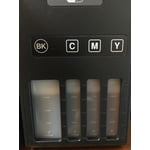
Finally a printer that works excellent, with features normally found in much higher-cost printers, but also lets me be in control of the ink. The fill windows give me an instant status of ink available; ink usage is very efficient and lasts longer than other cartridge-type devices; and the quality and options for printing are the best! I've been using mine for over a year and only hope it lasts forever.

Review from epson.com
Helpful?5HORJINKF4CN15315553577