Skip to Main Content
Sam's Club
Sam's Club
All Departments
All Services
Customer reviews for SAMSUNG 77" Class S90 Series OLED 4K Smart TV for
SAMSUNG 77" Class S90 Series OLED 4K Smart TV
4.3 out of 5 stars
stars
89 ratings80 reviews
  1. 5 stars62% (55)
  2. 4 stars24% (21)
  3. 3 stars6% (5)
  4. 2 stars3% (3)
  5. 1 star6% (5)

Member photos

  • +12 images
Sort by |
Showing 11-20 of 80 reviews
Apr 20, 2025
Reviewer name: Anonymous
4 out of 5 stars
4 out of 5 stars review

It's all about the color

[This review was collected as part of a promotion.] The color is as lush, detailed and dazzling as you would expect in an OLED. Once you have one it's hard to imagine buying something lesser. My only quibbles: at times when I turn on the set I get a loud staticky noise that forces me to unplug and reboot the set. Also, adding streaming channels to the main menu is not initially intuitive. The menu should also be larger to accommodate more channels.

Review from Samsung US
Helpful?7AR1GVLFOSV413951464167
Apr 26, 2025
Reviewer name: GABE
2 out of 5 stars
2 out of 5 stars review

Bad TV

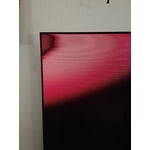
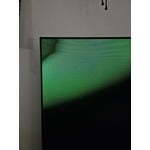
Had this TV for 15 months. The color was great, and the TV worked fine. Then about two weeks ago the screen started to go bad, flashing red, green and blue colors in the upper left-hand corner on startup. on closer inspection of that corner fine horizontal lines were visible. The lines did not continue across the entire screen. Warranty turned us down claiming the TV had Non-Manufacturing Damage (NMD), implying that we did the damage. That was impossible! The retailer made good on the warranty and took it back. We decided to upgrade and buy a Sony TV.

Review from Samsung US
Helpful?7AR1GVLFOSV413951464167
Apr 20, 2025
Reviewer name: Steelyjaz
5 out of 5 stars
5 out of 5 stars review

Remarkable TV

[This review was collected as part of a promotion.] I researched many TVs before deciding on the Samsung S90C. First , the design is very modern and ultra thin so it's easy to mount. Normally, with a new TV I spend time adjusting the various pictures and color settings. With this TV I found the picture to be perfect right out of the box and have not made any changes since purchasing it. Everyone who visits comments on how amazing the picture is with this TV. In fact, a couple of it friends have purchased this TV based on our recommendation. We stream everything on this TV and enjoy every minute of it. I highly recommend purchasing this TV. Another winner from Samsung.

Review from Samsung US
Helpful?7AR1GVLFOSV413951464167
May 6, 2025
Reviewer name: Tvwacher
4 out of 5 stars
4 out of 5 stars review

Lovely TV, OLED is super

[This review was collected as part of a promotion.] I really like the tv. Beautiful sharp image. What I am not happy with is how it struggles with Roku and getting to spectrum without freezing screen. Many times I have to reboot Roku to get it to perform. Other than that, it's great

Review from Samsung US
Helpful?7AR1GVLFOSV413951464167
May 5, 2025
Reviewer name: RoddyO
3 out of 5 stars
3 out of 5 stars review

I'm unsure about the picture quality
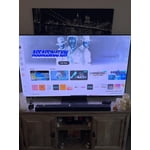
[This review was collected as part of a promotion.] I use my tv for regular programming.the issue I have is when I turn on the tv apps or Home Screen the pictures are out of focus they look like a picture negative.I have cable and when it kicks in the picture is fine

Review from Samsung US
Helpful?7AR1GVLFOSV413951464167
May 6, 2025
Reviewer name: Andrew4h
5 out of 5 stars
5 out of 5 stars review

Great picture

[This review was collected as part of a promotion.] Overall, really love this TV. perfect size, great picture. User interface is fine, neither the best nor poor. One minor issue is I wish it had either a faster processor or more RAM or something as it sometimes will get stuck for a bit / move slowly as you are going through the user interface.

Review from Samsung US
Helpful?7AR1GVLFOSV413951464167
Mar 21, 2025
Reviewer name: Greattv
5 out of 5 stars
5 out of 5 stars review

Best Purchase Ever

[This review was collected as part of a promotion.] I recently picked up a Samsung QN90C/QN90CD QLED TV, and I'm absolutely loving it! The picture quality is stunning—bright, vibrant colors pop off the screen, and the contrast is spot-on, making everything from movies to games look incredible. It's a high-end 4K TV that really shines in my living room, especially with its impressive brightness that handles daylight viewing with ease. The sleek design fits perfectly in my space, and the smart features are super convenient for streaming my favorite shows. Setup was a breeze, and the remote is simple yet effective. If you're looking for a top-notch TV that delivers on both performance and style, this one's a winner!

Review from Samsung US
Helpful?7AR1GVLFOSV413951464167
Feb 20, 2025
Reviewer name: mroemer
4 out of 5 stars
4 out of 5 stars review

Great Picture!

Hands down the best picture in a TV I've ever owned. Only 4 stars due to the EARC sound software issue. The cutting in and out sound issue when using EARC/HDMI is the same as hundreds of other users are experiencing after your latest firmware upgrade. A temporary work around is to use optical sound but it's not the same quality. Please address this for us!!!

Review from Samsung US
Helpful?7AR1GVLFOSV413951464167
Apr 20, 2025
Reviewer name: RussG79
5 out of 5 stars
5 out of 5 stars review

Lovely TV, Beautiful Picture

[This review was collected as part of a promotion.] This is my main TV in the living room and I use it for just about everything. I game, stream, and connect my phone to it it from time to time. It always gives a beautiful picture, vibrant colors, and solid black.

Review from Samsung US
Helpful?7AR1GVLFOSV413951464167
Feb 5, 2025
Reviewer name: Buck
3 out of 5 stars
3 out of 5 stars review

App Issues

Would have given it a 5 but Hulu and Disney+ apps don't work. I spent a lot of time with their support and they can't fix it, not sure what the Samsung update created.

Review from Samsung US
Helpful?7AR1GVLFOSV413951464167
reply from Samsung Specialist

Buck, We appreciate your feedback on apps, and for optimal performance, we ask that you please ensure you've got the latest firmware version installed on your TV. You can check this by going to: Home > Menu > Settings > Support > Software Update. You may also want to further optimize performance with the self-diagnostic tool, which checks memory, frees up unused cached memory, and closes background apps. Go to: Home > Menu > Settings > Support > Device Care > Start Device Care I hope these tips help you enjoy your new product. You can always contact us for further help at 1-800-SAMSUNG, 8AM - 12AM EST, 7 days a week. Our LiveChat agents are also available by clicking on the ‘Support’ link on our website. ~ Samsung Specialist