
Skip to Main Content
Sam's Club
Sam's Club
All Departments
All Services
Customer reviews for SAMSUNG 85” Class DU7200 Series 4K Smart TV for
SAMSUNG 85” Class DU7200 Series 4K Smart TV
4.3 out of 5 stars
stars
1,178 ratings1,031 reviews
  1. 5 stars63% (745)
  2. 4 stars18% (208)
  3. 3 stars8% (98)
  4. 2 stars5% (58)
  5. 1 star6% (69)

Member photos

  • +175 images
Sort by |
Showing 641-650 of 1,031 reviews
May 20, 2025
Reviewer name: Shopping for the house
5 out of 5 stars
5 out of 5 stars review

Great Product

A lot of features, smart TV works well with apps. Picture is clear and sharp. Try different view modes find the one right for you.

Review from Samsung US
Helpful?1RMTE3JL1NV513893753801
Feb 7, 2025
Reviewer name: Sadly
1 out of 5 stars
1 out of 5 stars review

Bad reception

Disappointed in the tv receiver..had a 14 yr old Samsung that received 44 ai channels..new one gets 15..unhappy

Review from Samsung US
Helpful?1RMTE3JL1NV513893753801
reply from Samsung Advisor

Hi Sadly, If you’re not receiving all channels, first ensure that your coaxial cable is securely connected to the TV. Then, run Auto Program: Home > Menu > Settings > All Settings > Broadcasting > Auto Program. Select Start to begin auto-programming, and then select either Air, Cable, or Both. - Select Air if you're using an antenna only. - Select Cable if you're using a cable box only. - Select Both if you're using an antenna and a cable box. You will get the most channels this way. If you're still having difficulties, please reach us on Facebook or Chat with us on the Samsung website. You can also reach us at 1-800-SAMSUNG / Available 8AM - 12AM EST, 7 days a week. ~Samsung Advisor

Apr 20, 2025
Reviewer name: Couchpotatoe
5 out of 5 stars
5 out of 5 stars review

Happy.... happier with instructions.

Very happy with tv performance. I would have been happier much sooner with an owners manual and written instructions for setup and use.

Review from Samsung US
Helpful?1RMTE3JL1NV513893753801
May 16, 2024
Reviewer name: Lovemykids
5 out of 5 stars
5 out of 5 stars review

Love picture and.soumds is great

[This review was collected as part of a promotion.] I use to play my Playstation 4 listen to music an use watch movies an tube videos

Review from Samsung US
Helpful?1RMTE3JL1NV513893753801
Dec 27, 2024
Reviewer name: Allthesports
5 out of 5 stars
5 out of 5 stars review

This product was the perfect size for bedroom.

[This review was collected as part of a promotion.] We use this product just about everything that is on this tv.. local,streaming and sports.

Review from Samsung US
Helpful?1RMTE3JL1NV513893753801
Apr 23, 2025
Reviewer name: RE2025
5 out of 5 stars
5 out of 5 stars review

Great features

I bought my first Samsung TV this year, and I love it! Thinking about buying a Samsung refrigerator next! Sure wish I had a coupon, LOL

Review from Samsung US
Helpful?1RMTE3JL1NV513893753801
May 20, 2025
Reviewer name: Rene
4 out of 5 stars
4 out of 5 stars review

Almost perfect

Love the TV, although sometimes the streaming lags. If I choose shows via AppleTV the problem seems to disappear. I'm not sure why that is.

Review from Samsung US
Helpful?1RMTE3JL1NV513893753801
Feb 5, 2025
Reviewer name: Mountainman
1 out of 5 stars
1 out of 5 stars review

TV sucks!

I don’t suggest buying this TV! The remote sucks! The sound is awful and the TV itself is horrible! I wish I had never bought this pile of junk!

Review from Samsung US
Helpful?1RMTE3JL1NV513893753801
reply from Samsung Advisor

Hi Mountainman, I'm very sorry you are not satisfied with your TV. We understand there can be a learning curve when you get a new TV! This is why we have built a guide built into the TV that teaches you how to use your remote. You can learn how to use your Samsung Remote by going to Home> (left directional button) Settings> Support> Remote Control Guide. Regarding your issues with sound on the TV, there are several volume features you can adjust, which may improve your audio experience. 1) Auto Volume automatically adjusts the sound to a certain level when changing channels or switching to another external input. Go to Settings > All Settings> Sound > Expert Settings > Auto Volume. 2) Adaptive Sound automatically adjusts to a specific volume level while watching TV. The TV analyzes your volume usage history by time period to automatically adjust the volume when you use an app or switch to an external input source. Go to Settings> All Settings> Sound> Sound Mode> Adaptive Sound. 3) Several Sound Modes are likewise available to meet your personal preferences: Home > Settings > All Settings> Sound > Sound Mode. If you need more help, Samsung is here for you! Please call us at 1-800-SAMSUNG, 8 AM - 12 AM EST, seven days a week. Our LiveChat agents are also available by clicking on the ‘Support’ link on our website. ~ Samsung Advisor

Feb 5, 2025
Reviewer name: Kath
1 out of 5 stars
1 out of 5 stars review

Using the keyboard to search is time consuming.
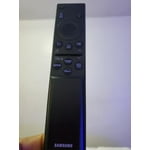
I am unable to search using voice. This feature is on the TV but not on the remote control that accompanied the TV.

Review from Samsung US
Helpful?1RMTE3JL1NV513893753801
reply from Samsung Advisor

Hi Kath, We appreciate your purchase and understand your frustration. We are sorry for any confusion regarding voice assistants. You are correct, the DU7200 does not have voice assistants built in. However, they do work with Alexa. You can connect them to your existing Alexa device to ask them to turn on your TV, change channels, control volume, and more. If you need further assistance, we would be happy to help! Please feel free to contact Samsung Support at 1-800-SAMSUNG, available from 8 AM to 12 AM EST, seven days a week. You can also chat with us on Samsung.com for immediate assistance. ~Samsung Advisor

Apr 19, 2025
Reviewer name: Cristian
4 out of 5 stars
4 out of 5 stars review

Great tv

Good an almost all but the for some reading the Samsung tv plus channels are not available and I have tray many things but nothing works

Review from Samsung US
Helpful?1RMTE3JL1NV513893753801




