Skip to Main Content
Sam's Club
Sam's Club
Customer reviews for SAMSUNG 75" Class TU700D-Series Crystal Ultra HD 4K Smart TV UN75TU700DFXZA for
SAMSUNG 75" Class TU700D-Series Crystal Ultra HD 4K Smart TV UN75TU700DFXZA

Member photos

  • +1519 images
Sort by |
Showing 4,661-4,670 of 10,060 reviews
Oct 27, 2020
Mark2
1 out of 5 stars review

WiFi keeps dropping.

[This review was collected as part of a promotion.] I have to of theses TVs that won't keep WiFi and have to do a soft reset every time it loses my IP address. I've tried the factory reset putting in everything for my Wi-Fi and manually called my internet provider and it's not on there end and it only this model that does it in my house have 7 Samsung smart TVs and it's just these 2 that do it all the other one work just fine never have an issue with them.

Review from Samsung US
Helpful?3STAXRT0NDXF13883163940
reply from OBA

Mark2: Thank you for purchasing the TU7000 TV and for your review. I am very sorry that you are experiencing Wi-Fi connection issues. You may want to go through these steps to check your network connection: 1) Check the distance between the TV and your modem or access point. The distance should not exceed 50 ft. (15.2 m). 2) Minimize interference by not using or turning off wireless devices. Also, verify that there are no obstacles between the TV and the modem or access point. (WiFi strength can be decreased by appliances, cordless phones, stone walls/fireplaces, etc.) 3) Perform a network test to check if there is a network problem. Press the Home button on your remote. Navigate to Settings > Support > Device Care > Self Diagnosis> Smart Hub Connection Test 4) Please be sure you have the latest firmware update which enhances network connectivity. Ver 1401.7 is now available. You can check to see what software version your TV is using and if there is an available update through the settings on your TV. Go to Settings>Support>Software Update Both the current version and new version number will be displayed. The current version is what your TV is using and the new version is the latest update. New updates will be downloaded and installed on your TV. Updates usually take a few minutes; please do not turn off the TV until the update is complete. When the update is finished, the TV will restart automatically. If there aren't any new updates, select OK to exit. For further assistance or service, please contact us via any of the following options: 1) Phone: 1-800-SAMSUNG (ask for TVs), available 8AM – 12AM EST 7 days a week 2) LiveChat: https://www.samsung.com/us/support/#contact_us_for_support 3) Facebook Messenger: https://www.facebook.com/samsungsupport 4) Twitter: https://twitter.com/SamsungSupport 5) The Samsung Members Community is also a great resource for getting help from Samsung moderators and customers: https://us.community.samsung.com If you have not already done so, we invite you to register your new Samsung product at: https://www.samsung.com/us/account/signin/?redirect=https%3A%2F%2Fwww.samsung.com%2Fus%2Fsupport%2Fregister%2F Registering your product gives you access to easy warranty support, convenient opt-in to special promos and offers, faster troubleshooting and service, and quick notification of system updates. ~ Samsung Solutions

Jul 27, 2022
MaryDubya
5 out of 5 stars review

So nice I bought it twice!

[This review was collected as part of a promotion.] I first purchased the Samsung Crystal UHD 70” last year. It's such a great tv, I bought a 55” for my bedroom! It works seamlessly with all of my other devices (Apple included) Apps are easy to download. Comes with Apple TV already installed. It has a sleek design, lightweight, easy to clean (with proper screen cleaner) and the picture and sound quality is amazing. My son is about to purchase one for himself. Would definitely recommend!

Review from Samsung US
Helpful?3STAXRT0NDXF13883163940
Dec 15, 2024
Lithia FL
1 out of 5 stars review

Stop working after 3 years

Purchased in 2021 and the TV just died on Dec. 2024. I do not recommend this product.

Review from Samsung US
Helpful?3STAXRT0NDXF13883163940
May 8, 2020
Sb greek
1 out of 5 stars review

Tv sucks
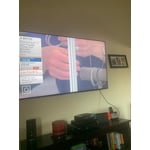
Bought the tv month and half ago got a big line down the middle and flickers on and off

Review from Samsung US
Helpful?3STAXRT0NDXF13883163940
reply from OBA

Sb greek, I am sorry to hear that you are experiencing issues. Samsung is committed to providing the best possible product experience, quality, and value. We back this TV with a 1-year limited manufacturer's warranty if purchased brand-new directly from an authorized seller. Please reach out to us via any of the following so that we can provide troubleshooting or begin warranty service. 1) Phone: 1-800-SAMSUNG Available 8AM – 9PM EST (Mon-Fri) 2) LiveChat: https://www.samsung.com/us/support/#contact_us_for_support 3) Facebook Messenger: https://www.facebook.com/samsungsupport 4) Twitter: https://twitter.com/SamsungSupport We hope to hear from you soon and assist you with a satisfactory solution. -Samsung Ambassador

Jun 10, 2021
Terrible
1 out of 5 stars review

Terrible

so slow response. disconnects from internet daily. then i have to reset. what a joke.

Review from Samsung US
Helpful?3STAXRT0NDXF13883163940
Feb 10, 2022
Doreen
2 out of 5 stars review

Are used to like Samsung products

i am so disappointed in my samsung tv, i will never buy another one!

Review from Samsung US
Helpful?3STAXRT0NDXF13883163940
reply from Samsung Brand Ambassador

Hi Doreen, Thank you for purchasing the TU7000 TV and for sharing your review. The Crystal Processor 4K transforms everything you watch to 4K. Its crisp, clear picture is 4x the resolution of Full HD. If you are experiencing specific issues which caused you to give this a 2-star rating, please know Samsung Customer Support is here to help. Please contact us at 1-800-SAMSUNG (ask for TVs), available 8AM - 12AM EST, 7 days a week. For additional support resources, visit us on the Samsung website and click on the ‘Support’ link in the upper right corner of the homepage for: 1) Chat with Us/Product Help: To begin a chat or find solutions, choose ‘TVs & Home Theater’ and select your model & topic. 2) Register a Product: For access to easy warranty support, convenient opt-in to special promos and offers, faster troubleshooting and service, and quick notification of system updates. 3) Manuals & Software 4) Warranty Info 5) Contact Us ~ Samsung Solutions

Jan 18, 2021
Bodine
5 out of 5 stars review

Great picture!

watch 4k movies on netflix. breathtaking picture! i would recommend to everyone.

Review from Samsung US
Helpful?3STAXRT0NDXF13883163940
Sep 23, 2021
Rottweilerlover
5 out of 5 stars review

Amazing TV

[This review was collected as part of a promotion.] Started using smart hub... way better than the roku !

Review from Samsung US
Helpful?3STAXRT0NDXF13883163940
Nov 9, 2022
Jasen007
1 out of 5 stars review

Poor build

Only 2 HDMI ports on a 65" tv? That's pathetic. Especially when many people are switching away from using receivers.

Review from Samsung Canada
Helpful?3STAXRT0NDXF13883163940
reply from Operations

Hi Jasen007, thank you for sharing your thoughts with us. We’re sorry to hear that you’re disappointed, and we will be sure to share your feedback with our teams so we can continually improve our products, services, and processes. Thanks again. 

Oct 21, 2020
Jason
1 out of 5 stars review

Not Happy at All

[This review was collected as part of a promotion.] Owned the tv less than 2 months and it quit working

Review from Samsung US
Helpful?3STAXRT0NDXF13883163940
reply from OBA

Jason: Thank you for purchasing the Samsung TU7000 TV. I am sorry to hear that you are experiencing issues with your TV. Please give us the opportunity to assist you by contacting Samsung Customer Support. Samsung is committed to providing the best possible product experience, quality, and value. We back this Samsung TV with a 1-year limited manufacturer's warranty, including authorized repair for manufacturer defect, if purchased brand-new directly from an authorized seller. 1-800-SAMSUNG (available 8AM -12AM EST, 7 days a week) Or visit us on the Samsung website and click on the ‘Support’ link in the upper right corner of the homepage for: 1) Contact Us Options (LiveChat, Remote Support, Facebook, Twitter) 2) Product Support 3) Manuals and Downloads 4) Warranty Info 5) Product Registration: Registering your product gives you access to easy warranty support, convenient opt-in to special promos and offers, faster troubleshooting and service, and quick notification of system updates 6) Samsung Community: A great resource for getting help from Samsung moderators and customers and more 7) …and more product, repair, order, and care options ~ Samsung Solutions