Skip to Main Content
Sam's Club
Sam's Club
All Departments
All Services
Customer reviews for SAMSUNG 75" Class TU700D-Series Crystal Ultra HD 4K Smart TV UN75TU700DFXZA for
SAMSUNG 75" Class TU700D-Series Crystal Ultra HD 4K Smart TV UN75TU700DFXZA
4.4 out of 5 stars
stars
10.4K ratings10K reviews
  1. 5 stars69% (7,261)
  2. 4 stars18% (1,887)
  3. 3 stars5% (566)
  4. 2 stars3% (265)
  5. 1 star5% (499)

Member photos

  • +1529 images
Sort by |
Showing 4,431-4,440 of 10,069 reviews
Oct 26, 2022
Reviewer name: KateTheGreat
5 out of 5 stars
5 out of 5 stars review

great quality at a great price
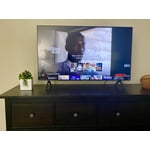
[This review was collected as part of a promotion.] I have an older 36" Samsung (2006 Touch Of Red model) I wanted to replace. Not because it didn't work but because I wanted a new modern smart TV Samsung builds TV's to last, 16 years is a long time for a TV hold up and keep working Anyway A few weeks ago I purchased a 43 inch Tu7000 for the bedroom. I was seeking a thin modern affordable TV with a great picture This was the ultimate choice! I also find this model has decent internal sound, without a soundbar but of course you can always add one which I'll do soon to watch my music videos. .

Review from Samsung US
Helpful?3STAXRT0NDXF13883163940
Sep 15, 2021
Reviewer name: Kwalker1085
5 out of 5 stars
5 out of 5 stars review

Love love love this tv

[This review was collected as part of a promotion.] We use our Samsung TV for our bedroom, it is amazing. The picture is bright and vibrant. The sound quality is perfect and it's easy to use and set up. It took my husband and I about 15 minutes to get it out of the box and set up with everything. It's not heavy so the only reason it took two of us is because of how big it is.

Review from Samsung US
Helpful?3STAXRT0NDXF13883163940
Sep 20, 2021
Reviewer name: Eli11
3 out of 5 stars
3 out of 5 stars review

Good tv

[This review was collected as part of a promotion.] The tv is good overall. Apps respond quickly and theres a good amount of apps to download. The picture quality becomes blurry in dark scenes. The biggest dislike on the tv is the ads that appear in the app store and app selection.

Review from Samsung US
Helpful?3STAXRT0NDXF13883163940
Sep 15, 2020
Reviewer name: PoofZ06
3 out of 5 stars
3 out of 5 stars review

Great Overall Product

[This review was collected as part of a promotion.] Overall my experience has been neutral as I've owned the product for only around two-three months and upon turning on the screen one day there was a pinkish/redish tint to everything. It had seemed as if the brightness had increased too as pictures and images had blurred together and were no longer decipherable from each other. As far as before that, I had enjoyed it for watching and streaming movies or TV shows because the picture and colors are amazing. It also is acceptable for living room gaming as there is very little input delay but as far as refresh rate it could use some slight improvements. It wasn't intended for primarily gaming so it isn't a big concern compared to dedicated displays at higher price tags.

Review from Samsung US
Helpful?3STAXRT0NDXF13883163940
reply from OBA

PoofZ06: Thank you for purchasing the TU7000 TV. I am very sorry for the color glitch issue you encountered. Please check that your TV has the latest firmware update, which should resolve this specific issue. To update directly from your TV, press the HOME button on your remote. - Go to SETTINGS (gear icon) > Support > Software Update > Update Now - Your TV will check for the update and should start downloading the update. After the update is installed the TV will shut down and restart. Once the TV restarts, press and hold the Power button until the TV turns off and back on. If your TV is not connected to the internet, follow these steps to update the firmware. - You can find the update (version 1301.5) at: samsung.com/us/support/owners/product/crystal-uhd-tvs-tu7000-2020 - Extract the firmware to the root of a USB thumb drive. (Do not put it in any folders on the thumb drive.) - Connect the USB thumb drive to a USB port on your TV. - Navigate to Settings > Support > Software Update, select Update Now, and then select Yes. - The TV will install the update and then restart. - Once the TV restarts, press and hold the Power button on your remote until the TV turns off and back on. If the abnormal colors continues after the firmware update, please contact Samsung Customer Support. 1-800-SAMSUNG (8AM -12AM EST, 7 days a week) On the Samsung website and click on the SUPPORT link in the upper right corner for: 1) Contact Us Options (LiveChat, Remote Support, Facebook, Twitter) 2) Product Support 3) Manuals and Downloads 4) Warranty Info 5) Product Registration: Registering your product gives you access to easy warranty support, convenient opt-in to special promos and offers, faster troubleshooting and service, and quick notification of system updates 6) Samsung Community: A great resource for getting help from Samsung moderators and customers and more 7) …and more product, repair, order, and care options ~ Samsung Solutions

Jun 17, 2022
Reviewer name: samsungguy
5 out of 5 stars
5 out of 5 stars review

I LOVE THIS TV... AWESOME PICTURE!

[This review was collected as part of a promotion.] What a phenomenal picture... Streaming & dvds look awesome puts you in the show. The 1 and only compliment is the preloaded apps... They just take up space. You can't Uninstall them. I'm an android guy and I wish that I could uninstall them!! I'm a Samsung Fan and this is my first disappointment.

Review from Samsung US
Helpful?3STAXRT0NDXF13883163940
Apr 15, 2021
Reviewer name: rjvino70
5 out of 5 stars
5 out of 5 stars review

Love my 75"er

[This review was collected as part of a promotion.] I'm a huge watcher of TV and a gamer. I bought this TV right before the pandemic and got my PS5 shortly after. I can't say enough about this TV. The picture is amazing and the sound quality is better than I imagined. Games have never been this good. I play for hours and with absolutely no issues. Also I might subscribe to every possible streaming service there is so you all see how important having a great TV is. Tizen is way better than I ever imagined. I'm an Android guy but I think it's time to switch. Thank you Samsung.

Review from Samsung US
Helpful?3STAXRT0NDXF13883163940
Aug 1, 2020
Reviewer name: Sandy
3 out of 5 stars
3 out of 5 stars review

Crystal clear picture.

bought this tv because i have a samsung phone that i totally love. love the looks of the set & the picture couldn't be clearer. the sound is much better than our previous tv. however, we are having a problem with it periodically disconnecting us from hulu or even from dish network for no apparent reason. not happy about that.

Review from Samsung US
Helpful?3STAXRT0NDXF13883163940
reply from OBA

Sandy: I am sorry for the issue you are having with Hulu. This is not common, but Samsung is aware of the problem and is working closely with Hulu towards a solution. In the meantime, please try power-cycling your TV: 1) Power off your TV using the remote or by pressing the power button on the TV. 2) Next, unplug your TV from the power source. If your TV is connected to a surge protector, power it off. 3) Wait 30 seconds, and then plug your TV back in. 4) Power on the TV using the remote or the power button. For further assistance, please contact Samsung Customer Support. 1-800-SAMSUNG (8AM -12AM EST, 7 days a week) Or visit us on the Samsung website and click on the SUPPORT link in the upper right corner for: 1) Contact Us Options (LiveChat, Remote Support, Facebook, Twitter) 2) Product Support 3) Manuals and Downloads 4) Warranty Info 5) Product Registration: Registering your product gives you access to easy warranty support, convenient opt-in to special promos and offers, faster troubleshooting and service, and quick notification of system updates 6) Samsung Community: A great resource for getting help from Samsung moderators and customers and more 7) …and more product, repair, order, and care options Again, thank you for taking the time to share your thoughts on this product. Your feedback helps us continuously deliver best-in-class products and service. ~ Samsung Solutions

Jun 6, 2022
Reviewer name: Karen58
5 out of 5 stars
5 out of 5 stars review

So happy with the features this TV offers

[This review was collected as part of a promotion.] Use this TV in my sunroom for relaxing. Stream movies, watch local news and programing, listen to music channels. It is easy to use, offers free Samsung channels and technical support when needed has been helpful. Good picture and sound, would recommend this product.

Review from Samsung US
Helpful?3STAXRT0NDXF13883163940
Sep 15, 2020
Reviewer name: MrGTeach
4 out of 5 stars
4 out of 5 stars review

Nice TV for the price.

[This review was collected as part of a promotion.] Great looking TV with a pretty good picture. Only flaw is it should be 240hz for motion clarity. Then it would probably be twice as much so it is a reflection of the price in a way. Overall a nice TV for the price.

Review from Samsung US
Helpful?3STAXRT0NDXF13883163940
May 26, 2022
Reviewer name: ChelleTv2021
5 out of 5 stars
5 out of 5 stars review

My Favorite TV 2021

[This review was collected as part of a promotion.] I and my family use the TV for everything, streaming , game play, web surfing, playing videos, music, playing games, watching movies, I mean everything. I had wanted a Samsung when a friend and my mother-in-law showed me theirs and I finally bought one and now I hope to purchase 3 more. I LOVE Samsung products. I am on the 4th tablet I have owned and researching a new one, also researching the smart phones. I the amount of space they have and the capabilities is why I love the products.

Review from Samsung US
Helpful?3STAXRT0NDXF13883163940