Customer reviews for SAMSUNG 75" Class TU700D-Series Crystal Ultra HD 4K Smart TV UN75TU700DFXZA forMember photos


+1519 images
Great TV for the price!
[This review was collected as part of a promotion.] Ok so to start off I love the TV. It works very well for how I use it. We stream all the time and never have any problems with the feature. I also game on it regularly, PS4 and the picture is amazing especially with the HDR and automatic "game mode". I even occasionally screen mirror or screen view. All in all GREAT TV. I have just 2 problems.. 1. Trying to get Google Assistant hooked up with it is ridiculous. The options in menu do not match what troubleshooting says. Still haven't gotten it to work. 2. It needs a smart remote not the old style for previous models. It would be so much easier to do everything not nearly as many buttons or confusion. Other than that.."Hands down best TV I've had in a Long Time".
Hi JRD3262724, Thank you for reviewing the TU7000 TV; we are happy to hear you are enjoying your TV. You mentioned having issues getting Google Home set up; if you haven't already, please try the following steps. 1) Make sure you have the SmartThings app on your mobile device. Add your TV device to the SmartThings app. 2) Open the Google Home app on your phone. If you do not have the app on your phone, you can search for Google Home in the Google Play Store and download the app. 3) Select the Add button. On the next screen, select Set Up Device. 4) Press on the text under the title Works with Google. Here you will see a list of accounts. Scroll down until you see SmartThings and select it or search SmartThings by pressing the search icon in the top right-hand corner. 5) Once you have selected SmartThings, press the “Sign in with Samsung Account”’ and use the same Samsung Account you used to sign in on the SmartThings app on your mobile. 6) The TV will be added automatically. If you continue to have issues, please give us a call! Contact us at 1-800-SAMSUNG, 8 AM - 12 AM EST, seven days a week. Or visit us on the Samsung website and click on the ‘Support’ link for: 1) LiveChat with an agent 2) Manuals, Software, & Warranty Info ~ Samsung Advisor
Slow, only reliable somtimes
[This review was collected as part of a promotion.] I like this TV, the overall quality is good. But there are times when the software is so slow and I have to wait 10 seconds (or more) for the system to catch up before I can hit another button on the remote. I have also had problems with the picture flashing or not showing colors properly during bright scenes. It also bothers me that some applications are not available on the version of Tizen that works on this model. The most up-to-date software should be available.
ST73628: Thank you for sharing your experience with the TU7000 TV. I am sorry that you are experiencing some delayed response when using your remote. To optimize the smart TV performance, please try Device Care option under the Support Menu. Go to Settings > Support> Device Care > Start Device Care This service checks memory and frees up unused cached memory and closes background apps. I hope this helps to solve your concerns. You can check to see what software version your TV is using and if there is an available update through the settings on your TV. Go to Settings>Support>Software Update Both the current version and new version number will be displayed. The current version is what your TV is using and the new version is the latest update. New updates will be downloaded and installed on your TV. Updates usually take a few minutes; please do not turn off the TV until the update is complete. When the update is finished, the TV will restart automatically. If there aren't any new updates, select OK to exit. You may want to enable automatic updates for convenience by selecting > Auto Update. Should you need further assistance, please contact Samsung Customer Support. 1-800-SAMSUNG (available 8AM -12AM EST, 7 days a week) Or visit us on the Samsung website and click on the ‘Support’ link in the upper right corner of the homepage for: 1) Contact Us Options (LiveChat, Remote Support, Facebook, Twitter) 2) Product Support 3) Manuals and Downloads 4) Warranty Info 5) Product Registration: Registering your product gives you access to easy warranty support, convenient opt-in to special promos and offers, faster troubleshooting and service, and quick notification of system updates 6) Samsung Community: A great resource for getting help from Samsung moderators and customers and more 7) …and more product, repair, order, and care options ~ Samsung Solutions
device screen cast!
be sure to get the extended warranty, the box said made in mexico. easy set up, does not come with special screws for wall mounting and my old ones did not fit. working with other samsung devices is the best feature. the screen has good color and quite sharp with hd programs, it does show light glare/reflection. other than that i wish it had power and function buttons and more jacks for accessories.
Samsung Crystal UHD
[This review was collected as part of a promotion.] I purchased this tv as a replacement for an older tv (non-samsung). I have several samsung tvs and this one by far has the best quality picture. It was very easy to set-up including the set'up of my smart tv apps. I would highly recommend this tv additionally i plan on purchasing the newer model as a replacement for my older samsung thst i purchased in 2012 which still works well, but the new one allows for newer apps.
I don't know of anything I value most.
samsung tv's should not come loaded with samsung television channels. they are not worth it! also, a channel guide should be available for any network you choose, not just the channels you pre-load. i rated it a 3 because the picture is good. the top of the line samsung sound bar i purchased with the television i rate a 3 also. the quality of sound sometimes is very marginal. in my way of thinking, samsung televisions & sound bars are overpriced for what you get in return.
Harold: Thank you for sharing your review of the TU7000 TV. We value your feedback and will share it with our teams. If there is anything we can do to improve your enjoyment such as helping to optimize settings for your specific usage scenario, please contact Samsung Customer Support. 1-800-SAMSUNG (ask for TVs), available 8AM -12AM EST, 7 days a week Or visit us on the Samsung website and click on the ‘Support’ link in the upper right corner of the homepage for: 1) Contact Us Options (LiveChat, Remote Support, Facebook, Twitter) 2) Product Support 3) Manuals and Downloads 4) Warranty Info 5) Product Registration: Registering your product gives you access to easy warranty support, convenient opt-in to special promos and offers, faster troubleshooting and service, and quick notification of system updates 6) Samsung Community: A great resource for getting help from Samsung moderators and customers and more 7) …and more product, repair, order, and care options ~ Samsung Solutions
A total touchdown
[This review was collected as part of a promotion.] My wife and I have been shopping for a 70"-75" TV for our living room for a while, but after comparing multiple models and qualities we decided to go with Samsung. Frankly, I wasn't a big fan of Samsung before, but after checking out all the reviews online, and physically watching it at a shop, my wife and I are both convinced of its quality and design. Also, we love the price tag of the model we got. It's an easy setup and it incorporates with Samsung remote app.
Great TV for the price
[This review was collected as part of a promotion.] For the price of the TV this is great. Beautiful picture great vibrant colors. Honestly don't think there is anything negative I could say about this. I did notice my q90 TV was able to download the ABC app and this one didn't have it available so unsure there. But overall I am happy with it
Great product one issue
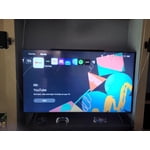
[This review was collected as part of a promotion.] I liked the screen on this product. The only issue for me is the main screen set up, it has too many options / looks really busy with the layout. It is hard to navigate the apps and the remote control is not easy to understand
This TV has great features and is pretty seamless
[This review was collected as part of a promotion.] I bought this tv so that i could get a decent enough sized screen for movies in my apartment while being fast enough to handle gaming, and it has not disappointed. Not to mention its smart features that allow any add-ons to be able to be used pretty seamlessly such as my PS4 and Apple TV.
The Best money can buy
[This review was collected as part of a promotion.] I am extremely satisfied with my samsung tv. The picture is incredible, and I get all the features I love and more. Overall samsung makes the best TVs money can buy. They never disappoint, especially this model.