Skip to Main Content
Sam's Club
Sam's Club
All Departments
All Services
Customer reviews for SAMSUNG 75" Class TU700D-Series Crystal Ultra HD 4K Smart TV UN75TU700DFXZA for
SAMSUNG 75" Class TU700D-Series Crystal Ultra HD 4K Smart TV UN75TU700DFXZA
4.4 out of 5 stars
stars
10.4K ratings10K reviews
  1. 5 stars69% (7,256)
  2. 4 stars18% (1,886)
  3. 3 stars5% (566)
  4. 2 stars3% (265)
  5. 1 star5% (498)

Member photos

  • +1522 images
Sort by |
Showing 251-260 of 10,062 reviews
May 16, 2025
Reviewer name: Rishabh
1 out of 5 stars
1 out of 5 stars review

Worst TV ever

Worst television ever. Goes totally black in case of night scene. Software is really slow and there is a delay of 2-3 seconds while navigating options. Don't go with Samsung.

Review from Samsung US
Helpful?3STAXRT0NDXF13883163940
Mar 11, 2025
Reviewer name: Casual User
2 out of 5 stars
2 out of 5 stars review

Sluggish interface

The user interface on this tv is very sluggish. There's lots of lag between pressing a button on the remote and the response of the tv.

Review from Samsung US
Helpful?3STAXRT0NDXF13883163940
Jul 5, 2026
Reviewer name: Samsung TU7000
4 out of 5 stars
4 out of 5 stars review

Remote

[This review was collected as part of a promotion.] Channel and volume buttons awkward to use. No mic included

Review from Samsung US
Helpful?3STAXRT0NDXF13883163940
Apr 17, 2025
Reviewer name: Nope
1 out of 5 stars
1 out of 5 stars review

Do not recommend

The typing on screen is not intuitive, the remote buttons are also not placed in normal spots. After about 1.5 years, all the sudden it stopped working, luckily under warranty but they replaced the whole backside of the unit.

Review from Samsung US
Helpful?3STAXRT0NDXF13883163940
Aug 15, 2020
Reviewer name: REZphoto
1 out of 5 stars
1 out of 5 stars review

Flickers

i've had this tv for about a month and a half and i've been noticing a lot of flicker i have to constantly unplug then plug it back in.. horrible i usually like samsung products

Review from Samsung US
Helpful?3STAXRT0NDXF13883163940
reply from OBA

REZphoto: If your TV is flickering or dimming sporadically, you may need to disable some of the energy efficiency features. Disable Ambient Light Detection, Power Saving Mode, Motion Lighting, or Contrast Enhancer. Settings > General> Eco Solution> Ambient Light Detection Settings > General> Eco Solution> Power Saving Mode Settings > General> Eco Solution> Motion Lighting Settings > Picture > Expert Settings > Contrast Enhancer Run Picture Test. When the tested image quality is normal, check the signal of the connected device. Settings > Support > Device Care > Self Diagnosis > Picture Test I hope this helps. If your issue persists, please reach out to Samsung Customer Support, and a representative will gladly assist you. 1-800-SAMSUNG (8AM -12AM EST, 7 days a week) Or visit us on the Samsung website and click on the SUPPORT link in the upper right corner for: 1) Contact Us Options (LiveChat, Remote Support, Facebook, Twitter) 2) Product Support 3) Manuals and Downloads 4) Warranty Info 5) Product Registration: Registering your product gives you access to easy warranty support, convenient opt-in to special promos and offers, faster troubleshooting and service, and quick notification of system updates 6) Samsung Community: A great resource for getting help from Samsung moderators and customers and more 7) …and more product, repair, order, and care options Again, thank you for taking the time to share your thoughts on this product. Your feedback helps us continuously deliver best-in-class products and service. ~ Samsung Solutions

Oct 1, 2021
Reviewer name: SamsungUser
1 out of 5 stars
1 out of 5 stars review

Lasted under 2 yrs from purchase date.

[This review was collected as part of a promotion.] Bought this 10/29/2019 and the power supply stopped working a few days ago. Won't turn on, screen turns "on" black screen then off. Red light flashes few times then nothing.

Review from Samsung US
Helpful?3STAXRT0NDXF13883163940
Apr 5, 2020
Reviewer name: meggy
2 out of 5 stars
2 out of 5 stars review

netflix volume problems

when i play anything on netflix, the volume is very very soft. i have to either fast forward or rewind, then hit play again, before the volume can be normal. i turned off the auto volume but still no use

Review from Samsung US
Helpful?3STAXRT0NDXF13883163940
reply from OBA

meggy, I am sorry that you experienced a volume issue with Netflix app. Our engineer team has tested it in the lab but could not reproduce the issue. If you the volume issue is still present, please reach out to us at: 1) Phone: 1-800-SAMSUNG Available 8AM – 9PM EST (Mon-Fri) 2) LiveChat: https://www.samsung.com/us/support/#contact_us_for_support 3) Facebook Messenger: https://www.facebook.com/samsungsupport 4) Twitter: https://twitter.com/SamsungSupport 5) The Samsung Members Community is also a great resource for getting help from Samsung moderators and customers: https://us.community.samsung.com If you have not already done so, we invite you to register your new Samsung product at: https://www.samsung.com/us/account/signin/?redirect=https%3A%2F%2Fwww.samsung.com%2Fus%2Fsupport%2Fregister%2F Registering your product gives you access to easy warranty support, convenient opt-in to special promos and offers, faster troubleshooting and service, and quick notification of system updates -Samsung Ambassador

Aug 12, 2025
Reviewer name: Taylor
1 out of 5 stars
1 out of 5 stars review

Junk

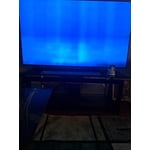
Bought this tv in 2021, just stopped working august 2025. Big black blob takes over and spreads like a virus. Don't recommend. Now I can't watch Jeopardy.

Review from Samsung US
Helpful?3STAXRT0NDXF13883163940
Apr 23, 2020
Reviewer name: Srys
1 out of 5 stars
1 out of 5 stars review

Unhappy with the purchase

First 2 days of using the tv had no issues. After software update, tv freezes while watching nextflix and youtube this happens very frequently and is very frustrating. I have been using samsung TV from last 5yrs and after tv upgrade very disappoint.

Review from Samsung US
Helpful?3STAXRT0NDXF13883163940
reply from OBA

Srys, I apologize for the App issues you had with your TU7000 TV. It may be related to your network connection and quality. We thus suggest you try the following: 1. Use 5G WiFi if possible 2. Try wired LAN if available 3. Try repositioning the router so there are no obstacles between your TV and the router If the issues persist, please reach out to Samsung Customer Support at: 1) Phone: 1-800-SAMSUNG (ask for TVs) Available 8AM - 12AM EST (Mon-Fri) / 9AM - 11PM EST (Sat-Sun) 2) LiveChat: https://www.samsung.com/us/support/#contact_us_for_support 3) Facebook Messenger: https://www.facebook.com/samsungsupport 4) Twitter: https://twitter.com/SamsungSupport Have you registered your new Samsung TV with us? If not, we invite you to do so at: https://www.samsung.com/us/account/signin/?redirect=https%3A%2F%2Fwww.samsung.com%2Fus%2Fsupport%2Fregister%2F, and gain access to easy warranty support, convenient opt-in to special promos & offers, faster troubleshooting & service, and quick notification of system updates. -Samsung Ambassador

Mar 31, 2020
Reviewer name: JackZ23
1 out of 5 stars
1 out of 5 stars review

Don't Fall For It... waist of time

Don't waist your time. The TV doesn't stop stalling. Freezing. The TV is literally meant to just be for show. I hope I can still return this peice of disaster.

Review from Samsung US
Helpful?3STAXRT0NDXF13883163940
reply from OBA

JackZ23, I am sorry that you are experiencing stalling and freezing with your TU7000 TV. To optimize smart TV performance, please try the Device Care option under the Support Menu. Go to Settings > Support > Device Care > Start Device Care This checks memory and frees up unused cached memory and closes background apps. If you need further troubleshooting with this issue or have any other questions, please reach out to Samsung Customer Support via any of the following options: 1) Phone: 1-800-SAMSUNG (ask for TVs) -- Available 8AM - 12AM EST (Mon-Fri) / 9AM - 11PM EST (Sat-Sun) 2) LiveChat or Email: https://www.samsung.com/us/support/#contact_us_for_support 3) Facebook Messenger: https://www.facebook.com/samsungsupport 4) Twitter: https://twitter.com/SamsungSupport I hope the above tip resolves your issue. Otherwise, we hope to hear from you and assist with step-by-step troubleshooting in the context of your specific setup.