
Skip to Main Content
Sam's Club
Sam's Club
All Departments
All Services
Customer reviews for SAMSUNG 65" Class TU700D-Series Crystal Ultra HD 4K Smart TV UN65TU700DFXZA for
SAMSUNG 65" Class TU700D-Series Crystal Ultra HD 4K Smart TV UN65TU700DFXZA
4.5 out of 5 stars
stars
11.3K ratings10.3K reviews
  1. 5 stars70% (7,942)
  2. 4 stars18% (1,994)
  3. 3 stars5% (589)
  4. 2 stars3% (284)
  5. 1 star5% (523)

Member photos

  • +1564 images
Sort by |
Showing 6,961-6,970 of 10,373 reviews
Aug 23, 2022
Reviewer name: 18CWPfxt
5 out of 5 stars
5 out of 5 stars review

Perfect for what i need

[This review was collected as part of a promotion.] Perfect size for my studio apartment. Amazing picture especially in the dark. Tons of free movie apps built-in. Never had a problem connecting to wifi.

Review from Samsung US
Helpful?3V8BU16WBLTL13878902648
May 29, 2022
Reviewer name: PapaandNanasTV
4 out of 5 stars
4 out of 5 stars review

Our Samsung TV
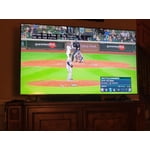
[This review was collected as part of a promotion.] We love the color the TV brings us. We love being able to find our premium channels easily without having a firestix or other means by simply asking for it. Would buy another one if we need to!

Review from Samsung US
Helpful?3V8BU16WBLTL13878902648
Jun 17, 2022
Reviewer name: tooclean
1 out of 5 stars
1 out of 5 stars review

Good picture, cheap parts

[This review was collected as part of a promotion.] TV WORKED GREAT FOR THE FIRST 2 YEARS. suddenly, picture went out. Had trouble connecting to wifi. Somehow, the parts are more expensive than a new TV. Makes absolutely no sense.

Review from Samsung US
Helpful?3V8BU16WBLTL13878902648
reply from Samsung Brand Ambassador

tooclean: We always aim to deliver a great experience, and it’s unfortunate to hear the TU7000 TV did not meet your expectations. Here are some service options: - If you have an extended warranty, you can reach out to them to have process a service request. - If you're OUT of warranty, you can find locations near you to help you with your repair. On Samsung’s website, go to ‘Support’ (top right corner) and select ‘Schedule a Service Appointment’. From there, you can search locations in the Store location option. Please give us the opportunity to assist you by contacting Samsung Customer Support. Call us at 1-800-SAMSUNG (ask for TVs), available 8AM - 12AM EST, 7 days a week. For additional support resources, visit us on the Samsung website and click on the ‘Support’ link in the upper right corner of the homepage for: 1) Chat with Us/Product Help: To begin a chat or find solutions, choose ‘TVs & Home Theater’ and select your model & topic. 2) Manuals, Software, & Warranty Info We look forward to hearing from you. ~ Samsung Advisor  

Aug 28, 2020
Reviewer name: Tammy
5 out of 5 stars
5 out of 5 stars review

Great TV but no controls.

i bought this tv for my son's room. huge mistake as there is no way to set up parental controls for the samsung tv plus and a lot of things are not suitable for young children.

Review from Samsung US
Helpful?3V8BU16WBLTL13878902648
Sep 17, 2020
Reviewer name: Love2shop
4 out of 5 stars
4 out of 5 stars review

Great features

[This review was collected as part of a promotion.] My only challenge is that I wish I could project my iPhone on the screen, similarly to screen mirroring.

Review from Samsung US
Helpful?3V8BU16WBLTL13878902648
Jul 18, 2020
Reviewer name: Jake
4 out of 5 stars
4 out of 5 stars review

Picture

the picture quailty is great when you are just view cable. however, with some of the streaming apps the screen gets super dark in scenes. trying to navigate though the settings to brighten the screen some of them are not able to open.

Review from Samsung US
Helpful?3V8BU16WBLTL13878902648
reply from OBA

Jake: Thank you for purchasing the Samsung TU7000 and for your review. I am very sorry you are viewing scenes that appear too dark. A new firmware update has been released to address this issue. You may also need to manually reboot your TV after the update by either unplugging the AC cord or by pressing and holding the power button on the remote until the TV powers off and back on. Using your TV's remote, navigate to Settings, and select Support. Select Software Update, and then select Update Now. New updates will be downloaded and installed on your TV. Updates usually take a few minutes; please do not turn off the TV until the update is complete. When the update is finished, the TV will restart automatically. If there aren't any new updates, select OK to exit. You may want to enable automatic updates for conveniences. Select Settings > Support > Software Update, then select Auto Update. If you would like to update your software using USB, please check for the latest version at: https://www.samsung.com/us/support/owners/product/crystal-uhd-tvs-tu7000-2020 Instructions for how to update firmware are detailed here: samsung.com/us/support/answer/ANS00062224/ If you need further assistance or have any questions, please contact Samsung Customer Support. 1) Phone: 1-800-SAMSUNG, Available 8AM -12AM EST (7 Days a Week) 2) LiveChat: https://www.samsung.com/us/support/#contact_us_for_support 3) Facebook Messenger: https://www.facebook.com/samsungsupport 4) Twitter: https://twitter.com/SamsungSupport 5) The Samsung Members Community is also a great resource for getting help from Samsung moderators and customers: https://us.community.samsung.com If you have not already done so, we invite you to register your new Samsung product at: https://www.samsung.com/us/account/signin/?redirect=https%3A%2F%2Fwww.samsung.com%2Fus%2Fsupport%2Fregister%2F Registering your product gives you access to easy warranty support, convenient opt-in to special promos and offers, faster troubleshooting and service, and quick notification of system updates. ~ Samsung Solutions

Oct 21, 2020
Reviewer name: LoveTVs
5 out of 5 stars
5 out of 5 stars review

Amazing TV

[This review was collected as part of a promotion.] This TV is the biggest I've owned and the picture is amazing! Any sports make sure feel like you are at the event. Love the Smart functions and other bells and whistles.

Review from Samsung US
Helpful?3V8BU16WBLTL13878902648
Sep 16, 2020
Reviewer name: Shoppergirl
5 out of 5 stars
5 out of 5 stars review

This product has a great picture

[This review was collected as part of a promotion.] I love this TV. I put it in my room, and the setup was extremely easy. The picture is so clear and it's easy to navigate.

Review from Samsung US
Helpful?3V8BU16WBLTL13878902648
Sep 27, 2022
Reviewer name: Accbsunflower
5 out of 5 stars
5 out of 5 stars review

Amazing purchase

[This review was collected as part of a promotion.] My husband was so excited with his birthday gift! This TV is a game changer. Awesome quality ! We definitely recommend it.

Review from Samsung US
Helpful?3V8BU16WBLTL13878902648
Apr 18, 2021
Reviewer name: CheeksMalone
5 out of 5 stars
5 out of 5 stars review

The picture is so clear.

[This review was collected as part of a promotion.] My kids live to play their game systems on the TV I personally love the streaming quality on it. Honestly it is so user friendly.

Review from Samsung US
Helpful?3V8BU16WBLTL13878902648




