
Skip to Main Content
Sam's Club
Sam's Club
All Departments
All Services
Customer reviews for SAMSUNG 65" Class TU700D-Series Crystal Ultra HD 4K Smart TV UN65TU700DFXZA for
SAMSUNG 65" Class TU700D-Series Crystal Ultra HD 4K Smart TV UN65TU700DFXZA
4.5 out of 5 stars
stars
11.3K ratings10.3K reviews
  1. 5 stars70% (7,942)
  2. 4 stars18% (1,994)
  3. 3 stars5% (589)
  4. 2 stars3% (284)
  5. 1 star5% (523)

Member photos

  • +1563 images
Sort by |
Showing 2,001-2,010 of 10,373 reviews
Jul 29, 2022
Reviewer name: Anonymous
5 out of 5 stars
5 out of 5 stars review

Love my Samsung smart tv!!!!
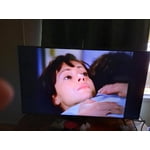
[This review was collected as part of a promotion.] I enjoy watching movies on my Samsung TV. The picture is so clear and sharp, I can take off my glasses to watch. Samsung TV plus is great!! So many channels! The sound quality is great, just what I expect from a Samsung. I will always buy Samsung.

Review from Samsung US
Helpful?3V8BU16WBLTL13878902648
Jun 13, 2022
Reviewer name: Simplepickens
5 out of 5 stars
5 out of 5 stars review

Best picture I've seen

[This review was collected as part of a promotion.] I usually use tvs to watch my shows and movies, and something for games. Before this Samsung TV, I never truly knew how crystal clear a picture could look. It renewed my enjoyment of my favorite shows, movies felt new when I watched them again, I replayed older games just to watch it anew on this TV.

Review from Samsung US
Helpful?3V8BU16WBLTL13878902648
Oct 21, 2022
Reviewer name: Samisgood
5 out of 5 stars
5 out of 5 stars review

The TV has many useful features

[This review was collected as part of a promotion.] The picture is very clear while streaming, Watching YouTube surfing the web. Used as a second monitor. Love the ease of connecting. Also t works well with my Roku. Very good quality built into the TV.

Review from Samsung US
Helpful?3V8BU16WBLTL13878902648
Oct 25, 2022
Reviewer name: fxybx3
5 out of 5 stars
5 out of 5 stars review

Seriously the best TV we've owned

[This review was collected as part of a promotion.] The picture on this TV is so clear. It's even great when it comes to older video game systems, the image is so nice. The sound is really great. I love the edvanced settings, it especially helps when we have our soundbar on. It has a wide range of apps, but I wish it had the f1 app. The best part about this TV is we can control it with our phones using the device control feature. It's so helpful when someone loses the remote.

Review from Samsung US
Helpful?3V8BU16WBLTL13878902648
Oct 25, 2022
Reviewer name: KCnumber9
5 out of 5 stars
5 out of 5 stars review

Excellent Purchase
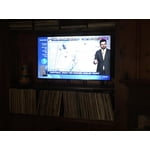
[This review was collected as part of a promotion.] Placed within a study/ den bookshelf. Minimal tv bevel allows for seamless integration of set and shelving. Sharp and well lit display work well against the room's warm, wood-paneled walls and decor. Overall, completely satisfied with the purchase.

Review from Samsung US
Helpful?3V8BU16WBLTL13878902648
May 24, 2022
Reviewer name: Disappointed
2 out of 5 stars
2 out of 5 stars review

Not what I expected

[This review was collected as part of a promotion.] The picture is not very bright. The smart tuner loses app sign-in info or ability and the TV has to be unplugged and rebooted to make it right. I would not have expected this from, what is supposed to be, such a good brand. I am very disappointed and will probably go back to Insignia.

Review from Samsung US
Helpful?3V8BU16WBLTL13878902648
reply from Samsung Brand Ambassador

Disappointed: Thank you for purchasing the TU7000 TV and for your review. I am sorry to hear that you are not happy with the brightness levels of your picture. If the colors on your TV are correct but just a little too dark or bright you can try the different Picture Modes or manually adjust the Brightness settings to your liking. Dynamic Picture Mode will make pictures brighter and clearer in bright viewing environments. Go to: Settings > Picture > Picture Mode > Dynamic Or manually adjust the Brightness and other settings to your liking. Press the HOME button on your remote, then navigate to: Settings > Picture > Expert Settings You may also want to disable Power Saving Mode which automatically adjusts the brightness to reduce the TV’s power consumption. Go to Settings> General> Eco Solution> Power Saving Mode. Ambient Light Detection will also automatically adjust the brightness level of the TV, according to the ambient light level, to reduce power consumption. If Ambient Light Detection has adjusted the screen brightness to a too bright or dark level, you can select Minimum Brightness to manually adjust the minimum screen brightness. Go to Settings> General> Eco Solution> Ambient Light Detection Please also be sure you are running the latest firmware. You can check to see what software version your TV is using and if there is an available update through the settings on your TV. Go to: Settings>Support>Software Update. You may want to enable automatic updates for convenience. Select Settings > Support > Software Update, then select Auto Update. I hope this helps to improve your picture. Should you need further assistance, please contact Samsung Customer Support. Call us at 1-800-SAMSUNG (ask for TVs), available 8AM - 12AM EST, 7 days a week. For additional support resources, visit us on the Samsung website and click on the ‘Support’ link in the upper right corner of the homepage for: 1) Chat with Us/Product Help: To begin a chat or find solutions, choose ‘TVs & Home Theater’ and select your model & topic. 2) Register a Product: For access to easy warranty support, convenient opt-in to special promos and offers, faster troubleshooting and service, and quick notification of system updates. 3) Manuals & Software 4) Warranty Info 5) Contact Us ~ Samsung Advisor

Oct 21, 2020
Reviewer name: GUMITO
4 out of 5 stars
4 out of 5 stars review

UHD REVIEW

[This review was collected as part of a promotion.] I HAVE A UHD 7 SERIES AND I LOVE THE TV WITH ONLY ONE EXCEPTION...I CAN NOT DOWNLOAD APPS FROM THE APP STORE. AND I HAVE NOT BEEN ABLE TO FIND ANY HELP FOR THIS ISSUE. THE TV IS AMAZING AND THE DISPLAY IS BEAUTIFUL BUT THE APPS ISSUE IS CONCRNING.

Review from Samsung US
Helpful?3V8BU16WBLTL13878902648
Sep 17, 2020
Reviewer name: DswFL
5 out of 5 stars
5 out of 5 stars review

Very clear picture!

[This review was collected as part of a promotion.] This Samsung Crystal UHD 4k tv is fantastic! We were recently watching a popular show from the 90's and couldn't not get over the fact that the show looks crystal clear! Not only was it really clear, it looked so good you would have never known the show was 25+ years old! This tv is so clear and the picture is sharp! Besides the color and picture I love that fact that it's a smart tv. We do not have cable, but honestly with this tv we don't miss it! Samsung has a Samsung TV guide loaded with free shows and channels to watch. We are able to watch those shows and also add our paid apps so that we can quickly watch our favorite shows without having to have a 2nd remote. I am so happy we chose this tv! It fits in our living room perfectly and looks amazing! I would definitely recommend a Samsung Crystal UHD 4k tv to my friends and family!

Review from The Insiders
Helpful?3V8BU16WBLTL13878902648
May 24, 2022
Reviewer name: PoppaJim
5 out of 5 stars
5 out of 5 stars review

Incredible Picture!

[This review was collected as part of a promotion.] We primarily use our Samsung TU7000 Crystal UHD 4K Smart TV for watching sports, series, comedies, singing competition shows, and movies. Our main source is a satellite box for networks, but we also have an HD antenna connected. Since it is a smart TV we are able to stream many channels, including several music apps. Our Samsung is connected by a 4K HDMI cable to a Yamaha 5.1 4KHD Receiver running Polk speakers. Since we are retired, anytime we are home and inside, the TV is on playing music when we're not watching a show. We love that when we are playing songs from Apple Music the lyrics to the song playing scroll down the screen. The picture quality is incredible! Watching NFL football on the 75" screen with surround sound is awesome! This is the fourth HDTV we have had for our main viewing in our Family room. Each time we have gone up in screen size and changed brands. This Samsung, by far, is the absolute best one we have ever had! The remote is functional and easy to use, however, since we watch satellite programs the most, we have programed the satellite remote to turn on and off both the Samsung TV and the Yamaha receiver. We are very satisfied with our Samsung TU7000 Crystal UHD 4K Smart TV!

Review from Samsung US
Helpful?3V8BU16WBLTL13878902648
Oct 6, 2022
Reviewer name: JaYxViiRuZz
5 out of 5 stars
5 out of 5 stars review

Amazing Quality, Amazing Price.

[This review was collected as part of a promotion.] Out of all the TVs I've owned never have I felt satisfied with my purchase as much as I do with this Samsung. From the low price, the ease of use, and the feature packed UI, the TU7000 is all around AMAZING. I use almost every feature on the daily and mainly for gaming on my PS5. The 4K Image quality is so vibrant and bright and the sharpness doesn't leave me fiddling with settings to get the perfect setting for crisp, no jagged edged and defined picture it also doesn't have me turning sharpness down to the point its fuzzy and smeared looking it has the spot on in between where every time you use it its still as jaw dropping as it was on day one. If your someone who's on a budget, or someone who all in all just wants a beautiful picture with little to no effort to navigate and someone who wants a top tier feature packed smooth UI in their television then the Samsung TU7000 is that television and will not disappoint!

Review from Samsung US
Helpful?3V8BU16WBLTL13878902648




