
Skip to Main Content
Sam's Club
Sam's Club
All Departments
All Services
Customer reviews for SAMSUNG 65" Class TU700D-Series Crystal Ultra HD 4K Smart TV UN65TU700DFXZA for
SAMSUNG 65" Class TU700D-Series Crystal Ultra HD 4K Smart TV UN65TU700DFXZA
4.5 out of 5 stars
stars
11.3K ratings10.3K reviews
  1. 5 stars70% (7,942)
  2. 4 stars18% (1,994)
  3. 3 stars5% (589)
  4. 2 stars3% (284)
  5. 1 star5% (523)

Member photos

  • +1563 images
Sort by |
Showing 1,561-1,570 of 10,373 reviews
May 14, 2020
Reviewer name: Ashp
5 out of 5 stars
5 out of 5 stars review

GREAT TV

I just recently bought this tv, I've always been a fan of Samsung and they definitely did not disappoint with this tv. The setup is super easy, the quality of the picture is on point. It does exactly what it's supposed to do. I will continue to recommend Samsung to everyone.

Review from Samsung US
Helpful?3V8BU16WBLTL13878902648
Aug 10, 2020
Reviewer name: Reggie
1 out of 5 stars
1 out of 5 stars review

What happened?

i typically look to samsung for quality products, but this television did not meet my expectation. 1. the wifi connection is unstable. 2. theres an issue with lagging - at times i'll make selections on the remote control and nothing happens on the tv for several seconds so i press the button again and the tv will perform that function twice. this is incredibly frustrating because you have to wait for the tv to respond all over again. 3. the settings arent as intuitive to navigate. if i could give this tv zero stars, i would. i am dissappointed.

Review from Samsung US
Helpful?3V8BU16WBLTL13878902648
reply from OBA

Reggie: I am very sorry that you are experiencing Wi-Fi connection issues. You may want to go through these steps to check your network connection: 1) Check the distance between the TV and your modem or access point. The distance should not exceed 50 ft. (15.2 m). 2) Minimize interference by not using or turning off wireless devices. Also, verify that there are no obstacles between the TV and the modem or access point. (WiFi strength can be decreased by appliances, cordless phones, stone walls/fireplaces, etc.) 3) Perform a network test to check if there is a network problem. Press the Home button on your remote. Navigate to Settings >Support> Device Care> Self Diagnosis> Smart Hub Connection Test 4) Please be sure you have the latest firmware update which enhances network connectivity. Version 1301.5 is now available on the Support page on the Samsung website. To optimize the smart TV performance, please try Device Care option under the Support Menu. Go to Settings > Support> Device Care > Start Device Care This service checks memory and frees up unused cached memory and closes background apps. I hope this helps to solve your concerns. Should you need further assistance, please contact Samsung Customer Support. 1-800-SAMSUNG (8AM -12AM EST, 7 days a week) Or visit us on the Samsung website and click on the SUPPORT link in the upper right corner for: 1) Contact Us Options (LiveChat, Remote Support, Facebook, Twitter) 2) Product Support 3) Manuals and Downloads 4) Warranty Info 5) Product Registration: Registering your product gives you access to easy warranty support, convenient opt-in to special promos and offers, faster troubleshooting and service, and quick notification of system updates 6) Samsung Community: A great resource for getting help from Samsung moderators and customers and more 7) …and more product, repair, order, and care options Again, thank you for taking the time to share your thoughts on this product. Your feedback helps us continuously deliver best-in-class products and service. ~ Samsung Solutions

Apr 15, 2021
Reviewer name: LisaSpeech
4 out of 5 stars
4 out of 5 stars review

Love the clarity

[This review was collected as part of a promotion.] Wasn't sure how Samsung free TV worked, initially, but now enjoy having free live TV. I gave it a 4, because I dont like the remote. I would have preferred a voice remote in 2020. The button configuration is crowded and when you have to search, the time delay in the letter input lags.

Review from Samsung US
Helpful?3V8BU16WBLTL13878902648
Oct 6, 2020
Reviewer name: dgnzlz
5 out of 5 stars
5 out of 5 stars review

Great TV

[This review was collected as part of a promotion.] So far so good. Picture is crisp and clear. The only complaint I have is I'm unable to plug my Samsung soundbar into it and have to use it via Bluetooth. No big deal but I would have rather been able to plug it in to the tv.

Review from Samsung US
Helpful?3V8BU16WBLTL13878902648
Oct 25, 2022
Reviewer name: Gran2two
5 out of 5 stars
5 out of 5 stars review

This Smart TV is the Best

[This review was collected as part of a promotion.] The picture quality is excellent and makes scenes feel as if they are in your living room. The sound quality is crystal clear and I don't have to be in the room to hear. Each time a new device is added to our television it automatically tries to pair which makes the process easier for me. Also the built in apps make life that much easier. Finally the price was affordable and well worth it.

Review from Samsung US
Helpful?3V8BU16WBLTL13878902648
Jul 27, 2022
Reviewer name: Mi24UHD700
4 out of 5 stars
4 out of 5 stars review

Great choice for a living room TV

[This review was collected as part of a promotion.] The Samsung crystal UHD 700 was the best selection for its value, size, and features. It has a wide viewing angle for an average size living and kitchen. Most features were setup out of the box, I just need to setup Wi-Fi although the internet connection sometimes hesitated which may due to its location to the router. Some standard apps were pre-installed such as YouTube, Prime Video, Netflix. You can browse the internet on this TV. Samsung also provides a Gallery to load up your pictures and use as frames TV. It has been a very useful and enjoyable TV.

Review from Samsung US
Helpful?3V8BU16WBLTL13878902648
Oct 25, 2022
Reviewer name: Qualitynotperfect
3 out of 5 stars
3 out of 5 stars review

Good for the value
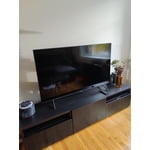
[This review was collected as part of a promotion.] The 4K video quality seems lower than I would have expected, but I guess it's related to the cost. Sometimes the video quality looks great, but sometimes the iPad or my 4 year old computer looks more detailed than the TV.

Review from Samsung US
Helpful?3V8BU16WBLTL13878902648
reply from Samsung Brand Ambassador

Hi Qualitynotperfect, We appreciate your review of the TU7000 TV's video quality. I have a few tips which may improve your experience. First, let's ensure you are running the latest Firmware. Go to Settings> Support> Software Update. Next, if the picture you’re seeing is not to your liking, there are several picture settings you may want to try adjusting. Go to Home > Settings > Picture > Picture Mode and select the mode that best fits your usage: 1) Standard: Default mode suitable for general viewing environments. 2) Natural: Reduces eye strain for a comfortable viewing experience. 3) Movie: Suitable for watching TV or movies in a dark room. 4) Dynamic: Makes the picture brighter and clearer in bright viewing environments. 5) Filmmaker Mode: You can watch the source content (e.g., movie) as it is. If the image is defined as Filmmaker Mode, it will automatically switch to Filmmaker Mode while watching. You can also go to Settings > Picture > Expert Settings > to manually fine-tune your image. Finally, if you are using an external device; below are some tips to help improve picture clarity: 1) HDMI cables are recommended for optimal HD viewing. 2) If you have an analog cable box or satellite box, upgrade to a digital cable box or satellite box. 3) Change the output resolution of your devices, such as digital broadcast receivers, IPTV, and set-top boxes, to UHD or HD. Should you ever have questions or need help with TV features, specs, or operations, we are here to help. Call us at 1-800-SAMSUNG, 8 AM - 12 AM EST, seven days a week. LiveChat with an agent, as well as manuals, software, and warranty info, can be found at the ‘Support’ link on our Samsung website. ~ Samsung Advisor

Oct 7, 2022
Reviewer name: Joeyab80
5 out of 5 stars
5 out of 5 stars review

Samsung Smart TV High Quality

[This review was collected as part of a promotion.] I use my TV for streaming and regular Satellite TV connection. I have other Samsung TVs and I like that the remotes are compatible. I like the color and quality of the TV. It is also very easy to change the Source from Satellite to other streaming sites.

Review from Samsung US
Helpful?3V8BU16WBLTL13878902648
Oct 25, 2022
Reviewer name: Christel
5 out of 5 stars
5 out of 5 stars review

Samsung TV, a Great Buy!

[This review was collected as part of a promotion.] This tv is great for watching movies, streaming shows, and network programming. The color is realistic and the clarity is perfect! I watched live church services on the first Saturday and Sunday in October and it was better than being there because I could see and hear speakers better than if I was there. I think I got a good deal on this tv because it wasn't all that expensive.

Review from Samsung US
Helpful?3V8BU16WBLTL13878902648
Sep 19, 2020
Reviewer name: ILuvSamsung
5 out of 5 stars
5 out of 5 stars review

Great product

[This review was collected as part of a promotion.] I have had this Tv for 5 months and everything works great, but the volume sometimes is quite at the beginning of some Netflix shows. But it is still a great Tv at a great price. I would recommend it for other users.

Review from Samsung US
Helpful?3V8BU16WBLTL13878902648




