Skip to Main Content
Sam's Club
Sam's Club
All Departments
All Services
Customer reviews for SAMSUNG 55" Class Q6-Series 4K Ultra HD Smart QLED TV QN55Q6DAAFXZA for
SAMSUNG 55" Class Q6-Series 4K Ultra HD Smart QLED TV QN55Q6DAAFXZA
4.6 out of 5 stars
stars
1,348 ratings1,284 reviews
  1. 5 stars74% (996)
  2. 4 stars18% (248)
  3. 3 stars4% (51)
  4. 2 stars1% (19)
  5. 1 star3% (34)

Member photos

  • +20 images
Sort by |
Showing 1,121-1,130 of 1,284 reviews
Sep 24, 2021
masis
5 out of 5 stars review

this is a great

[This review was collected as part of a promotion.] Really great and great picture quality.Speed ​​in apps is good.Excellent image transparency.

Review from Samsung US
Helpful?6YW7ERS0HTVS13877667901
Oct 14, 2021
Lovely
5 out of 5 stars review

Great

[This review was collected as part of a promotion.] Love the streaming I can do Netflix HBO easy to use

Review from Samsung US
Helpful?6YW7ERS0HTVS13877667901
Sep 24, 2021
Moose
5 out of 5 stars review

Very easy to use with great features

[This review was collected as part of a promotion.] I use it for streaming and movies and of cource news

Review from Samsung US
Helpful?6YW7ERS0HTVS13877667901
Apr 23, 2021
MC28
5 out of 5 stars review

This TV has excellent image quality

[This review was collected as part of a promotion.] We use our TV mostly foe streaming and watch TV shows

Review from Samsung US
Helpful?6YW7ERS0HTVS13877667901
Sep 27, 2023
Jian
5 out of 5 stars review

Great color quality, I love it

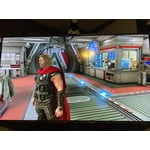
I bought this to match my PS5 and has a good quality and very vivid colors. No need to buy a separate monitor for my PS5.

Review from Samsung Canada
Helpful?6YW7ERS0HTVS13877667901
Sep 16, 2021
Samsung35
4 out of 5 stars review

Easy to use

[This review was collected as part of a promotion.] Streaming online it is fun to navigate with this tv

Review from Samsung US
Helpful?6YW7ERS0HTVS13877667901
Sep 27, 2023
csquare27
5 out of 5 stars review

Great picture

We bought this for our gym two years ago. The picture quality is great and it looks very sleek mounted from the ceiling. Perfect for the space.

Review from Samsung Canada
Helpful?6YW7ERS0HTVS13877667901
Sep 25, 2021
JOHN
5 out of 5 stars review

GREAT TV AND PRICE

[This review was collected as part of a promotion.] THE TELEVISION WORKS WONDERFUL WITH EVERYTHING AND IS A GREAT SET.

Review from Samsung US
Helpful?6YW7ERS0HTVS13877667901
Jul 23, 2021
Steph
3 out of 5 stars review

Missing Feature of Auto ON

[This review was collected as part of a promotion.] Excellent TV except that it does not have an Automatic ON setup for days ON

Review from Samsung US
Helpful?6YW7ERS0HTVS13877667901
reply from Samsung Brand Ambassador

Hi Steph, Thank you for choosing Samsung’s 2021 Q60A QLED TV. We appreciate your thoughts on the functions of your TV. The Q60A features built-in Alexa and Google Assistant, allowing you to utilize voice commands to power on your TV. To give commands, you can press and hold the Microphone button on your remote, or you can give hands-free commands by enabling the Voice Wake-Up feature (Press the Microphone button > Explore Now > Settings > Voice Wake-up). To turn your TV on or off when Voice Wake-up is enabled, simply say "Alexa/Hey Google, turn on the living room TV". There are a few things to keep in mind when using voice commands: - The TV must be connected to the network via Wi-Fi to be able to turn on with Alexa or Google Assistant, and will not respond if connected to a wired network. - Your TV must be connected through SmartThings to use it with Alexa or Google Assistant. - If you choose to utilize Google Assistant, make sure you download and install the Google Home app, and then set up your Google Assistant devices. - If you choose to utilize Alexa: Open the Amazon Alexa app on your phone and navigate to Menu > Skills & Games. Search for and enable SmartThings for a TV. I hope this tip helps! Should you ever have questions or need help, please call us at 1-800-SAMSUNG (ask for TVs), available 8AM -12AM EST M-F (9AM – 6PM EST Sat). Or text HELP to 62913. For additional support resources, visit us on the Samsung website and click on the ‘Support’ link in the upper right corner of the homepage for: 1) More ‘Contact Us’ options – LiveChat, Facebook, Twitter, Samsung Community, Samsung Members app 2) Manuals & Software 3) Warranty Info 4) Product Registration: For access to easy warranty support, convenient opt-in to special promos and offers, faster troubleshooting and service, and quick notification of system updates. ~ Samsung Specialist

Dec 27, 2021
helpachild
5 out of 5 stars review

Great Picture

(This review was collected as part of a promotion.) Just bought this before Christmas and love the features and picture quality.

Review from Samsung Canada
Helpful?6YW7ERS0HTVS13877667901
reply from Operations

We are very happy to hear this, we hope you enjoy your new TV.