Skip to Main Content
Sam's Club
Sam's Club
All Departments
All Services
Customer reviews for Skylight 15" Touchscreen Calendar & Organizer + 3 Year Photo & Videos for
Skylight 15" Touchscreen Calendar & Organizer + 3 Year Photo & Videos
4.1 out of 5 stars
stars
1,956 ratings1,848 reviews
  1. 5 stars59% (1,151)
  2. 4 stars13% (250)
  3. 3 stars16% (309)
  4. 2 stars7% (131)
  5. 1 star6% (115)

Member photos

  • +48 images
Sort by |
Showing 591-600 of 1,848 reviews
May 3, 2024
Reviewer name: Allison W.
5 out of 5 stars
5 out of 5 stars review

Game Changer! Every busy family needs this!

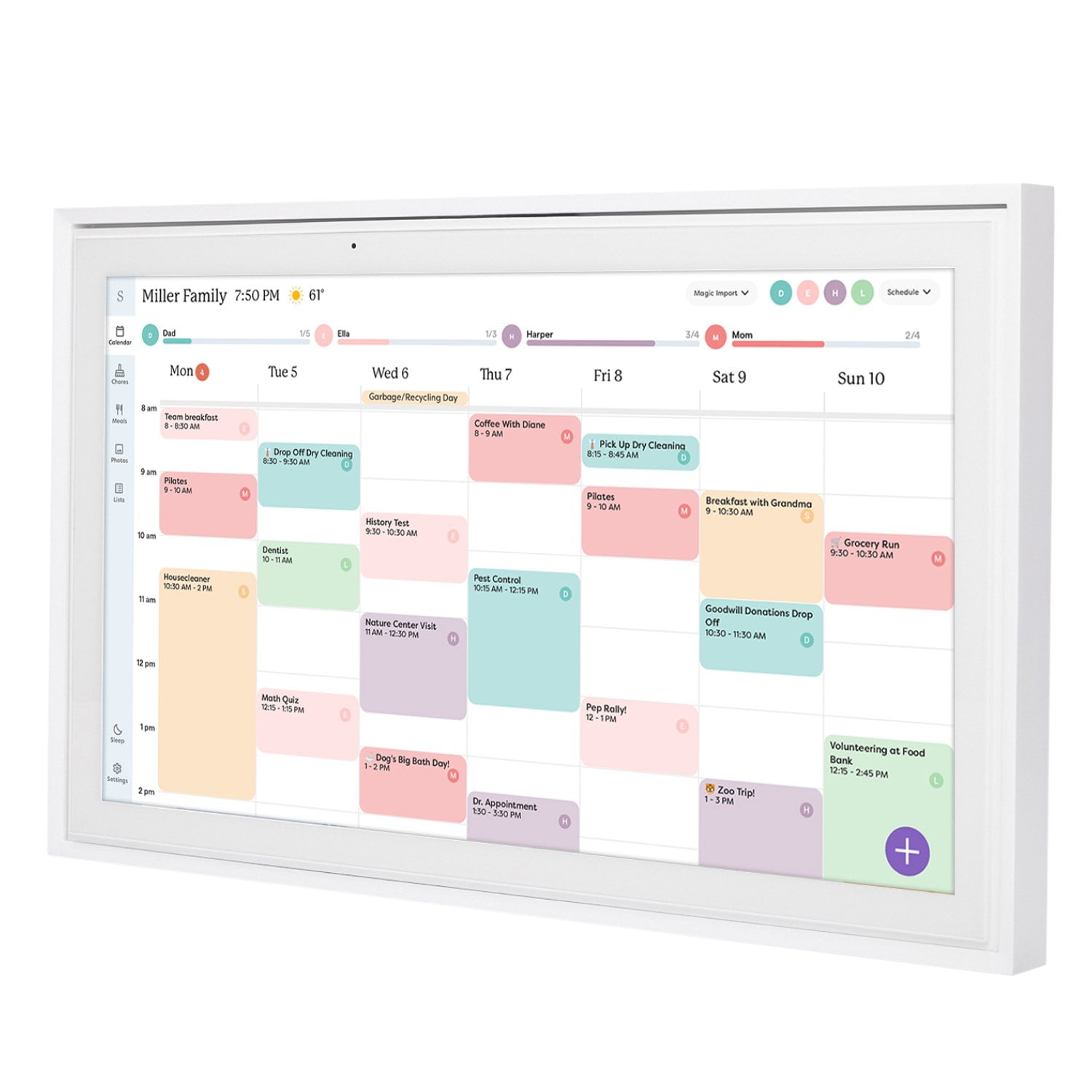
I'm a very organized person and was trying to live on a white board calendar with two young kids and a million activities. This is a game changer!!! I love how my husband and I can access the calendar from the app wherever we ware and use it to schedule appointments, sporting events, etc. Being able to color code activities for each member of my family really helps my ADHD/neurotic brain process the mountain of things we do. Yes, this was a pricey purchase for our family but 100% worth it.

Review from skylightframe.com
Helpful?2H0DCOCQ499L13867269032
Sep 26, 2023
Reviewer name: MaryKate A.
5 out of 5 stars
5 out of 5 stars review

Perfect for getting organized

We've only had the calendar for a little over a week in our new home but it has already been super helpful in organizing our work schedules, household to-do lists and we're looking forward to using the grocery list function. It was super easy to set up on our phones and mount on our wall.

Review from skylightframe.com
Helpful?2H0DCOCQ499L13867269032
Sep 19, 2024
Reviewer name: Miguel M.
3 out of 5 stars
3 out of 5 stars review

Mostly is good, but a few annoyances make you wish for more

Overall, I like our Skylight. It is a clean and efficient way for the family to see what's going on, keep track of chores and grocery lists, etc. And it does those things well. Where it fails is in the control you have over lists and chores once they are entered. There is NO WAY to sort your lists! That's right, if you want to use the grocery list for shopping, you cannot then organize it so you can use it as a pick list in the store. Fail. Also, the chore lists cannot be sorted. So if you want to have an ordered list of chores or tasks for the kids, you have to put them in order as you type them. Annoying. Also, the “email yourself calendar stuff” only works sometimes. Not enough to trust it. Apparently you should get a confirmation email that it worked or didn't work. I have never received one. Finally, I wish you could subscribe to the Skylight calendar. I use iCal on my iPhone, so if someone adds something to the Skylight, I have no way of seeing it. You can apparently do 2-way sync if you use a Google calendar, but for those of us who prefer iOS, we are out of luck. Again, these might be minor gripes, but they are things that should work or be tweaked in my opinion. All in all, I am happy with the Skylight. If the above won't annoy you, it will be a great addition to your home.

Review from skylightframe.com
Helpful?2H0DCOCQ499L13867269032
Apr 12, 2024
Reviewer name: Kelly J.
5 out of 5 stars
5 out of 5 stars review

Love it!

We have everything in one place for our family...and accessible on our phones through the app. My kids can see what's for dinner and all of their events. They are even making their bed daily because they are motivated by checking it off the chore chart!

Review from skylightframe.com
Helpful?2H0DCOCQ499L13867269032
Oct 25, 2022
Reviewer name: Anonymous
3 out of 5 stars
3 out of 5 stars review

Technology just quite not there yet

The idea is great, and the calendar works, it's just not very easy to set up and it's not very readable once you add your events. The entire month should be in view so you don't have to scroll to see all dates. Calendar sync should not be so cumbersome. Chores should be able to have a check mark or star on every day that is due/done on the actual day of the calendar so you can see at a glance if the day is done without going into each child's colored circle. The app should look more like the calendar itself so you can just touch a day and add info, it is a bit time consuming, though it is easier that using your phones calendar. I like ot, but I hope for updates soon.

Review from skylightframe.com
Helpful?2H0DCOCQ499L13867269032
Jan 17, 2024
Reviewer name: Cindy H.
5 out of 5 stars
5 out of 5 stars review

This is a great organization tool.

We first saw the package at our son's house. We were so impressed we ordered one for ourselves. So easy to setup and get started. We wall mounted. Loving the ease and ability to keep two of us organized and in step. Plus the photo capabilities show off photos of our on going adventures. Would highly recommend!

Review from skylightframe.com
Helpful?2H0DCOCQ499L13867269032
Jan 5, 2024
Reviewer name: Brent A.
4 out of 5 stars
4 out of 5 stars review

Beautiful Calendar, but unnecessary upcharges

This calendar is very pretty with great visuals on events. I love the Grocery list option and the ability for it to be seen on the app while we are at the store. The kids actually enjoy the Chores list. The only thing was I disappointed in was the unnecessary up-charge for putting photos on the device. It is 2024, some basic features should be enabled with the device.

Review from skylightframe.com
Helpful?2H0DCOCQ499L13867269032
Oct 14, 2025
Reviewer name: Lesley D.
4 out of 5 stars
4 out of 5 stars review

One Stop For Family Calendar

We enjoy the Skylight. It keeps our family on task and easy to know what's on the calendar in one location. I would enjoy being able to add stars directly within the Skylight instead of using the app - it's an extra step for me especially if my phone is not nearby while updating tasks. Otherwise we have highly recommend this to family and friends.

Review from skylightframe.com
Helpful?2H0DCOCQ499L13867269032
Jan 5, 2024
Reviewer name: Adam T.
4 out of 5 stars
4 out of 5 stars review

We like it.

There are a few integration issues we've found when using it with iPhone calendars. But nothing that can't be overcome. We like the features of having categories and being able to mark different categories in different colors. Similar to the way you would make separate calendars in iPhone. We've found it is better to make your categories in iPhone calendars by creating separate calendars than syncing each calendar to skylight frame. If you make them all in skylight you cannot select a category within the calendar in the iPhone calendar but have to use the app or the frame it will just go to calendar you made it in. So it would be best to make a calendar n iPhone for each kid, birthdays, and home, or whichever. Than you can sync each calendar to skylight, and you will be able to select in iPhone which calandra/category you want to add the event. Also we found if you make an even in iPhone calendar you cannot edit the even in skylight. You must delete it and remake it in skylight in order to edit, as the edit button is missing for all events created in iPhone calender. Over all it is great, could use better instructions. They are lacking greatly. We like the simplicity Again if you use the skylight app there are no issues but if you continue to add events with iPhone calendar than make sure you set it up this way in the beginning and the only problem you will have is the no edit button. Which isn't a huge issue but would like to have that fixed. You can always make your edits on the phone instead of the calendar.

Review from skylightframe.com
Helpful?2H0DCOCQ499L13867269032
Oct 24, 2025
Reviewer name: Carol G.
5 out of 5 stars
5 out of 5 stars review

Skylight 15 Calendar

I love my new skylight 15 calendar. I have entered all my information and is so great just to glance at the calendar and see what the day, week or month has in store. Being able to assign a color to each person is really a great idea and easy to tell who has what going on each day.

Review from skylightframe.com
Helpful?2H0DCOCQ499L13867269032