Skip to Main Content
Sam's Club
Sam's Club
All Departments
All Services
Customer reviews for SAMSUNG 85" Class Q7-Series 4K Ultra HD Smart QLED TV - QN85Q7DAAFXZA for
SAMSUNG 85" Class Q7-Series 4K Ultra HD Smart QLED TV - QN85Q7DAAFXZA
4.7 out of 5 stars
stars
1,797 ratings1,775 reviews
  1. 5 stars80% (1,432)
  2. 4 stars15% (270)
  3. 3 stars3% (45)
  4. 2 stars1% (22)
  5. 1 star2% (28)

Member photos

  • +297 images
Sort by |
Showing 251-260 of 1,775 reviews
Jun 14, 2022
Reviewer name: Redneck
5 out of 5 stars
5 out of 5 stars review

This tv is great for the new Gen gaming consoles

[This review was collected as part of a promotion.] I Ilike the 120hz refresh rate for the newest consoles. I have the ps5 and xbox series x hooked up to it and they look amazing on this tv. I really like the q symphony and dolby atmos. If you have the samsung soundbar that supports those features as well it truly sounds amazing like you're right in the action. Great TV with great features and great picture

Review from Samsung US
Helpful?6VT5DVUKIND213737353383
Sep 8, 2021
Reviewer name: Cliffiekins
5 out of 5 stars
5 out of 5 stars review

This product is great

[This review was collected as part of a promotion.] We bought this Samsung TV because we wanted to upgrade and heard this was one of the best. When we got it set up and in the picture was so clear. The quality was so much better. It is really easy to access all of the apps that we subscribe to. We love that the removed had a charger but also can be charged by light (inside or outside light). We couldn't be happier with our purchase!!

Review from Samsung US
Helpful?6VT5DVUKIND213737353383
May 11, 2021
Reviewer name: shaggy9869
4 out of 5 stars
4 out of 5 stars review

Solid for a 4k
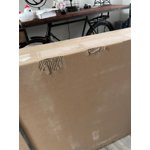
[This review was collected as part of a promotion.] I received my 65” after unboxing which was pretty easy to do, setup was easy. Connection options not working have been an issue with this TV. Not a huge deal but one downside I've seen. The option to pick a smart assistant to work with your smart home is very nice. Additionally selection of apps is sufficient, with Apple TV included and Airplay ability makes for a well rounded device. Overall I'd say I'm satisfied wit it. The solar powered remote was a nice added feature I wasn't expecting. Picture quality is great as well.

Review from The Insiders
Helpful?6VT5DVUKIND213737353383
reply from Samsung Brand Ambassador

shaggy9869: I’m happy to hear that setup of your new Q70A QLED TV was easy and you are enjoying features such as Voice Assistant, selection of apps, and the SolarCell remote. If you would like assistance with your connection options, please reach out to Samsung TV Support and we will be happy to assist. You can reach us at 1-800-SAMSUNG (ask for TVs), available 8AM -12AM EST, 7 days a week. Or text HELP to 62913. For additional support resources, visit us on the Samsung website and click on the ‘Support’ link in the upper right corner of the homepage for: 1) More ‘Contact Us’ options – LiveChat, Facebook, Twitter, Samsung Community, Samsung Members app 2) Manuals & Software 3) Warranty Info 4) Product Registration: For access to easy warranty support, convenient opt-in to special promos and offers, faster troubleshooting and service, and quick notification of system updates. ~ Samsung Solutions

Jun 29, 2021
Reviewer name: Ducky
4 out of 5 stars
4 out of 5 stars review

Easy setup and control

[This review was collected as part of a promotion.] Having installed many TV sets this was by far the easiest. I previously used my receiver as the control hub but instead connected my other devices directly to the TV. The TV controller replaced all but my cable remote and does a better job.

Review from Samsung US
Helpful?6VT5DVUKIND213737353383
Apr 26, 2021
Reviewer name: Lzinck61
5 out of 5 stars
5 out of 5 stars review

Love it

[This review was collected as part of a promotion.] I purchased this TV for the living room, but I do most of my streaming at night when I am relaxing in my room. It was so easy to connect to my Alexa and my soundbar. Beautiful sound and perfect picture.

Review from Samsung US
Helpful?6VT5DVUKIND213737353383
Apr 20, 2021
Reviewer name: Basillisk
5 out of 5 stars
5 out of 5 stars review

Stunning & gorgeous, yet to simple to use

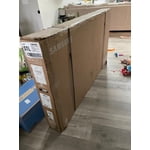
[This review was collected as part of a promotion.] I have been using Samsung TVs for the last 10 years or so and there's a reason I continue to do so. TLDR: I am very happy with the TV so far. Beautiful graphics, easy to use remote, simple smart TV interface, easy to use voice assistant (Alexa & Google), Free cable TV like channels, seamless integration with external devices, sleek and slim and no complaints. If you are not ready to spend on the new Neo LED series and this Samsung QLED is the way to go. Details: Unboxing & setup - The TV comes in a easy slide out box, and you'll need two people to open up the box and assemble it, to ensure you don't risk any damage. After unboxing, it took me less than 5 mins to attach the stand (instructions are simple, and everything you need is included). Within 10-15 mins of starting to unbox I was ready to start setting up the TV. Set-up & smart features: As soon as you power on the TV, the simple guided instructions make the setup a breeze. I choose setting up through my phone. I have a samsung galaxy phone and am already a user of Samsung Smartthings hub and app. If you are the same I was impressed with how easy it was to go through the initial setup and wifi connectivity It imported all key information from my phone and I did not have to deal with navigating a whole lot on the TV for my setup. This process probably took <10 mins and I was ready to start using the TV. It comes preinstalled with some of the major streaming apps and services and rest are easy to find and install. I was surprised to see a cable like Samsung TV feature which allows me to watch TV and some live news. Plugging in my Soundbar (of a different brand), it immediately recognized it and the external devices already connected to my soundbar. I could easily change source and navigate to those external devices, and control volume etc. from my soundbar just using the simple remote that comes with the TV. I like that the remote can charge with just the light in the house and I don't have to worry about batteries. Since it came in the box, after initial usage the remote did die out and I had to charge it 100% once with USB C (not included). But since then I haven't needed to charge the remote. I like the dedicated Netflix and prime buttons. Display Quality & Other Features: The 4K content looks stunning with Samsungs vivid color look that has been standard for many years. The ambience mode is a cool feature to let the TV blend into the background and become and art piece that this truly is.

Review from The Insiders
Helpful?6VT5DVUKIND213737353383
Jan 3, 2022
Reviewer name: DavidO
5 out of 5 stars
5 out of 5 stars review

Great 4K TV

the 55" class q70a has what i needed: a central pedestal so i could clamp it to a rolling table, built-in wifi so i could stream wherever in the house i rolled it, and support for over-the-air free tv with an antenna. i'm happy with the picture, the sound, and the remote control.

Review from Samsung US
Helpful?6VT5DVUKIND213737353383
May 27, 2022
Reviewer name: SoCalHusker
5 out of 5 stars
5 out of 5 stars review

The best TV we've ever owned... by far

[This review was collected as part of a promotion.] We are a family of six, ranging from adults to teenagers and down to toddlers and an infant. We watch sports and movies, stream numerous apps, listen to music, play video games, share our computer and smartphone screens... we do it all. This TV has the most incredible picture and I continue to receive compliments from family and friends who visit us, that this is one of the nicest pictures they've ever encountered. The functionality of the TV is so simple and logical yet wide ranging... we love to connect our smartphones and tablets, share screens, browse photos together, and then switch right back to watching a football game with only a few clicks on a remote control. This is one of the greatest purchases we've made for our family.

Review from Samsung US
Helpful?6VT5DVUKIND213737353383
Jun 20, 2022
Reviewer name: Jimbob
5 out of 5 stars
5 out of 5 stars review

Great picture and feature set.
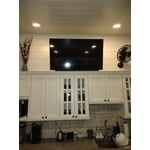
[This review was collected as part of a promotion.] Use our Samsung TV in our new family addition. Also, purchased a Samsung sound bar with sub to complete the package. Great picture quality, easy setup, simple sleek remote, easy to navigate TV and app guide. Sound bar linked flawlessly with TV and once set works with one remote. Would definitely purchase another Samsung product in the future.

Review from Samsung US
Helpful?6VT5DVUKIND213737353383
Aug 23, 2022
Reviewer name: ChrisT
3 out of 5 stars
3 out of 5 stars review

Not Impressed With The Picture Quality

[This review was collected as part of a promotion.] The TV is used for watching Xfinity Cable in our main living room. Overall it is a good TV with a lot of features and apps built in. The sound is also very good for a TV. However, I would expect the picture quality to be better from a higher end TV. The picture is very jittery when watching sports. Some text in commercials and sport tickers at the bottom of the screen are jittery and hard to read as well. I have tried every setting to correct the issue, but then you run into the soap opera effect or it still isn't fixed. Also, when watching golf or sports with a white background you can see shadows in the screen when the camera moves fast. In the end, I wish I had gotten a different TV.

Review from Samsung US
Helpful?6VT5DVUKIND213737353383
reply from Samsung Brand Ambassador

ChrisT, We appreciate your feedback on your Q70A TV’s picture when watching fast motion. For optimal motion image performance, you may want to adjust the picture clarity setting by going to: Menu > Picture > Expert Settings > Picture Clarity Settings - Off: Picture Clarity Settings will always be off - Auto: Picture Clarity Settings will automatically activate and deactivate based on the type of program being watched - Custom: Allows custom adjustments and settings to be used. By selecting the Custom option, you can access these advanced settings for Judder Reduction, LED Clear Motion, and Noise Reduction. To ensure you’ve got the latest image quality updates, please also confirm that your TV is up to date with the latest firmware version. You can check by going to: Menu > Settings > Support > Software Update. If we can help with anything else, please call us at 1-800-SAMSUNG, 8AM - 12AM EST, 7 days a week. LiveChat with an agent as well as manuals, software, and warranty info can be found at the ‘Support’ link on our Samsung website. ~ Samsung Specialist