Skip to Main Content
Sams Club
Sams Club
Customer reviews for SAMSUNG Q-series 5.1 Channel Sound Bar with Wireless Subwoofer, Q-Symphony & Dolby ATMOS Audio for
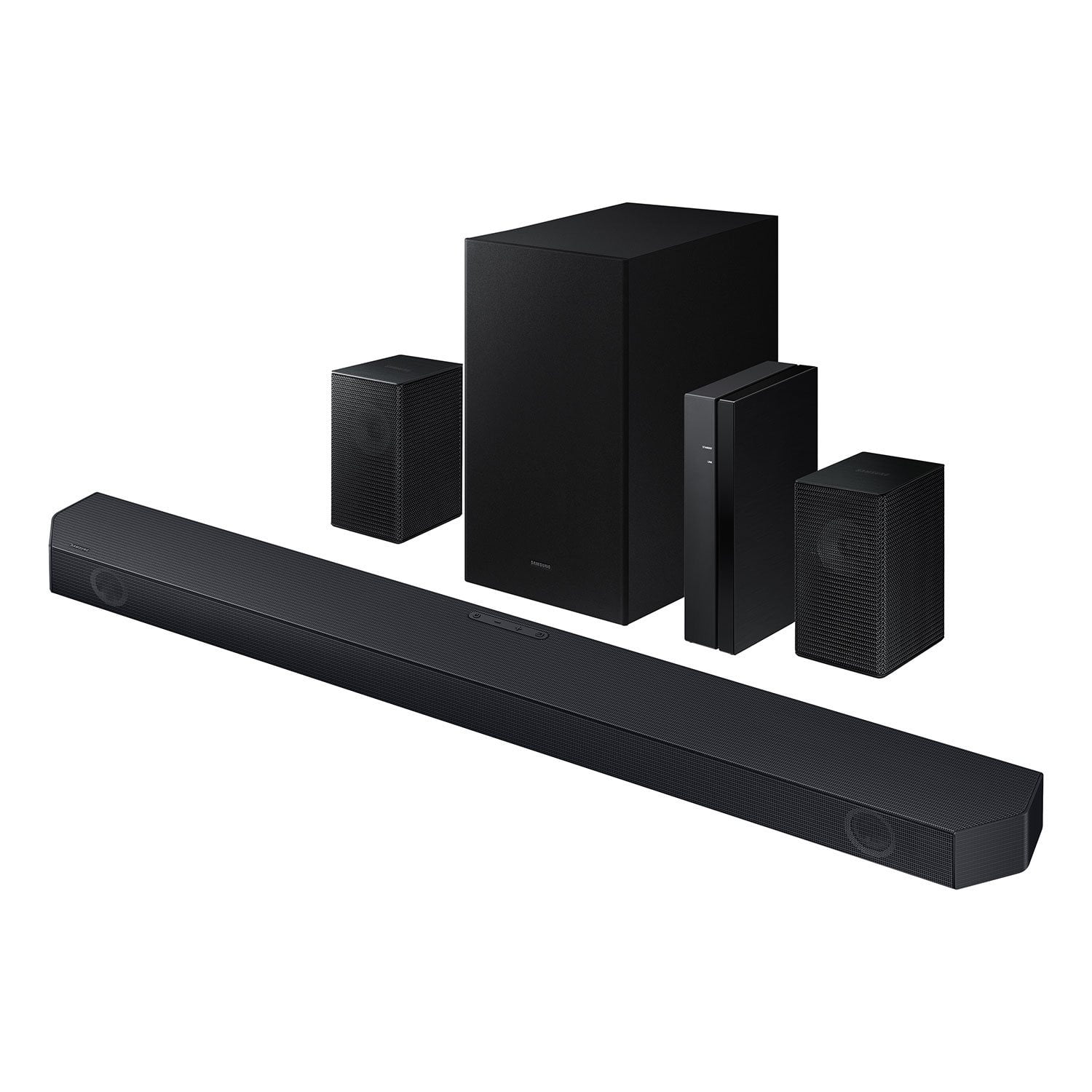
SAMSUNG Q-series 5.1 Channel Sound Bar with Wireless Subwoofer, Q-Symphony & Dolby ATMOS Audio
4.6 out of 5 stars
stars435 ratings323 reviews
  1. 5 stars75% (327)
  2. 4 stars14% (62)
  3. 3 stars6% (24)
  4. 2 stars1% (4)
  5. 1 star4% (18)

Member photos

  • +30 images
Sort by |
Showing 1-10 of 323 reviews
Mar 7, 2026
Tom O
5 out of 5 stars review

Excellent Sound

[This review was collected as part of a promotion.] This sound system is excellent for smaller to midsize rooms. The sub has more than enough punch for lows and the sound bar does a great job with the dialogue and midrange. The wireless rear speakers add to the perfect listening experience. I have received many compliments on our sound system.

Review from Samsung US
Helpful?3195MT0SA8FL13599821582
Nov 23, 2025
Want2Cher
5 out of 5 stars review

Sounds Super!

[This review was collected as part of a promotion.] The sound is rich. The back speakers make it sound so nice. Once we figured out the Bluetooth connection it worked great. Very happy with our purchase!

Review from Samsung US
Helpful?3195MT0SA8FL13599821582
Jul 21, 2025
zeromarine
5 out of 5 stars review

amazing bass

[This review was collected as part of a promotion.] i’ve used this sound bar for over a year now and i’ve gotten little to no issues it has worked perfectly with my samsung tv and when dolby atmos is on while i’m watching or playing anything it’s done an amazing job keeping me immersed the settings are easy and fun to mess around with with which is a huge plus while i’m watching any specific type of tv from shows to sports the two back speakers are bright and loud the bass is more immersive than any theatre i’ve been to and with q symphony it makes it all the worth it’s affordable and easy to plug and play

Review from Samsung US
Helpful?3195MT0SA8FL13599821582
Feb 26, 2025
Gary
5 out of 5 stars review

Verified Purchase

Integrated easily with our Samsung TV

These speakers were super Australian to install and setup, most remotely. Our previous rear speakers were wall mounted with wires that attached with spring tension wire clips. We were very happy to see that these new speakers attach the same way. We were able to keep our existing wiring and simply add the required unique plug end with scotch locks. It took longer to unpack them than the entire set up procedure. They sound great work perfectly.

Helpful?3195MT0SA8FL13599821582
Jul 19, 2025
1TVsound
5 out of 5 stars review

Love the sound coming out of my system

[This review was collected as part of a promotion.] I use my system to watch movies and sports sound is incredible love the sound love the system I would buy another one this time bigger than the one I have.

Review from Samsung US
Helpful?3195MT0SA8FL13599821582
Dec 6, 2025
Yuca26
4 out of 5 stars review

Perfect for video games

[This review was collected as part of a promotion.] ... what can I say, there are many aspects of this bar that I like first and most important for video games is a delight, games like the Call of Duty feel as your enemies walk behind you, or as the shots will pass around you, let's go some of the best purchases I throw and for movies well the same ajahaj

Review from Samsung US
Helpful?3195MT0SA8FL13599821582
Apr 9, 2026
kwsutter
4 out of 5 stars review

Verified Purchase

Read description carefully

I think it's a solid soundbar. But, I thought the rear speakers were truly wireless. They have to be hard wired to the wireless receiver. I wanted to mount them on my ceiling and that wasn't going to work. I had to return it.

Helpful?3195MT0SA8FL13599821582
Jun 20, 2025
LAWRENCES
3 out of 5 stars review

Verified Purchase

Samsung Q-Series

Samsung Q-Series has a solid sound. The surround is good. The only problem I have is it keeps going in/out of the Q-Symphony mode. I checked out the Onn $199 system. Sounded amazing in the store. Because of the Q-Symphony, I went with the Samsung. I wished I had saved a few dollars and purchased the Onn since the Q-Symphony is not consistent.

Helpful?3195MT0SA8FL13599821582
reply from Samsung

Hi LAWRENCES,<br /><br />We appreciate you taking a moment to review the Samsung HW-Q65C Soundbar.<br /><br />Updating the firmware on your soundbar gives you all the benefits of the latest improvements. When an update is available, you can update the Soundbar by connecting the USB drive that contains the update firmware to the SERVICE port of the Soundbar.<br /><br />1.Go to the Samsung Electronics website (www.samsung.com) → click on the “Support” option in the upper right corner. <br />2.Click on “Manuals &amp; Software” from the pop-up list &gt; TVs &amp; Home Theater &gt; Home Theater &gt; Select your model<br />2. Download the firmware file (USB type). <br />3. Unzip the file to create a folder with the file name. <br />4. Store the created folder in a USB and then connect it to the Soundbar. <br />5. A sequence of “UPDATE” &gt; “BYE” &gt; “ON” will appear on the display 3 times. This will take around 6 minutes.<br /> - During update, do not turn it off or remove the USB. <br /> - If “UPDATE” does not appear on the display window, remove the power cord from the Soundbar and then reconnect it.<br /> - When the latest Version is installed, no update is performed. <br /> - Depending on the USB type, update may not be supported.<br />6. After the 3 cycles are complete, the Soundbar will restart and last source used will appear on the display for about 20 seconds and then it will go off (“UPDATE” &gt; “BYE” &gt; “ON”) 3 times “D.IN” &gt; off<br /><br />If you need more help, Samsung is here for you. Please call us at 1-800-SAMSUNG, 8AM - 12AM EST (Ask for Soundbars), 7 days a week. Our Live Chat agents are also available by clicking on the ‘Support’ link on our website.<br /><br />~ Samsung Solutions

Sep 14, 2024
Lee
3 out of 5 stars review

Verified Purchase

I can make it work but...

I have an issue with latency in all but one surround sound modes. Lip sync sucks on any other settings. And I have a Q55 Samsung TV. Whats the point of having multiple surround settings if only one will operate satisfactorily. Also, after rewinding a segment of a program, there is a long delay before sound begins to restart. I have to back up way beyond the point where I want the sound to be replayed because of the long delay after I press play.

Helpful?3195MT0SA8FL13599821582
reply from Samsung

Hi Lee,We appreciate you taking a moment to review the Samsung HW-Q65C Soundbar.If the video on the TV and audio from the soundbar are not synchronized, press the SOUND CONTROL button on the soundbar remote, until you see AUDIO SYNC on the display. You can then set the audio delay between 0~300 milliseconds by using the Up/Down buttons.You can also try the below to minimize the delay:1) Connect the source directly to the Soundbar’s HDMI input, then connect the Soundbar to the HDMI ARC input on the TV.2) On the TV, set the Sound Delay level to 0. Home > Settings > Sound > Expert Settings > Digital Output Audio Delay: “0”3) Change the audio format to PCM on both the source device and the TV. For additional troubleshooting steps, please refer to this online guide:https://www.samsung.com/us/support/troubleshooting/TSG01110022/I hope the above helps to solve your issue. If you need further help, please reach out to Samsung Customer Support. Please call us at 1-800-SAMSUNG, 8AM - 12AM EST (Ask for Soundbars), 7 days a week. Our Live Chat agents are also available by clicking on the ‘Support’ link on our website.~ Samsung Solutions

Feb 19, 2025
tmad07a
1 out of 5 stars review

Verified Purchase

Not worth the money.

I have a Samsung 2.1 soundbar and the sound is good so I thought the 5.1 would be much better but oh was I wrong. The sound was not good at all and the rear speakers had very little volume and they sounded like you were in a tunnel. Needless to say I took it all back. Stay away from these. A waste of money.

Helpful?3195MT0SA8FL13599821582
reply from Samsung

tmad07a,We appreciate you taking a few moments to review the Samsung HW-Q65C Soundbar.To control the volume of the treble or bass press the TONE CONTROL button, and then adjust the volume between -6 to +6 by using the Up/Down buttons on your soundbar remote. Press and hold the SOUND CONTROL button for about 5 seconds to adjust the sound for each frequency band. 150Hz, 300Hz, 600Hz, 1.2kHz, 2.5kHz, 5kHz, and 10kHz are selectable using the Left/Right buttons and each can be adjusted to a setting between -6 to +6 using the Up/Down buttons. (Make sure the Sound mode is set to “STANDARD”.) Press the CH LEVEL button so you can adjust the volume of each speaker. CENTER LEVEL can be adjusted using the UP/DOWN buttons from -6 to +6.With the Wireless Rear Speaker Kit connected you can adjust the volume by using the provided Soundbar remote. Press CH LEVEL and select REAR LEVEL, then use the Up/Down buttons to adjust the volume within a -6 to +6 range. If you would like louder (or softer) bass from your subwoofer, you can adjust the level by rocking the WOOFER button on the soundbar remote, and then adjusting the level from -6 to +6. To set the subwoofer volume level to 0, press the button in.If you need more help, Samsung is here for you. Please call us at 1-800-SAMSUNG, 8AM - 12AM EST (Ask for Soundbars), 7 days a week. Our Live Chat agents are also available by clicking on the ‘Support’ link on our website.~ Samsung Solutions