Skip to Main Content
Sam's Club
Sam's Club
All Departments
All Services
Customer reviews for SAMSUNG 75” Class M70H Series Mini LED 4K UHD Vision AI Companion Smart Tizen TV for
SAMSUNG 75” Class M70H Series Mini LED 4K UHD Vision AI Companion Smart Tizen TV
4.5 out of 5 stars
stars
325 ratings315 reviews
  1. 5 stars70% (227)
  2. 4 stars16% (51)
  3. 3 stars7% (23)
  4. 2 stars5% (17)
  5. 1 star2% (7)

Member photos

  • +81 images
Sort by |
Showing 201-210 of 315 reviews
Aug 7, 2026
Reviewer name: Anonymous
4 out of 5 stars
4 out of 5 stars review

Big and Beautiful!

[This review was collected as part of a promotion.] The TV is great ! Unfortunately the sound bar is not Working . I've plugged it in but can't seem to Sync the TV and the sound bar . I guess I'll eventually figure it out.

Review from Samsung US
Helpful?5O410ST4GD5019920056303
Aug 5, 2026
Reviewer name: Sam Carpenter
5 out of 5 stars
5 out of 5 stars review

Great picture clarity, good sound, ease of use.
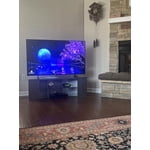
[This review was collected as part of a promotion.] Brightness: just right. Color is magnificent. Contrast is good. Responsiveness is great, Uniformity is very good.

Review from Samsung US
Helpful?5O410ST4GD5019920056303
Aug 5, 2026
Reviewer name: Opsman
3 out of 5 stars
3 out of 5 stars review

Just OK

[This review was collected as part of a promotion.] Took me forever to figure out how to turn off the voice assist function. Very dark picture with Amazon Prime movies.

Review from Samsung US
Helpful?5O410ST4GD5019920056303
reply from Samsung Advisor

Hi Opsman, We’re sorry to hear you’re not fully satisfied with the picture quality on your Samsung M70HD TV. If the image appears too dark, we suggest disabling certain energy-saving features, which can automatically adjust brightness and affect how the screen looks. Go to: Settings > All Settings > General & Privacy > Power and Energy Saving, then turn off Brightness Optimization, Energy Saving Solution, Motion Lighting, and/or Contrast Enhancer. You can also adjust the Picture Mode to better suit your environment: Settings > All Settings > Picture > Picture Mode • Standard – Default mode for general viewing • Dynamic – Brighter and clearer, ideal for well-lit rooms • Movie – Best for dark room viewing • Eco – Energy-saving mode • Filmmaker Mode – Preserves content as intended by creators To fine-tune brightness, go to: Home > left directional key > Settings > All Settings > Picture > Expert Settings, then adjust the Brightness level (0–50) to your preference. Lastly, please make sure your TV is running the latest firmware: Home > Home > left directional key > Settings > Support > Software Update > Update Now We hope these tips help improve your viewing experience. If you need further support, feel free to contact us at 1-800-SAMSUNG (8AM – 9PM EST Mon – Fri, 8AM – 6PM Sat – Sun). LiveChat is also available via the ‘Support’ link on our website. ~ Samsung Advisor

Jun 21, 2026
Reviewer name: Rweaver
4 out of 5 stars
4 out of 5 stars review

Great upgrade

[This review was collected as part of a promotion.] This television has been wonderful. Color, picture, and size fit the room well. The only reason for the4 instead of 5 is the apps load a little slower than I would like.

Review from Samsung US
Helpful?5O410ST4GD5019920056303
reply from Samsung Advisor

Hi Rweaver, Thank you for sharing your experience with the M70HD app on your TV. The issue you’re encountering may be related to network strength or stability. We recommend the following steps: 1. Connect to a 5GHz Wi-Fi network, if available 2. Use a wired LAN connection for increased stability 3. Reposition your router to reduce obstacles between the TV and the router Please also check that your TV is running the latest firmware by going to: Settings > Support > Software Update. From there, you can also enable Auto Update for added convenience. For improved app performance, we recommend running Device Care, which can help by clearing memory and closing background apps. To access it: Settings > Support > Device Care We hope these steps improve your streaming experience. If the issue continues, please reach out to us at 1-800-SAMSUNG (8AM – 9PM EST Mon – Fri, 8AM – 6PM Sat – Sun), or reach us via text anytime. You can also visit ‘Support’ on our website for: You can also chat with one of our agents by clicking the ‘Support’ link on our website for: • Live Chat • Manuals, Software, & Warranty Info ~ Samsung Advisor

Jul 20, 2026
Reviewer name: Jimmy
5 out of 5 stars
5 out of 5 stars review

Great picture

[This review was collected as part of a promotion.] We live our new Samsung tv. We now have three Samsung and they are great. Highly recommended them.

Review from Samsung US
Helpful?5O410ST4GD5019920056303
Jul 5, 2026
Reviewer name: Batman
5 out of 5 stars
5 out of 5 stars review

Samsung 50 inch review

[This review was collected as part of a promotion.] Let's go Excellent color excellent contrast excellent Responsiveness excellent Please with the TV thus far

Review from Samsung US
Helpful?5O410ST4GD5019920056303
Jul 20, 2026
Reviewer name: Okcbrown
5 out of 5 stars
5 out of 5 stars review

Clear precise colors with samsung
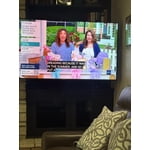
[This review was collected as part of a promotion.] I love this Samsung tv it has great color Wonderful contrast. I have had issues with too much sun and the tv is hard to see but not with this Samsung. Very easy to hook up.

Review from Samsung US
Helpful?5O410ST4GD5019920056303
Jul 27, 2026
Reviewer name: PCase
5 out of 5 stars
5 out of 5 stars review

Works great. Great color and like google features.

[This review was collected as part of a promotion.] Bright colors. Great definition and clarity with movies and TV shows. Responsive prompts and good contract. Easy to adjust for clean uniformity.

Review from Samsung US
Helpful?5O410ST4GD5019920056303
Jun 22, 2026
Reviewer name: Nitsud
5 out of 5 stars
5 out of 5 stars review

Need to buy it

[This review was collected as part of a promotion.] Been a great TV so far. Hooked up easy with Samsung sound bar to provide sound that is epic with a clear and bright Pic. Love it. Love it. Love it

Review from Samsung US
Helpful?5O410ST4GD5019920056303
Jun 25, 2026
Reviewer name: Boom
5 out of 5 stars
5 out of 5 stars review

Boom

[This review was collected as part of a promotion.] Looks good I keep these on at all times and they have bot caused any issues since installing them.

Review from Samsung US
Helpful?5O410ST4GD5019920056303