Skip to Main Content
Sam's Club
Sam's Club
All Departments
All Services
Customer reviews for SAMSUNG 42” Class S90H Series OLED 4K UHD Vision AI Smart Tizen TV for
SAMSUNG 42” Class S90H Series OLED 4K UHD Vision AI Smart Tizen TV
4.8 out of 5 stars
stars
163 ratings163 reviews
  1. 5 stars86% (140)
  2. 4 stars8% (13)
  3. 3 stars4% (7)
  4. 2 stars1% (1)
  5. 1 star1% (2)

Member photos

  • +29 images
Sort by |
Showing 71-80 of 163 reviews
Sep 6, 2026
Reviewer name: PBLOLLIPOP2
5 out of 5 stars
5 out of 5 stars review

AMAZING PICTURE AND SOUND QUALITY

[This review was collected as part of a promotion.] THE PICTURE AND SOUND QUALITY BOTH JUST AMAZED ME, EVERY TV I HAVE EVER HAD IN THE PAST EITHER THE PICTURE WAS AWFUL AND THE SOUND WAS GOOD, VICE VERSA. I AM SO HAPPY THAT I FINALLY HAVE THE TV THAT I HAVE ALWAYS WANTED.

Review from Samsung US
Helpful?3YH4RYSHV2A819904818175
Sep 13, 2026
Reviewer name: ezgrider
3 out of 5 stars
3 out of 5 stars review

Great picture BUT

[This review was collected as part of a promotion.] The picture is beautiful, the color and contrast are out standing. However, it has a very hard time keeping in contact with the internet. I have to wait frequently for the TV to connect to the internet and a couple of times I have had to move the TV to unplug it so it would reset.

Review from Samsung US
Helpful?3YH4RYSHV2A819904818175
reply from Samsung Ambassador

Hi ezgrider, Thank you for sharing your experience with the internet connection on your Samsung S90HD TV. Whether you're using Wi-Fi or a wired (LAN) connection, there are a few steps you can take to help resolve the issue: 1. Power Cycle Your Equipment. Unplug both your TV and router/modem from the wall outlet. Wait at least 30 seconds, then plug them back in and allow both devices to fully restart. 2. Check the Network Status. On your TV, go to: Home > top directional key > Settings > All Settings > Connection > Network > Network Status. This will help determine if the issue lies with the network or the TV. 3. Try a Different Connection Type. If you're using Wi-Fi, try connecting an Ethernet (LAN) cable directly from your router to the TV to test the connection. If you're using a wired connection, try switching to Wi-Fi to see if the issue persists. 4. Reestablish the Network Connection. Go to: Settings > All Settings > Connection > Network > Open Network Settings, and follow the prompts to reconnect to your Wi-Fi or wired network. 5. Update Firmware. Software updates can often resolve network bugs. To check for the latest version: Settings > Support > Software Update > Update Now If these steps don't resolve the issue, we’d be happy to provide further assistance. Please call Samsung Support at 1-800-SAMSUNG, (8AM – 9PM EST Mon – Fri, 8AM – 6PM Sat – Sun). LiveChat is also available at the ‘Support’ link on our website. ~ Samsung Ambassador

Aug 27, 2026
Reviewer name: Rhiorules
5 out of 5 stars
5 out of 5 stars review

Awesome Features

[This review was collected as part of a promotion.] one of the best TVs I've ever bought it has the most beautiful clearest picture I've ever seen easiest interface to use the fact that it has the Samsung TV pass TV Pass movie pass all movies and TV for free it's just awesome I would buy it over and over

Review from Samsung US
Helpful?3YH4RYSHV2A819904818175
Aug 5, 2026
Reviewer name: Greg
5 out of 5 stars
5 out of 5 stars review

Samsung S90H 65" Television - One Amazing TV
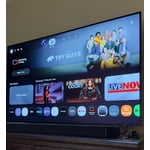
[This review was collected as part of a promotion.] Once you have tweaked the settings on this television, it produces amazing picture quality. So true to life. The glare free coating produces a picture with no distractions like a lamp, overhead light, or window frame. When paired with my Samsung Q950A soundbar thru the eArc HDMI port, you get something called Q-Symphony which allows the sound to come thru the tv speakers and the soundbar producing a theatre like experience. Highly recommend this television.

Review from Samsung US
Helpful?3YH4RYSHV2A819904818175
Sep 6, 2026
Reviewer name: JRD93
3 out of 5 stars
3 out of 5 stars review

Ai assisted voice amplification

[This review was collected as part of a promotion.] The Aiken's voice amplification is not as good as I had hoped. That was my main reason for buying this tv. I still have to increase and decrease the volume. When the voice is not being amplified and music is played or there are action scenes I have to decrease the volume. I would have thought AI could help with this.

Review from Samsung US
Helpful?3YH4RYSHV2A819904818175
reply from Samsung Ambassador

Hi JRD93, Thank you for sharing your experience with volume fluctuations on your TV. Here are a few steps that may help resolve the issue: 1. Turn off the Sound Sensor: Use the button located beneath the Samsung logo on the bottom of the TV. With the TV powered on, press the button to the left to turn the sensor on or to the right to turn it off. 2. Disable AI Sound Features: Some AI functions automatically analyze and adjust sound, which may cause volume to fluctuate. To disable these: Settings > All Settings > Advanced Features > AI Mode Settings > AI Mode. You can turn off all AI functions at once or toggle each setting individually. 3. Check for Firmware Updates: Keeping your TV up to date may improve audio performance: Settings > Support > Software Update > Update Now If the issue continues after these steps, please contact Samsung Support for further assistance at 1-800-SAMSUNG (8AM – 9PM EST Mon – Fri, 8AM – 6PM Sat – Sun). LiveChat and additional support resources are also available through the Support link on our website. ~ Samsung Ambassador

Sep 20, 2026
Reviewer name: Gene
5 out of 5 stars
5 out of 5 stars review

No more glare

[This review was collected as part of a promotion.] I never enjoyed watching tv because of a constant glare on the screen. After much research, I decided to buy this model primarily because of the matted finish. I can honestly say that there is no glare on the screen and I can enjoy the fantastic colors without a glare. It has improved my tv watching immeasurably.

Review from Samsung US
Helpful?3YH4RYSHV2A819904818175
Aug 21, 2026
Reviewer name: Steve W
5 out of 5 stars
5 out of 5 stars review

Love the TV

[This review was collected as part of a promotion.] The TV is great. The picture is so sharp. You feel like you were right there in the middle of whatever you're watching. Love it. It is easy to read the writing on the screen as there is such great contrast that we did not have before.

Review from Samsung US
Helpful?3YH4RYSHV2A819904818175
Sep 21, 2026
Reviewer name: Audrey M
5 out of 5 stars
5 out of 5 stars review

Beyond Expectations
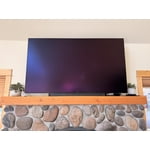
[This review was collected as part of a promotion.] After much research about new 77" TV sets, Samsung shined brighter than the rest with their anti - glare screen. We live is a very sunny house and reflections are a problem. Not with Samsung. It's a GAME CHANGER!. We even consulted our friend, who is "Mr. Dolby" and he recommended the same. Thank you Samsung for a perfect product!

Review from Samsung US
Helpful?3YH4RYSHV2A819904818175
Oct 12, 2026
Reviewer name: Amigo
5 out of 5 stars
5 out of 5 stars review

My Stuff

[This review was collected as part of a promotion.] It worth money it's a very good quality television and it gives me all the things that I like. best investment I made thus far this year

Review from Samsung US
Helpful?3YH4RYSHV2A819904818175
Oct 20, 2026
Reviewer name: Deb L
5 out of 5 stars
5 out of 5 stars review

Love our Samsung TV

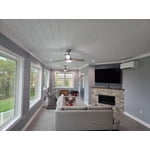
[This review was collected as part of a promotion.] I love the picture. So clear and bright. I especially like the anti glare screen. Our room has a lot of windows and glare has always been a problem. The picture is very clear now.

Review from Samsung US
Helpful?3YH4RYSHV2A819904818175