Skip to Main Content
Sam's Club
Sam's Club
All Departments
All Services
Customer reviews for SAMSUNG 85” Class M80H Series Mini LED 4K UHD Vision AI Smart Tizen TV for
SAMSUNG 85” Class M80H Series Mini LED 4K UHD Vision AI Smart Tizen TV
4.7 out of 5 stars
stars
92 ratings92 reviews
  1. 5 stars75% (69)
  2. 4 stars21% (19)
  3. 3 stars4% (4)
  4. 2 stars0% (0)
  5. 1 star0% (0)

Member photos

  • +17 images
Sort by |
Showing 1-10 of 92 reviews
Nov 3, 2026
Reviewer name: Phil
5 out of 5 stars
5 out of 5 stars review

Verified Purchase

The picture is awesome. Clear and concise. Sound is another thing, very spotty volume, some programs you need to increase the volume almost all the way, while others blast you out of the room if you dont turn it down before you channel surf.

Helpful?5IGWZQU28OT119900257823
Nov 5, 2026
Reviewer name: VinceV
5 out of 5 stars
5 out of 5 stars review

Nice TV

[This review was collected as part of a promotion.] I purchased my 65” TV about two weeks ago. It was to replace my LG TV that was about 7 years old. One thing I didn't like was the mounting. I don't understand why the hardware for all wall mounted TV cannot be the same. I hang on to everything so I did still have the hardware I needed. If I didn't I would have had to buy another mount. The TV is great. I love the universal remote and the way everything just works seamlessly. The picture is nice and bright and clear.

Review from Samsung US
Helpful?5IGWZQU28OT119900257823
Oct 24, 2026
Reviewer name: Cindy
5 out of 5 stars
5 out of 5 stars review

Ai function

[This review was collected as part of a promotion.] The AI function is a life saver. It helps searching issues so much easier and gives you very detailed information. The sound and brightness/ contrast in the picture is phenomenal! So far great product

Review from Samsung US
Helpful?5IGWZQU28OT119900257823
Nov 6, 2026
Reviewer name: Little Lady
5 out of 5 stars
5 out of 5 stars review

Extremely colorful!

[This review was collected as part of a promotion.] The color contrast is crisp and sharp. Watching football games on my 4K Samsung smart TV is a veritable game changer! Like I'm right there in the stadium with the fans. I'm also enjoying favorite programs and Netflix like it's a new experience. The picture couldn't get clearer or more colorful. The remote is easy to use and lets me access other channels or genres with just a quick tap.

Review from Samsung US
Helpful?5IGWZQU28OT119900257823
Sep 9, 2026
Reviewer name: CREEKiEGiRL
5 out of 5 stars
5 out of 5 stars review

Stunning Picture Quality and Ultra Fast Response

[This review was collected as part of a promotion.] The brightness and contrast on this Mini LED TV are incredible, delivering deep black levels and vibrant colors even in a well-lit living room. Motion handling is buttery smooth during fast-paced sports and action scenes, and the 4K AI upscaling makes older HD content look remarkably sharp. The interface responsiveness is lightning fast with zero lag when navigating apps or gaming. Overall, it provides an outstanding viewing experience.

Review from Samsung US
Helpful?5IGWZQU28OT119900257823
Nov 5, 2026
Reviewer name: Billy Bo
5 out of 5 stars
5 out of 5 stars review

Only one gripe

[This review was collected as part of a promotion.] I only wish that when I powered on the TV it went directly to my cable provider. It is a real inconvenience to turn on the TV and have to go to another remote control in order to get to my cable provider.

Review from Samsung US
Helpful?5IGWZQU28OT119900257823
Nov 5, 2026
Reviewer name: ChildofGod
4 out of 5 stars
4 out of 5 stars review

Great for the price
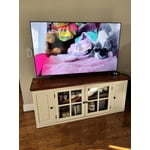
[This review was collected as part of a promotion.] At first, I was really disappointed with this television. The picture seemed very dim with poor clarity. After playing with the Settings quite a bit I was able to make it brighter and more colorful. And I am pleased with it now. However, in the chair that I sit in off to the side a bit, those qualities diminish a little. It is best viewed straight from the front. If that’s where I sit then it has a very nice picture. I think it is a good buy for the price range.

Review from Samsung US
Helpful?5IGWZQU28OT119900257823
Nov 5, 2026
Reviewer name: John
4 out of 5 stars
4 out of 5 stars review

Perfect answer To our problem
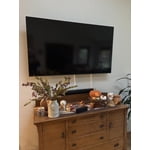
[This review was collected as part of a promotion.] We needed a large TV in our living room so we could host our friends for football games and movie nights. The 65 inch Samsung mini LED was a great value for the price. And the picture quality is amazing and so is the sound.

Review from Samsung US
Helpful?5IGWZQU28OT119900257823
Nov 6, 2026
Reviewer name: Long time Samsung user
4 out of 5 stars
4 out of 5 stars review

Too Much AI generated rubbish

[This review was collected as part of a promotion.] M80HD has too much AI generated stuff that I won't use. No instructions anywhere on how to turn off AI. Once or more times a day AI pops up on screen and its frustrating to get rid of it with out losing your original screen showing. When you try to use the Retail mode for its brilliant screen display, it doesn't stay with out all the commercials and other annoying pop ups. Samsung should go back and get rid of AI for there big screen tv's.

Review from Samsung US
Helpful?5IGWZQU28OT119900257823
Nov 9, 2026
Reviewer name: Ginger
3 out of 5 stars
3 out of 5 stars review

Good idea, imperfect execution

[This review was collected as part of a promotion.] Have had the tv for about a month, tv lags when streaming, despite troubleshooting internet, and doesnt always respond to button presses. Visual is good. Doesn't heat up as much as the OLEDs. Links well into the soundboard for symphony sound.

Review from Samsung US
Helpful?5IGWZQU28OT119900257823
reply from Samsung Advisor

Hi Ginger, Thank you for your feedback regarding your M80HD TV’s response time. To help ensure optimal performance, please try the following steps: 1. Check for firmware updates – An outdated version can affect overall performance: Home > left directional key > Settings > Support > Software Update > Update Now 2. Run Device Care – This tool clears unused cached memory and closes background apps: Home > left directional key > Settings > Support > Device Care > Start Device Care 3. Cold boot your TV – With the TV on, press and hold the Power button on your remote for about 5 seconds until the TV turns off and back on. This refreshes the system. 4. Power cycle the TV and any connected external devices – Unplug them from the power outlet, wait 30 seconds, then plug them back in. These steps often resolve issues with lag, freezing, or slow app performance. If the issue continues, please contact Samsung Support at 1-800-SAMSUNG (8AM – 9PM EST Mon – Fri, 8AM – 6PM Sat). LiveChat agents are also available through the ‘Support’ link on our website. ~ Samsung Advisor