
 Customer reviews for SAMSUNG 70" Class U7900F Series 4K Crystal UHD Smart TV for
Member photos









 +1528 images
Affordable Entry-Level 4K Smart TV
[This review was collected as part of a promotion.] Very affordable 65-Inch Entry-level 4k Smart TV, with its clean bezel-less design. With the access to lots of free Samsung TV Plus channels.
Needs better sound quality
The sound is not good at all. On some channels we are turning the sound up near the max it will go. That can't be good for a tv. We live in the country so there is no outside noise.
Hi Nonnie, Thank you for purchasing Samsung’s U7900FD TV and for sharing your feedback regarding low volume. To start, we recommend making sure your TV is running the latest firmware, as updates can include improvements to sound performance: Home > Settings > Support > Software Update If volume levels still seem too low, you can improve sound performance by adjusting a few key settings: Sound Mode: Navigate to: Settings > All Settings > Sound > Sound Mode • Standard: Balanced for everyday viewing • Optimized: Enhances effects and creates a more spacious sound • Amplify: Boosts mid and high tones, especially helpful if dialogue is difficult to hear Auto Volume: This feature helps maintain consistent volume levels across content and input sources. Turn it on under: Settings > All Settings > Sound > Expert Settings > Auto Volume = On You can also explore Expert Settings to fine-tune sound output with adjustments for Balance, Equalizer, and more. If you’re considering enhancing your setup, Samsung’s Q- and S-Series Soundbars feature Q-Symphony, which syncs your TV and soundbar speakers for a fuller, more immersive sound experience. For personalized support with these settings or selecting a soundbar to complement your setup, contact Samsung Support at 1-800-SAMSUNG (8AM – 9PM EST Mon – Fri, 8AM – 6PM Sat – Sun) or use LiveChat via the ‘Support’ link on our website. ~ Samsung Advisor
Best tv yet
[This review was collected as part of a promotion.] I love this tv its never let me down from the free live tv with samsung tv plus or curing boredom with its wide variety of downloable games and the picture quality is right on i also love how it can connect to do different things with my phone such as my ring doorbell camera
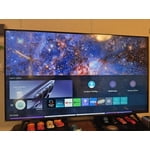
Beautiful tv I love it
[This review was collected as part of a promotion.] This tv offers sharp bright images and excellent deep blacks the contrast is always perfect good resolution. The only drawback for me is the audio quality, there is no noticeable difference between the audio settings and the sound seems to stay the same even the amplify settings. Another room for improvement is the remote its not multifunctional and very limited navigation when streaming, all that aside its a excellent set,
Really Good Affordable TV
[This review was collected as part of a promotion.] It's not easiest functioning smart tv as far as all the feature options and navigating the home menu. It is very dependable and at a low cost. Plus it has an amazing picture display and great sound for stock tv speakers.
Easy to use!
[This review was collected as part of a promotion.] I like to watch tv at night, so the ability to easily control the brightness is a GOD SEND. The home screen is easy to navigate. I love how they separate my consoles hdmi inputs from my streaming services. Love Samsung tvs
Lifelong customer > to > Never again customer
[This review was collected as part of a promotion.] The display is okay. The SmartTV software is terrible. The TV is unusable. It bogs and lags, and crashes. Constantly. When it isn’t crashing, it’s loading “system updates” (aka more bloatware). I’ll never buy another Samsung product again.
Hi Dave, We appreciate your feedback regarding response time. For optimal performance, please ensure your U7900F TV is running the latest firmware. You can check this by going to: Home > left directional key > Settings > Support > Software Update To further optimize performance, try running Device Care, which checks memory, clears unused cached data, and closes background apps: Home > left directional key > Settings > Support > Device Care > Start Device Care If issues continue, please reach Samsung Support at 1-800-SAMSUNG, available 8AM – 9PM EST Mon – Fri, 8AM – 6PM Sat – Sun. LiveChat is also available via the ‘Support’ link on our website. ~ Samsung Advisor
Hope I WIN
[This review was collected as part of a promotion.] The words don't match the lips. TV looses it's volume alot .TV cuts off on its own.but great picture. The resolution is great and my Ai doesn't work..brightness is slightly off.my neighbors hack into..asking to download. The lips mess with the anesthetics don't match the color
Hi Winner, Thank you for your feedback on the lip sync issues you're experiencing with your Samsung U7900F TV. This may be related to the content source, but if you're noticing the audio delay across all sources or channels, especially when using an external speaker setup (soundbar, receiver, etc.), there are a few settings that may help: 1. Adjust Digital Audio Delay. You can manually increase the audio delay to better match the video: Settings > All Settings > Sound > Expert Settings > Digital Output Audio Delay 2. Enable Audio Pass-Through. Samsung TVs include an audio pass-through option, which sends the audio signal directly to your connected soundbar or receiver without additional processing by the TV. This can reduce delay when using external audio devices: Settings > All Settings > Sound > Expert Settings > Digital Audio Output Format > Pass-Through 3. Check for Firmware Updates. Ensure your TV is running the latest software, which may include performance improvements related to sound or sync: Home > left directional key > Settings > Support > Software Update > Update Now If the issue continues after these steps, please contact Samsung Support for additional troubleshooting or assistance. We’re here to help at 1-800-SAMSUNG, 8AM – 12AM EST, 7 days a week. LiveChat and additional support resources are also available through the Support link on our website. ~ Samsung Advisor
might be better off saving your money
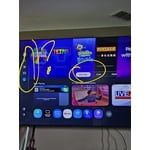
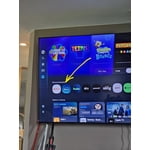
[This review was collected as part of a promotion.] I'm not sure if it's a software problem but whatever operating system is on this TV is very slow and laggy even with the best of the best internet I've tried it on fiber and I've also tried it with the most expensive star link plan there's no difference there that's how I know it's the TV and not a internet connection. The interface itself also is very disappointing there's all these recommended garbage things that I don't want and I actually have to scroll down through the trash to find my actual apps or the actual features that I'm looking for which is very inconvenient for me I like to be able to turn on a TV and go instantly to where I want kind of like the Roku settings are. So keep that in mind when you're designing other things. There's also an issue with a lot of the pre-downloaded programs. They will not let you delete them you can go through the whole deleting process and you can click okay to delete and it still stays there as well as new things you download you have to delete them three maybe five times before they'll actually be removed from your TV. The lack of an input section is fairly confusing I'm young so I was able to figure it out pretty quickly but for an elderly person I do not think this thing would be a good choice. I also don't like the fact that Samsung monitors everything I play on the TV for advertisement purposes and sells that data that's very bothersome and disturbing to me and if I would have known that before I spent the money I would not have purchased this TV. I am sick of being tracked with every little thing I do! Honestly if this TV wasn't so difficult to hang I would have returned it because of what I have described above.
Hi ktmrider77, We appreciate your detailed feedback. Please know your opinion is important to us and will be shared with our internal teams. We recommend ensuring your TV is running the latest Firmware, version 1132.0. Go to Settings> Support> Software Update. If this firmware version is not yet available on your TV, you can download the update on a USB drive and manually update your TV: 1. On Samsung's website (upper right corner), go to: Support > Manual & Software > Find your TV model, and click on the Firmware – Upgrade File. 2. When the file has finished downloading, locate it and then unzip it. There is normally one folder inside but there may be multiple files. 3. Copy or move all of the files that were included in the zip file to a USB flash drive, but do not place them inside any other folders. If you place the software folders inside a folder on the USB flash drive, the TV or monitor will not find them. 4. Connect the USB drive containing the software upgrade into a USB port on your device. 5. Using your device's remote, navigate to and select Settings, then select All Settings, and then select Support. Select Software Update, select Update Now, and then select Yes if prompted. Your device will search the USB drive for update files. Follow the on-screen instructions to install the updated software. Updates usually take a few minutes; please do not turn off the TV until the update is complete. When the update is finished, it will restart automatically. If you need additional support, Samsung is here to help. Please call us at 1-800-SAMSUNG, available 8AM – 9PM EST Mon – Fri, 8AM – 6PM Sat – Sun. You can also chat with a LiveChat agent by clicking the ‘Support’ link on our website. ~ Samsung Advisor
WOW
[This review was collected as part of a promotion.] We did not know what we were missing all these years with our 5+ year old TV until we purchased our new 65" Samsung. The picture is out of this world. We are still learning all the perks that this TV has. We are enjoying our shows even more with such high def and resolution.