Skip to Main Content
Sams Club
Sams Club
Customer reviews for SAMSUNG 70" Class U7900F Series 4K Crystal UHD Smart TV for
SAMSUNG 70" Class U7900F Series 4K Crystal UHD Smart TV
4.6 out of 5 stars
stars1,715 ratings1,708 reviews
  1. 5 stars78% (1,333)
  2. 4 stars14% (248)
  3. 3 stars4% (74)
  4. 2 stars1% (24)
  5. 1 star2% (36)

Member photos

  • +683 images
Sort by |
Showing 581-590 of 1,708 reviews
Nov 11, 2025
MGX0330
5 out of 5 stars review

I love this TV

[This review was collected as part of a promotion.] I'm a huge fan of Samsung products. I had a 32 & 40 inch that are a few years old still working well, so I ordered this for my den. The picture is crystal clear (just like the name). It was a breeze to set up & the remote is very responsive. I did have some lag issues when changing channels or streaming platforms but discovered it was my wifi. I hardwired the TV to my internet router and there was no more lag. Thanks for the great products Samsung.

Review from Samsung US
Helpful?519VMKO7QPOP17358505999
Oct 13, 2025
Lov2shop
4 out of 5 stars review

Great TV.

[This review was collected as part of a promotion.] Tv has a great picture, and the sound is pretty good too. Which is good because there is no optical audio out, the only way to connect is by Bluetooth, which is mind of a pain. But overall a good tv.

Review from Samsung US
Helpful?519VMKO7QPOP17358505999
Nov 21, 2025
Dmau86
2 out of 5 stars review

Great picture poor connectivity

[This review was collected as part of a promotion.] I've had the t v for a while now.And my first samsung, I have had several other TV brands and thus far this one has the poorest wifi connection. It drops out frequently while the others are working fine. Another drawback to this television is that you must have a samsung account logged in to even make the TV usable. On the plus side when the TV works the picture quality is good. I've move this TV to my bedroom now and placed the Vizio in the main living area now simply because of reliability of the connection.

Review from Samsung US
Helpful?519VMKO7QPOP17358505999
reply from Samsung Advisor

Hi Dmau86, Thank you for sharing your experience. Buffering during streaming is typically related to internet speed or signal strength. This can happen when your connection isn’t able to deliver data quickly enough for smooth playback. We recommend the following steps to help improve streaming performance: 1. Use a 5GHz Wi-Fi connection, if available 2. Try a wired LAN connection for more stability 3. Reposition your router to minimize obstacles between it and the TV 4. Make sure your TV is running the latest firmware (Settings > Support > Software Update) 5. Run Device Care to optimize performance: Home > left directional key > Settings > Support > Device Care > Start Device Care If buffering continues, you may want to contact your internet service provider to check your current speed or explore upgrade options. If we can assist further, please call us at 1-800-SAMSUNG, available daily from 8AM - 12AM EST. You can also visit the Samsung website and click on ‘Support’ for: • Live Chat • Manuals, Software, & Warranty Info ~ Samsung Advisor

Jan 20, 2026
Cristian
2 out of 5 stars review

network issues and lag on two tvs

Replaced two TCL smart tvs with these and I was disappointed to say the least. There is hardly and storage space on there (less than 2gb free space with just the default apps). But thats not what bothered me. The real issue is the network connectivity error I get every other time I start the tv. It's infuriating and happens all the time. It must be an issue with this model because it happens on both my tvs, not just one. It takes several restarts and/or network configurations in settings before it starts workingn again. I never had connectivity issues with my old TCLs and no other device in my home has network connection issues. To add to this, the button lag is super slow, and the home screen interface isnt very convient to get to your streaming apps easily. I was expecting more from Samung but after these go I probably wont stick with their brand.

Review from Samsung US
Helpful?519VMKO7QPOP17358505999
reply from Samsung Advisor

Hi Cristian, Thank you for your feedback. Please ensure you are running the latest Firmware Update 1132. To do so, go to Settings> Support> Software Update. If this firmware version is not yet available on your TV, you can download the update on a USB drive and manually update your TV: 1. On Samsung's website (upper right corner), go to: Support > Manual & Software > Find your TV model, and click on the Firmware – Upgrade File. 2. When the file has finished downloading, locate it and then unzip it. There is normally one folder inside but there may be multiple files. 3. Copy or move all of the files that were included in the zip file to a USB flash drive, but do not place them inside any other folders. If you place the software folders inside a folder on the USB flash drive, the TV or monitor will not find them. 4. Connect the USB drive containing the software upgrade into a USB port on your device. 5. Using your device's remote, navigate to and select Settings, then select All Settings, and then select Support. Select Software Update, select Update Now, and then select Yes if prompted. If you need additional support, Samsung is here to help. Please call us at 1-800-SAMSUNG, available daily from 8AM - 12AM EST. You can also chat with a LiveChat agent by clicking the ‘Support’ link on our website. ~ Samsung Advisor

Dec 17, 2025
Gemfreak
5 out of 5 stars review

Love it just right

[This review was collected as part of a promotion.] I just love my TV it's so lightweight and sleek. It's the perfect size and the picture it's the best picture I've ever seen the colors are so bright and vivid just vibrant it's one of the best investments I've made recently Love my tv

Review from Samsung US
Helpful?519VMKO7QPOP17358505999
Dec 20, 2025
TechLoverNY
5 out of 5 stars review

Love the quality and features!

[This review was collected as part of a promotion.] My new Samsung has exceeded my expectations with great picture quality, built in Samsung TV Plus channels for free streaming entertainment, and a modern user interface. A great choice for any entertainment setup, and the sleek, lightweight, slim design is simply amazing.

Review from Samsung US
Helpful?519VMKO7QPOP17358505999
Nov 30, 2025
Lauren
5 out of 5 stars review

The perfect value

[This review was collected as part of a promotion.] This is the perfect TV for a family to put in the living room! Even though it's a lower price range Samsung TV, that doesn't mean it's low in quality. Samsung just doesn't do low quality. Colors are vibrant, picture is sharp, and blacks are deep. You almost can't tell the difference between the TV speakers and the soundbar (if you have one), A+ on the integrated speakers. Everything you need in a TV.

Review from Samsung US
Helpful?519VMKO7QPOP17358505999
Jan 18, 2026
Frankie
1 out of 5 stars review

Hardware malfunction

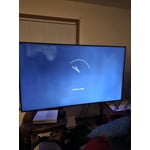
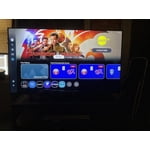
The first 4-6 weeks, the TV had no issues other than a slower interface. As I write this, I am roughly 2 months in and there is a hardware issue; a line runs across the top and there is a green dot. Save yourself a headache and do not purchase this item. First photo shows the green spot and part of the line. The second photo shows the entire line running across the TV.

Review from Samsung US
Helpful?519VMKO7QPOP17358505999
reply from Samsung Specialist

Hi Frankie, We regret to hear about your experience with the Samsung U7900F TV. Samsung stands behind the quality and performance of our products and offers a 1-year limited warranty covering manufacturer defects when purchased new from an authorized seller. You can enter your model number to review the full terms here: https://www.samsung.com/us/support/warranty/ If you haven’t already, please contact Samsung Customer Support at 1-800-SAMSUNG (available 8AM – 12AM EST daily) or via LiveChat on our website under the ‘Support’ section. We’d welcome the chance to assist. ~ Samsung Specialist

Nov 15, 2025
SamsungLoyal
5 out of 5 stars review

I love this television for many reasons!

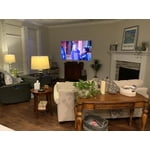
[This review was collected as part of a promotion.] I am so happy with our 50" Samsung Crystal television. It was easy to set up, the picture is beautiful, and I love all the options to create the perfect settings for your environment. We bought this for my hunny's mancave so it's nice to have the picture setting options to adjust so we get the best picture regardless of it being bright outside or darker at night...we can always make the proper adjustments and it really helps! I am able to watch programs without needing my glasses! That's a first for me! I love that I can control the settings in my Samsung Smart Things app on my phone! Plus..it's great that I can locate my phone through my TV settings when I misplace it! And...I seem to lose my phone more often than I'd like to admit! The ONLY suggestion would be to make the remote easier to understand when it comes to adjusting the volume! We both couldn't figure out that you have to push the button up and down. It wasn't clear about how to use it in the set-up details. But, that's a tiny thing to manage once you figure it out. Otherwise, we couldn't be happier! I'm including a pic...but keep in mind...it's in our mancave!

Review from Samsung US
Helpful?519VMKO7QPOP17358505999
Dec 20, 2025
Falconfly
5 out of 5 stars review

Clear picture

[This review was collected as part of a promotion.] The tv had really clear sound and picture. After 19 years I decided to upgrade to this one. My old TV is also a samsung and still works great i just wanted to get a bigger one. Samsung tvs are reliable and excellent quality. The price on this website beats the price on any other website.

Review from Samsung US
Helpful?519VMKO7QPOP17358505999