Skip to Main Content
Sam's Club
Sam's Club
All Departments
All Services
Customer reviews for SAMSUNG 65" Class Q6FD Series 4K QLED Smart TV for
SAMSUNG 65" Class Q6FD Series 4K QLED Smart TV
4.7 out of 5 stars
stars
1,260 ratings1,241 reviews
  1. 5 stars76% (954)
  2. 4 stars18% (228)
  3. 3 stars3% (43)
  4. 2 stars1% (14)
  5. 1 star2% (21)

Member photos

  • +402 images
Sort by |
Showing 91-100 of 1,241 reviews
Jun 1, 2026
Reviewer name: Lex2Good
5 out of 5 stars
5 out of 5 stars review

Must Have!

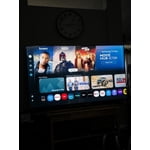
[This review was collected as part of a promotion.] This is an amazing television! The vibrant colors and brightness make it enjoyable to watch! It has such a user-friendly interface that allows me to seamlessly connect to my wifi and watch all of my streaming services!

Review from Samsung US
Helpful?7DLNSAICO7GM17341154888
Jun 10, 2026
Reviewer name: Mikem
5 out of 5 stars
5 out of 5 stars review

Nice display!

[This review was collected as part of a promotion.] This TV has thr sharpest screen I've ever owned! Beautiful contrast with nice, sharp edges.Bright enough to see everything but not so bright as to blind me. Beautiful colors. The user interface was different than I was used to, but it's getting easier as I use it. UHD resolution help everything look crisp.

Review from Samsung US
Helpful?7DLNSAICO7GM17341154888
Jun 5, 2026
Reviewer name: TC91
2 out of 5 stars
2 out of 5 stars review

Wish I never purchased

[This review was collected as part of a promotion.] If I had a second chance I would not purchase this TV. The remote control sucks. Buttons are so small I keep hitting the wrong button and lose my channel. Using phone ap makes it no better. Rewind/FF while in You Tube sucks. If you go to far it goes to the next video. I have lag between tv and signal some times that makes the play back stop and go. Picture and sound are just fine for the price.

Review from Samsung US
Helpful?7DLNSAICO7GM17341154888
reply from Samsung Advisor

Hi TC91, We appreciate your feedback regarding remote performance. If your Q6F TV is responding slowly or inconsistently to the remote, try the following steps: 1. Re-pair the remote – Stand within 1 foot of your TV and press Return and Play/Pause simultaneously for at least 5 seconds. A message should appear confirming it's connected. 2. Check the battery level – Go to: Home > left directional key > Settings > All Settings > General & Privacy > Remote Control 3. Ensure proper charging – SolarCell Remotes can charge using: o Room light or direct sunlight (solar panel should face light source) o USB-C cable (preferably Samsung-branded) 4. Update your TV’s firmware – Go to: Settings > Support > Software Update > Update Now 5. Run Device Care to clear memory and close background apps that may slow performance: Settings > Support > Device Care > Start Device Care If these steps don’t resolve the issue, please contact Samsung Support at 1-800-SAMSUNG (8AM – 9PM EST Mon – Fri, 8AM – 6PM Sat – Sun). LiveChat is also available through the ‘Support’ link on our website. ~ Samsung Advisor

Jun 12, 2026
Reviewer name: Katie
4 out of 5 stars
4 out of 5 stars review

Amazinh

[This review was collected as part of a promotion.] I think it's a beautiful TV I think the brightness is amazing I think the size is great especially for young people the resolution of the series amazing the contrast is a great contrast and interface of the two piece amazing the vibrantee is also great

Review from Samsung US
Helpful?7DLNSAICO7GM17341154888
Jun 10, 2026
Reviewer name: Wsully
2 out of 5 stars
2 out of 5 stars review

High hopes- dashed with screen freezing glitches
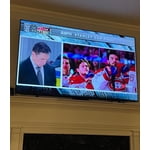
[This review was collected as part of a promotion.] This is my 3rd Samsung TV purchased for my main home living space. My previous Samsung was owned for 8 years and was still working properly. However, I wanted a larger screen and better smart features with updated graphics. I have largely been disappointed in this purchase. I have upgraded, high-speed internet in my home and the TV is located less than 10 feet from the router. The TV (nightly) pauses and the processing wheel spins in the middle of the screen. In addition, the screen freezes and the show you are watching stops streaming live but the sounds continues live. To fix this, you have to switch the channel or to another app. There are tons of online posts about this and a number of "fixes" posted by other Samsung owners. The real question is why does a brand new Samsung TV have buggy issues like this. The screen is great, refreshes smoothly, and the smart technology works well. But, that is all overshadowed by the two glitches that frequently, often daily. Overall, I am disappointed with this purchase. I have likely lost my loyalty to Samsung TVs.

Review from Samsung US
Helpful?7DLNSAICO7GM17341154888
reply from Samsung Specialist

Wsully, We appreciate you taking the time to let us know about your experience. So that we can better troubleshoot this issue and provide steps towards a solution, please contact Samsung Support at 1-800-SAMSUNG (8AM – 9PM EST Mon – Fri, 8AM – 6PM Sat – Sun), or visit our website for LiveChat. ~ Samsung Specialist

May 25, 2026
Reviewer name: Nitro00105
5 out of 5 stars
5 out of 5 stars review

Crystal clear & stunning colors
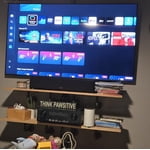
[This review was collected as part of a promotion.] The tv has a crystal clear screen, stunning colors, and great contrast. The brightness is good, but imo tends to be a bit overwhelming in very dark rooms or night time viewing, however on the flip the brightness is great for well lit rooms, as it poswers through even 5k overhead lights. The resolution is great, and can be used as a computer monitor but the frame rate functionality is lacking and difficult to leverage even with a GeForce graphics card. The Samsung interface is my favorite of all the interfaces I have ever used and the interface processing speed is on point. Makes for watch movies or tv shows easy. There is a plethora of apps for you to leverage and they do a great job at keeping them updated. Overall this is a great TV with great visuals and easy to use.

Review from Samsung US
Helpful?7DLNSAICO7GM17341154888
Jul 5, 2026
Reviewer name: Scott
5 out of 5 stars
5 out of 5 stars review

Great TV would recommend

[This review was collected as part of a promotion.] The TV has been great! The only things I wish are very small and some may be configurable that I just dont know about. First, I want to be able to set exactly how many minutes my sleep timer is. Its 2026, I should have full control and not just presets. Second, I wish I could stop the Samsung TV app from being preselected when I turn on the TV (guessing this is configurable but havent looked). Other than those 2 things, I have been extremely happy.

Review from Samsung US
Helpful?7DLNSAICO7GM17341154888
Jun 20, 2026
Reviewer name: Krass
4 out of 5 stars
4 out of 5 stars review

All Around Good TV
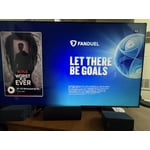
[This review was collected as part of a promotion.] Perfect size. Picture is consistent all the way to the edge. Good sound quality. Refresh rate follows accordingly to my setup. The clarity quality is lacking when it comes to detailed images/video. They are smoothed out instead of pinpoint detail.

Review from Samsung US
Helpful?7DLNSAICO7GM17341154888
May 27, 2026
Reviewer name: Jtmouse
4 out of 5 stars
4 out of 5 stars review

So,so...

[This review was collected as part of a promotion.] The resolution is not clear. In the store, it looked very sharp, but when I took it out of the box, it wasn't as clear as it was in the store. Is this a trick to steal our money? It's a lie. Shame on them. Also, the remote is very poor, with a very clumsy and awkward design.

Review from Samsung US
Helpful?7DLNSAICO7GM17341154888
Jun 5, 2026
Reviewer name: Angry
1 out of 5 stars
1 out of 5 stars review

JUNK!!!

[This review was collected as part of a promotion.] This is the worst TV I have ever bought. If the screensaver comes on for too long it won't go away even turning the TV off and back on multiple times, the only way to get the screensaver to go away is turn repeatedly unplug and plug in the TV about 10 times. TV will not automatically connect to the sound bar except maybe once a week.

Review from Samsung US
Helpful?7DLNSAICO7GM17341154888
reply from Samsung Specialist

Hi there, We appreciate you taking the time to let us know about your experience. So that we can better troubleshoot this issue and provide steps towards a solution, please contact Samsung Support at 1-800-SAMSUNG (8AM – 9PM EST Mon – Fri, 8AM – 6PM Sat – Sun), or visit our website for LiveChat. ~ Samsung Specialist