Skip to Main Content
Sam's Club
Sam's Club
All Departments
All Services
Customer reviews for SAMSUNG 75” Class U7900F Series 4K Crystal UHD Smart TV for
SAMSUNG 75” Class U7900F Series 4K Crystal UHD Smart TV
4.5 out of 5 stars
stars
3,936 ratings3,909 reviews
  1. 5 stars73% (2,886)
  2. 4 stars15% (599)
  3. 3 stars6% (238)
  4. 2 stars2% (92)
  5. 1 star3% (121)

Member photos

  • +1528 images
Sort by |
Showing 71-80 of 3,909 reviews
Aug 19, 2026
Reviewer name: ChewyChew91
5 out of 5 stars
5 out of 5 stars review

65" Crystal UHD Samsung Smart TV

The quality, brightness, contrast and sound is immaculate! Dont even need a sound bar because the sound from the tv speakers are enough! I always tell my husband are we in the movie theaters we need it that loud? Lol! Love how easy it is to navigate and connect to my phone also. Forever a samsung girly!

Review from Samsung US
Helpful?5E42PT4DC65117304274207
Aug 30, 2026
Reviewer name: Justher
3 out of 5 stars
3 out of 5 stars review

U7900FD Crystal UHD TV

Honestly, this TV is pretty solid for the price if you're just trying to watch your regular shows and stream some YouTube. The picture looks surprisingly clear out of the box, and setup didn't make me want to pull my hair out. That said, the sound is kind of tinny, so you're definitely going to want a soundbar if you care about bass, and the built-in menus get a little laggy when you're jumping around fast. If you're on a budget and just want something that works without overthinking it, it gets the job done.

Review from Samsung US
Helpful?5E42PT4DC65117304274207
reply from Samsung Advisor

Hi Justher, Thank you for purchasing Samsung’s U7900D TV and for sharing your feedback on the sound quality. To ensure you’re experiencing the best possible audio, we first recommend checking that your TV is running the latest firmware. To do this, navigate to: Home > Settings > Support > Software Update If the sound still doesn’t meet your expectations, there are a few settings you can try adjusting: Go to: Settings > All Settings > Sound > Sound Mode • Standard: Balanced sound without emphasis on any one range • Optimized: Enhanced effects and spacious sound • Amplify: Boosts mid and high tones to make dialogue clearer You can also explore Expert Settings to fine-tune options such as Balance, Equalizer, Auto Volume, and more to match your personal preferences. For further help adjusting your sound settings or finding the right soundbar for your space, feel free to reach Samsung Support at 1-800-SAMSUNG (8AM – 9PM EST Mon – Fri, 8AM – 6PM Sat – Sun). You can also LiveChat with an agent or find helpful guides by visiting the ‘Support’ section of our website. ~ Samsung Advisor

Aug 21, 2026
Reviewer name: Bill
4 out of 5 stars
4 out of 5 stars review

Volume Control

The remote doesn't always work right. Biggest problem is with the volume control have Samsung TV's both have the same volume issues. They have the same remote when trying to raise or lower the volume tv keeps going to mute. I have to use a fire stick remote to control the volume.

Review from Samsung US
Helpful?5E42PT4DC65117304274207
Sep 6, 2026
Reviewer name: Juicyt90
1 out of 5 stars
1 out of 5 stars review

Don't buy cheap tvs

Tv failed after 3 days spent several hours troubleshooting with Samsung for them to want to send a tech out to look at it. By the time tech arrived screen had other issue. My warranty case was closed and I tried to reach out for new tv but no response. That said can't recommend a tv like this and I love Samsung. Only use there products and are great when they work. I was surprised to see a product by them be so cheap.

Review from Samsung US
Helpful?5E42PT4DC65117304274207
reply from Samsung Advisor

Hi Juicyt90, We are sorry to hear about your experience. To best assist you, please contact us at 1-800-SAMSUNG (8AM – 9PM EST Mon – Fri, 8AM – 6PM Sat – Sun). LiveChat is also available under the ‘Support’ link on our website. ~ Samsung Advisor

Aug 26, 2026
Reviewer name: Quayway
5 out of 5 stars
5 out of 5 stars review

Amazing tv

[This review was collected as part of a promotion.] It's a great tv I love this tv like one of my kids it have ever feature you can name even a built in game system I'm in love with it's the best tv I would ever buy in my 30 years living Samsung are the most smart reliable television I can name one of the top tv that is thank you so much for yur creative model tv Samsung

Review from Samsung US
Helpful?5E42PT4DC65117304274207
Aug 22, 2026
Reviewer name: Luvtech91
5 out of 5 stars
5 out of 5 stars review

Beautiful Display

This is my second Samsung TV and this time I went bigger haha. I love the display and there's really a lot of content. I use a fire stick with it but Samsung has their own TV channels and I also have an antenna that I connect for my local channels. I really don't like ads so i stick to my streaming services mostly. And I'm not sure that I love the remote. Its just different than my last one so I'm getting used to it. Overall I love this TV. I moved my last one to the bedroom because it's still a great TV too so I'll keep buying Samsung TVs.

Review from Samsung US
Helpful?5E42PT4DC65117304274207
Aug 20, 2026
Reviewer name: Thunder
1 out of 5 stars
1 out of 5 stars review

TV is too Dark
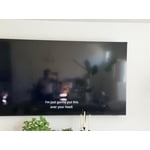
This TV is too dark to see. I asked for support and everything we tried it didn't work. Theu schedules for service tech but then mentioned if the “TV is working like its supposed to, then I will have to pay for the service regardless”. I read some posts online and it seems the Tv is just dark, you literally can't see any night scenes. I cancelled service because i didnt want to pay for nothing. Horrible policy of Samsung. If they don't reach out I am never buying Samsung again

Review from Samsung US
Helpful?5E42PT4DC65117304274207
reply from Samsung Specialist

We appreciate your feedback on the picture quality of Samsung’s U7900F TV. If the image doesn’t quite match your preferences, there are several adjustments you can make to better suit your viewing environment and content type. First, please ensure your TV is running the latest firmware, as updates may include important picture quality enhancements. Go to: Home > Top directional button > Settings > Support > Software Update > Update Now To explore picture mode options, navigate to: Home > Top directional button > Settings > All Settings > Picture > Picture Mode. Options include: • Standard – Ideal for general viewing • Dynamic – Brighter and more vibrant for well-lit spaces • Eco – Optimized for energy efficiency • Movie – Best for viewing in low light • Filmmaker Mode – Preserves the content creator’s intent and disables motion smoothing for supported content You can further customize your image by going to: Settings > All Settings > Picture > Expert Settings, where you can adjust Brightness, Contrast, Color Tone, Sharpness, Contrast Enhancer and more. If you’d like help finding the best picture settings for your preferences, please don’t hesitate to contact Samsung Support at 1-800-SAMSUNG (8AM – 9PM EST Mon – Fri, 8AM – 6PM Sat – Sun). You can also LiveChat with an agent or explore additional resources on our website by clicking the ‘Support’ link. ~ Samsung Specialist

Aug 18, 2026
Reviewer name: PreciousLee
5 out of 5 stars
5 out of 5 stars review

Love Samsung tvs

I love this TV I have several of the Samsung TVs the free Channel started the remote has stopped working on this one it will not go up lots of pain first time I've ever had that happen to get a new remote sent we have all Samsung in every room so TVs 7 Samsungs one Vizio

Review from Samsung US
Helpful?5E42PT4DC65117304274207
Aug 20, 2026
Reviewer name: Edward
3 out of 5 stars
3 out of 5 stars review

Streaming Monitor

Love the big screen. Thought I was buying a tv not a streaming monitor. The new remote is whacked . Not happy with the procedure to get to the tv . But again my mistake thought it was a tv . As a streaming monitor it seems to have all the whistles & bells . Not a happy camper. But will live with my mistake .

Review from Samsung US
Helpful?5E42PT4DC65117304274207
reply from Samsung Specialist

We appreciate you taking the time to let us know about your experience. So that we can better troubleshoot this issue and provide steps towards a solution, please contact Samsung Support at 1-800-SAMSUNG (8AM – 9PM EST Mon – Fri, 8AM – 6PM Sat – Sun), or visit our website for LiveChat. ~ Samsung Specialist

Sep 6, 2026
Reviewer name: DSSW
3 out of 5 stars
3 out of 5 stars review

Great picture, Disappointing AI interruptions

I'm very satisfied with the picture quality but very annoyed with Samsung's interruptions, suggestions & requirements to agree to new terms that unbelievably popup while I am watching a program. I am the one that purchased this TV & controlling it should be mine. Multiple times I've researched how to stop this but somewhere along the line, there is a disconnect between the instructions on the internet that don't match up to what's offered in my settings. Picture quality goes right out the window at this point. I will not buy another Samsung.

Review from Samsung US
Helpful?5E42PT4DC65117304274207
reply from Samsung Advisor

Hi DSSW, Thank you for your feedback. If there’s anything we can assist with, please don’t hesitate to call us at 1-800-SAMSUNG (8AM – 9PM EST Mon – Fri, 8AM – 6PM Sat – Sun), or reach us via text anytime. You can also visit ‘Support’ on our website for: • Live Chat • Manuals, Software, & Warranty Info ~ Samsung Advisor