Skip to Main Content
Sam's Club
Sam's Club
All Departments
All Services
Customer reviews for SAMSUNG 75” Class U7900F Series 4K Crystal UHD Smart TV for
SAMSUNG 75” Class U7900F Series 4K Crystal UHD Smart TV
4.5 out of 5 stars
stars
3,936 ratings3,909 reviews
  1. 5 stars73% (2,886)
  2. 4 stars15% (599)
  3. 3 stars6% (238)
  4. 2 stars2% (92)
  5. 1 star3% (121)

Member photos

  • +1528 images
Sort by |
Showing 661-670 of 3,909 reviews
Jun 20, 2026
Reviewer name: Jimmmy
3 out of 5 stars
3 out of 5 stars review

By Great Pic, but 1 HDMI port and no voice control

[This review was collected as part of a promotion.] I went for value, knowing that the picture quality would not disappoint. That said… I failed to look at the nomenclature, in that there is only 1 HDMI port and the TV is not capable of voice control from the remote that it came with.

Review from Samsung US
Helpful?5E42PT4DC65117304274207
reply from Samsung Advisor

Hi Jimmmy, We appreciate your feedback. Please know the U7900F TV features 2 HDMI ports. Although the TV does not include a voice remote, it can be connected to an external Alexa device. If you need assistance, please don’t hesitate to call 1-800-SAMSUNG (8AM – 9PM EST Mon – Fri, 8AM –6 PM Sat – Sun), or reach us via text 24/7. You can also visit ‘Support’ on our website for: • Live Chat • Manuals, Software, & Warranty Info ~ Samsung Advisor

May 20, 2026
Reviewer name: Updating my Front room
5 out of 5 stars
5 out of 5 stars review

New 55 TV

[This review was collected as part of a promotion.] I am enjoying my new 55” tv. I have on that was bought in 2011 that I still use, just put it a new room to be used for when I am doing my medical procedures so I don't have to move each time it is used since it will be used twice a day for an hour each time. I also have a 43” in my bedroom. I enjoy having Samsung products. I keep replacing them since 1980when I bought my first one. I haven't been disappointed in each purchase.

Review from Samsung US
Helpful?5E42PT4DC65117304274207
Jul 6, 2026
Reviewer name: Wesp
4 out of 5 stars
4 out of 5 stars review

Would have expected better from Samsung

[This review was collected as part of a promotion.] Picture is great audio not so much responsiveness is very shaky will not maintain Wi-Fi connection have to unplug it at least once a week to reset it I would have expected more for the money that I paid

Review from Samsung US
Helpful?5E42PT4DC65117304274207
Jun 21, 2026
Reviewer name: JerDog
4 out of 5 stars
4 out of 5 stars review

I love it except for 2 things. Lack of outputs

[This review was collected as part of a promotion.] I can't use my sound bar because there are no "audio output" jacks nor and optical output port. Our TV intermittently turns itself "on" or "off"...that's frustrating but almost everything else is wonderful.

Review from Samsung US
Helpful?5E42PT4DC65117304274207
Jun 24, 2026
Reviewer name: David
3 out of 5 stars
3 out of 5 stars review

Ok TV

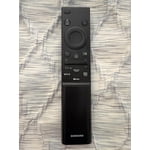
[This review was collected as part of a promotion.] The TV is OK, but the remote control could be a lot better as it has very limited buttons and functions. You can't type in the TV channel you have to select from the TV Guide on the screen or press the up-and-down channel button. The apps on the TV such as YouTube and DIRECTV are a little slow and they are Not as easy to use versus using them on a phone or tablet.

Review from Samsung US
Helpful?5E42PT4DC65117304274207
reply from Samsung Advisor

Hi David, Thank you for your feedback. Many buttons on your remote have multiple functions. • Settings/Number/Color: Allows you to easily access your TV's Quick Settings and input channel numbers. • Volume rocker: Push up/down to adjust volume. Press and release quickly to mute. • Long-press Volume button: Hold for more than 1 second to open Accessibility Shortcuts. • RETURN button: Press to go back to the previous menu or screen. While watching TV, it takes you back to the previous channel. These functions allow for a more streamlined experience without adding extra buttons. Learn TV Remote is a feature designed to help users become familiar with the layout and function of each button on the Samsung remote. When enabled, pressing any button (except the Power button, which will still turn off the TV) will prompt the TV to announce the button’s name and its purpose – without affecting TV operation. This teaching mode is especially useful for users who are visually impaired or new to Samsung remotes. To enable this feature, go to: Settings > All Settings > General & Privacy > Accessibility > Learn TV Remote. To exit, simply press the Return key twice. If you’d like more assistance with this feature, please reach Samsung Support at 1-800-SAMSUNG (8AM – 9PM EST Mon – Fri, 8AM – 6PM Sat – Sun). LiveChat agents are also available through the ‘Support’ link on our website. ~ Samsung Advisor

May 27, 2026
Reviewer name: Frustrated Gpa
1 out of 5 stars
1 out of 5 stars review

Frustrated with set up

[This review was collected as part of a promotion.] picture good - sound good. Gave this 1 star because set-up was very frustrating! 1st prob was could not set up without creating a Samsung account, Did not want to do that but required. Followed all on screen instructions which were wrong. Nothing worked until used QR. Once into set up process, most instructions were wrong of incomplete. On-line instructions for getting to items in settings were wrong - one step left out. Only got to settings by accident. Spent 1 to 1 1/2 hours each day over a one week period until I got what I wanted. Final frustration was TV lost the internet connection. It did not save the PW for my router - had to reenter. Took several tries - kept timing out cause I could not enter PW fast enough - 1st time I've ever been required to enter a PW quickly while setting up anything. Bottom line - I have not and will not recommend this TV to a friend - or anyone else for that matter. Done with Samsung if product has to be set up

Review from Samsung US
Helpful?5E42PT4DC65117304274207
reply from Samsung Advisor

Hi Frustrated Gpa, We are very sorry to hear about the issues you experienced while setting up your TV. Please know we appreciate all of your patience, and we are here for you if you have issues in the future. Reach out by calling 1-800-SAMSUNG from 8AM – 9PM EST Mon – Fri, 8AM – 6PM Sat – Sun, any day of the week. You can also chat with us online by visiting the ‘Support’ section of our website. ~ Samsung Advisor

Jun 20, 2026
Reviewer name: Lizzeees
5 out of 5 stars
5 out of 5 stars review

All around great tv
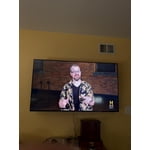
[This review was collected as part of a promotion.] I am very happy with our decision to purchase our Samsung TV. While there are lower cost options available for the same size television, Samsung is still competitively priced, and the quality is much better. The picture is very crisp and clear. Also, we've noticed that the sound quality on our other tv (not the Samsung) is very low and requires the use of a soundbar. The sound quality on our Samsung is excellent, and doesn't need any enhancement. The remote control is very user friendly and the responsiveness to the controls is quick. Once our other tv needs to be replaced, we will be purchasing another Samsung.

Review from Samsung US
Helpful?5E42PT4DC65117304274207
Jun 18, 2026
Reviewer name: Unsatisfied
1 out of 5 stars
1 out of 5 stars review

Poor features

[This review was collected as part of a promotion.] Very disappointed. When setting it up the television needs to download terms and conditions . Keep getting error 77-1 can't access the Samsung hub so the TV does not load. Only thing that works is hdmi so the TV is a big monitor for my computer 😪😭

Review from Samsung US
Helpful?5E42PT4DC65117304274207
reply from Samsung Advisor

Hi Unsatisfied, Thank you for your review and for sharing your concerns. A Samsung Account is required to access Smart Hub, which powers the core smart features of your TV - including app access (like Netflix and YouTube), service updates, and content personalization. Without signing in and accepting the Terms and Conditions, your TV will function in a basic mode - supporting external devices (such as HDMI and over-the-air antenna), but streaming apps and Smart Hub services will be unavailable. We understand this requirement may not be ideal for all users, but it’s necessary for full access to Samsung’s smart features and connected services. If you need assistance creating or logging into a Samsung Account, we’re here to help. Please contact Samsung Support at 1-800-SAMSUNG (8AM – 9PM EST Mon – Fri, 8AM – 6PM Sat – Sun). LiveChat and additional support resources are also available through the Support link on our website. ~ Samsung Advisor

Jun 1, 2026
Reviewer name: Etherealcam
4 out of 5 stars
4 out of 5 stars review

70 inch Crystal Clear TV Review
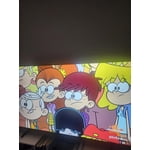
[This review was collected as part of a promotion.] the product is great very clear on the screen the audio is crisp and the colors is vibrant I would change would be the controller I would give it a voice like how you would have it with an Alexa or a fire stick I would give it a voice command button so that you can have the TV go to what you need to apply and click on it the buttons on the remote and then another thing is I think I would also change and add a button on the remote to switch HDMI it's a little Annoying going to the menu but then that the TV is good

Review from Samsung US
Helpful?5E42PT4DC65117304274207
Jun 5, 2026
Reviewer name: Daniel
2 out of 5 stars
2 out of 5 stars review

Fine but not great.

[This review was collected as part of a promotion.] It's fine but sometimes the sound cuts out and you have to power cycle the tv to get it to work again. Also kind of annoying that only the remote that came with it can click the update buttons. Overall a decent tv, but I don't think I'd buy it again.

Review from Samsung US
Helpful?5E42PT4DC65117304274207
reply from Samsung Advisor

Hi Daniel, For optimal performance, please ensure your TV is running the latest firmware. You can check this by going to: Home > left directional key > Settings > Support > Software Update To further optimize performance, try running Device Care, which checks memory, clears unused cached data, and closes background apps: Home > left directional key > Settings > Support > Device Care > Start Device Care If issues continue, please reach Samsung Support at 1-800-SAMSUNG (8AM – 9PM EST Mon – Fri, 8AM – 6PM Sat – Sun). LiveChat is also available via the ‘Support’ link on our website. ~ Samsung Advisor