Skip to Main Content
Sam's Club
Sam's Club
All Departments
All Services
Customer reviews for SAMSUNG 50" Class U7900F Series 4K Crystal UHD Smart TV for
SAMSUNG 50" Class U7900F Series 4K Crystal UHD Smart TV
4.6 out of 5 stars
stars
3,344 ratings3,280 reviews
  1. 5 stars74% (2,488)
  2. 4 stars15% (508)
  3. 3 stars5% (179)
  4. 2 stars2% (68)
  5. 1 star3% (101)

Member photos

  • +1324 images
Sort by |
Showing 271-280 of 3,280 reviews
Jun 20, 2026
Mike
4 out of 5 stars review

non compatible sound bar!

I upgraded from a 50 inch samsung with a samsung soundbar to a 75 inch. When trying to get the sound bar going it was not compatible with the new 75 inch. The old samsung sound bar wasn't that great anyway and only a few years old. I will not go out and get another sound bar. Thanks a lot. Mike

Review from Samsung US
Helpful?5C20ZRAZZ46Q16498555478
Jun 10, 2026
Maruang
5 out of 5 stars review

Great screen for a lot

[This review was collected as part of a promotion.] the product is perfect for Cinema for movies for staying at home for working remote work working on it doing some design and working on interactive and the creative the product is perfect for Cinema for movies for staying at home for working remote work working on it doing some design and working on interactive and creative stuff

Review from Samsung US
Helpful?5C20ZRAZZ46Q16498555478
Jun 5, 2026
Lloyd
5 out of 5 stars review

My Samsung Smart TV

[This review was collected as part of a promotion.] This TV is amazing. The picture is the best I have ever seen on a TV. Most shows appear that you are looking out a window watching the action, it's that true to life visual. Accessing the intertnet through the TV is a new experience for me and comes in quite handy on a lazy day. All in all I would recommend this TV to anyone wanting an exceptional product!!!

Review from Samsung US
Helpful?5C20ZRAZZ46Q16498555478
Jun 15, 2026
Weeping_Deer
4 out of 5 stars review

Network tends to drop while streaming in apps
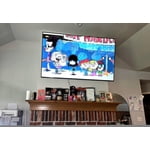
[This review was collected as part of a promotion.] This TV is aesthetically quite beautiful and has great resolution. I love the image quality and how quick and easy it was to set up and link to the Samsung phones in my house with the SmartThings app. The brightness gets quite bright which is great because my living room it is in is very dark later in the day but I will say that if I have the recessed light turned on just above the mounted TV, it tends to wash out the image and create a glare (as lights tend to do). The colors are bright and vivid on the picture and I feel as though my Samsung Account is secure being linked to the TV. My one main complaint is that every so often (about once every 2 hours) I lose my network connection. Sometimes it is only for a second or 2 before it reconnect and other times, I have to either change the channel on whatever app Im using or I will have to back completely out and restart the app I'm using. I have sat and waited for it to reconnect and if I'm in Samsung TV Plus, it will at times not go back to the programming unless I physically click a button... which isnt too big of a hassle, it just feels unnecessary as an older Samsung TV I used to have was capable of never losing my network connection. (And I want to mention that I have made sure it was not because of my home internet provider and have the router directly underneath of the TV and have used all different Ghz wifis to try and make it stop with no change.) Overall, it is a solid TV that I enjoy. The sound could be a bit louder for such a large TV but I still am very happy with this TV and would recommend it to friends and family.

Review from Samsung US
Helpful?5C20ZRAZZ46Q16498555478
Jun 20, 2026
Kitkat
5 out of 5 stars review

Loving all of my Samsung products!!!!!

I am a big fan of Samsung!I bought a front loader washer/dryer 14 yrs ago and they r going strong!I have a Samsung French door refrigerator that I bought almost 5 yrs ago and love it as well.This is my first Samsung tv but I'm loving it!The picture and sound is so good.My daughter has. 75” Samsung Tv and that's made me buy my 65”.

Review from Samsung US
Helpful?5C20ZRAZZ46Q16498555478
Jun 15, 2026
Upsettvbuyer
2 out of 5 stars review

Won't link to any wifi
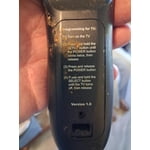
[This review was collected as part of a promotion.] I've been buying Samsung TVS for a long time. Enjoy the quality picture and everything about them. I recently purchased this new TV replacement that had broken on my outside patio I was a little taken back by the new style remote but being I have a roku TV I was able to figure it out quite easily. The problem I have is my tv will not pick up any Wi-Fi anywhere so as it stands, the only thing my TV picks up is digital TV from the antenna will not pick up any internet so I can't get any of my Samsung channels, my Netflix or any other apps that I have set up for my other televisions and it's very discouraging, and I can't figure out why I've done every steps. That I've seen to get remedy of this situation, but nothing seems to happen.I just wish someone could give me a hand with this.So I could get this t v working like I wanted to.

Review from Samsung US
Helpful?5C20ZRAZZ46Q16498555478
reply from Samsung Advisor

Hi Upsettvbuyer, Thank you for sharing your experience with Wi-Fi connectivity. If your TV is having trouble connecting to the network, the following steps may help resolve the issue: Signal & Setup Tips: 1. Check TV-to-router distance – Your TV should be within 50 feet of the modem or access point for reliable signal strength. 2. Minimize interference – Turn off nearby wireless devices and make sure there are no physical barriers (stone walls, fireplaces, appliances) between the TV and router. Power Cycle Devices: 3. Restart both your TV and router – Unplug both devices for at least 30 seconds, then plug them back in and allow them to reboot fully. Connection Type: 4. Evaluate your connection method – o If using Wi-Fi, move your router closer to the TV and eliminate any obstructions. o For a more stable connection, we strongly recommend using a wired Ethernet cable. o If already using Ethernet, verify the cable is working by testing it with another device. Run Built-In Diagnostic Tools: 5. Network Test: Settings > Support > Device Care > Self Diagnosis > Smart Hub Connection Test 6. Wi-Fi Check: Settings > Support > Device Care > Self Diagnosis > Wi-Fi 7. Please ensure you are running the latest Firmware. Go to Settings> Support> Software Update. Last Resort: 8. Perform a Factory Reset (if issues persist): Settings > All Settings > General & Privacy > Reset > Factory Data Reset. Note that this will return all settings to their original defaults. If these steps don’t resolve the issue, please reach out to Samsung Support at 1-800-SAMSUNG, available 8AM – 12AM EST, 7 days a week. LiveChat support and additional help are available at the ‘Support’ link on our website. ~Samsung Advisor

Jun 5, 2026
Pianonerd
4 out of 5 stars review

One disappointment

[This review was collected as part of a promotion.] My husband and i were greatly disappointed that the NESN sports app was not available for this tv. Unfortunately, when we stream NESN through the app on our iPad, it starts to "skip" and buffer at about the 3rd inning. Other than that, it's okay.

Review from Samsung US
Helpful?5C20ZRAZZ46Q16498555478
Jun 20, 2026
Icecreamdream
3 out of 5 stars review

Good for price has a slight glitch

Picture quality is outstanding as is ease of use however it has begun consistently shutting off on its own while we are using the Firestick, Netflix, Hulu etc it will just randomly power down for no reason right witching us viewing- very annoying. I researched online others have also had this issue.

Review from Samsung US
Helpful?5C20ZRAZZ46Q16498555478
reply from Samsung Advisor

Hi Icecreamdream, It’s unfortunate to hear your U7900F TV is turning off by itself while you're streaming apps. Please try resetting your TV's Smart Hub, as this should resolve the power off issue. Go to: Home > Settings > Support > Device Care > Self Diagnosis > Reset Smart Hub. If you need additional support, Samsung is here to help. Please call us at 1-800-SAMSUNG (8AM – 9PM EST Mon – Fri, 8AM – 6 PM Sat – Sun), or reach us via text 24/7. You can also visit ‘Support’ on our website for: • Live Chat • Manuals, Software, & Warranty Info ~ Samsung Advisor

Jun 18, 2026
Unsatisfied
1 out of 5 stars review

Poor features

[This review was collected as part of a promotion.] Very disappointed. When setting it up the television needs to download terms and conditions . Keep getting error 77-1 can't access the Samsung hub so the TV does not load. Only thing that works is hdmi so the TV is a big monitor for my computer 😪😭

Review from Samsung US
Helpful?5C20ZRAZZ46Q16498555478
reply from Samsung Advisor

Hi Unsatisfied, Thank you for your review and for sharing your concerns. A Samsung Account is required to access Smart Hub, which powers the core smart features of your TV - including app access (like Netflix and YouTube), service updates, and content personalization. Without signing in and accepting the Terms and Conditions, your TV will function in a basic mode - supporting external devices (such as HDMI and over-the-air antenna), but streaming apps and Smart Hub services will be unavailable. We understand this requirement may not be ideal for all users, but it’s necessary for full access to Samsung’s smart features and connected services. If you need assistance creating or logging into a Samsung Account, we’re here to help. Please contact Samsung Support at 1-800-SAMSUNG (8AM – 9PM EST Mon – Fri, 8AM – 6PM Sat – Sun). LiveChat and additional support resources are also available through the Support link on our website. ~ Samsung Advisor

Jun 6, 2026
larkspurlady
4 out of 5 stars review

The remote is hard to use.

[This review was collected as part of a promotion.] The TV itself is OK. The remote is hard to use. I think individual buttons would be better than the circle. My friend gave me the TV as a gift, so I will continue to use it, even if it is a little frustrating.

Review from Samsung US
Helpful?5C20ZRAZZ46Q16498555478