Skip to Main Content
Sam's Club
Sam's Club
All Departments
All Services
Customer reviews for SAMSUNG 50" Class U7900F Series 4K Crystal UHD Smart TV for
SAMSUNG 50" Class U7900F Series 4K Crystal UHD Smart TV
4.6 out of 5 stars
stars
3,418 ratings3,354 reviews
  1. 5 stars74% (2,533)
  2. 4 stars15% (525)
  3. 3 stars5% (186)
  4. 2 stars2% (71)
  5. 1 star3% (103)

Member photos

  • +1324 images
Sort by |
Showing 1,871-1,880 of 3,354 reviews
May 30, 2026
Nanny
4 out of 5 stars
4 out of 5 stars review

Great

[This review was collected as part of a promotion.] I think it's very it's been very helpful to me I'm constantly watching it it looks great receives a lot of compliments

Review from Samsung US
Helpful?5C20ZRAZZ46Q16498555478
Apr 21, 2026
Lisa
5 out of 5 stars
5 out of 5 stars review

Reviews

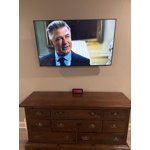
[This review was collected as part of a promotion.] I love the way my new to me.tv looks hanging on my wall.and it has the perfect brightness to eliminate the room. The color is very cool one that fits perfect with my color scheme. Theresol

Review from Samsung US
Helpful?5C20ZRAZZ46Q16498555478
May 20, 2026
SliccRicc88
5 out of 5 stars
5 out of 5 stars review

Awesome picture, awesome sound , awesome PRICE !!!

[This review was collected as part of a promotion.] Great TV!l. Love the way it looks, especially the color and size!! Great for movies and sports 🏀 events

Review from Samsung US
Helpful?5C20ZRAZZ46Q16498555478
Apr 20, 2026
Rodeocowboy
5 out of 5 stars
5 out of 5 stars review

Great all-around tv

[This review was collected as part of a promotion.] Use it mainly for gaming, picture is crisp, clean love the refresh rate for Xbox. Movie and shows look just as stunning

Review from Samsung US
Helpful?5C20ZRAZZ46Q16498555478
May 11, 2026
Tonydemac
4 out of 5 stars
4 out of 5 stars review

Exceptions

[This review was collected as part of a promotion.] Great tv once you get used to the never before seen add-ons. Remot e is a bit wonky at first but is a new invention for this model.

Review from Samsung US
Helpful?5C20ZRAZZ46Q16498555478
May 11, 2026
Dennis Dill
5 out of 5 stars
5 out of 5 stars review

Best bang for your buck

[This review was collected as part of a promotion.] Awesome tv does everything well has all the apps you could ever want fast great picture. Perfect Tv

Review from Samsung US
Helpful?5C20ZRAZZ46Q16498555478
May 20, 2026
Runt66
5 out of 5 stars
5 out of 5 stars review

Love it!

[This review was collected as part of a promotion.] I purchased this TV couple months ago now. The picture is great, has beautiful colors and I love how easy it was to set up streaming on it. Would purchase it again if was in market for another.

Review from Samsung US
Helpful?5C20ZRAZZ46Q16498555478
May 11, 2026
Spanky
5 out of 5 stars
5 out of 5 stars review

It's easy to use and set up

[This review was collected as part of a promotion.] This is a great TV, I personally don't have cable, I use an inttena , the TV works great, I'm very impressed with the clarity. The sound is clear , just a great TV

Review from Samsung US
Helpful?5C20ZRAZZ46Q16498555478
May 20, 2026
Timothy
3 out of 5 stars
3 out of 5 stars review

3 out of 5

[This review was collected as part of a promotion.] Pictures aren't isn't very sharp And the brightness never good volume is terrible Three out of fiveI haven't been

Review from Samsung US
Helpful?5C20ZRAZZ46Q16498555478
reply from Samsung Advisor

Hi Timothy, We’re sorry to hear that the picture on your Samsung U7900F TV appears too dark. If this isn’t meeting your expectations, there are several settings you can adjust to improve the overall brightness and clarity of your screen. First, try disabling certain energy-saving features that may be dimming the screen automatically. Go to: Settings > All Settings > General & Privacy > Power and Energy Saving, then turn off Brightness Optimization, Energy Saving Solution, Motion Lighting, and/or Contrast Enhancer. Next, adjust the Picture Mode to better match your viewing environment: Settings > All Settings > Picture > Picture Mode and choose from the following: • Dynamic – Brighter and clearer for well-lit rooms • Standard – Balanced for most environments • Movie – Ideal for watching in a dark room • Eco – Designed for energy savings • Filmmaker Mode – Preserves the creator’s original intent You can also manually adjust brightness by going to: Settings > All Settings > Picture > Expert Settings > Brightness. Use the slider to set a level that suits your preferences (0–50). Finally, we recommend making sure your TV has the latest software installed: Settings > Support > Software Update > Update Now We hope these tips help improve your viewing experience. If you need further assistance with setup or adjustments, feel free to contact Samsung Customer Support at 1-800-SAMSUNG, available daily from 8AM – 9PM EST Mon – Fri, 8AM – 6PM Sat – Sun. You can also visit the Samsung website and click on ‘Support’ for: • Live Chat • Manuals, Software, & Warranty Info ~ Samsung Advisor

Apr 20, 2026
Lovins
5 out of 5 stars
5 out of 5 stars review

Amazing Picture.

[This review was collected as part of a promotion.] Amazing product, my phone, tablet, laptop and t.v. are all Samsung and I tell everyone they should buy Samsung products as well!!! Top of the line products!

Review from Samsung US
Helpful?5C20ZRAZZ46Q16498555478