Skip to Main Content
Sam's Club
Sam's Club
All Departments
All Services
Customer reviews for SAMSUNG 55" Class U7900F Series 4K Crystal UHD Smart TV for
SAMSUNG 55" Class U7900F Series 4K Crystal UHD Smart TV
4.5 out of 5 stars
stars
3,830 ratings3,730 reviews
  1. 5 stars74% (2,820)
  2. 4 stars15% (576)
  3. 3 stars6% (228)
  4. 2 stars2% (89)
  5. 1 star3% (117)

Member photos

  • +1467 images
Sort by |
Showing 291-300 of 3,730 reviews
Jul 6, 2026
Reviewer name: Cherryberry
5 out of 5 stars
5 out of 5 stars review

Wonderful picture
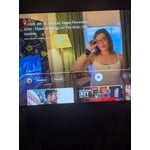
[This review was collected as part of a promotion.] I love everything about my television I wasn't able to even watch tv before my eyesight isn't what it used to be. I couldn't read anything it said and the picture was fuzzy now > enjoy my TV every day.. the color is beautiful it's all great.

Review from Samsung US
Helpful?3X98WOQFG1UG16471557124
Jul 20, 2026
Reviewer name: Bill
5 out of 5 stars
5 out of 5 stars review

Great pic and sound
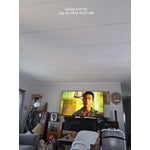
[This review was collected as part of a promotion.] I live in a mobile home with a 14 × 30 living room. I was afraid the 65" might be too large, but low a ND behold , it is perfect. I am 79 yrs old a d reading T V screen can be tough sometimes. I sit at the far end of the room and don't miss a thing. Also the sound is great. I still look behind me occasionally because I hear things I didn't hear previously. Thanks Bill

Review from Samsung US
Helpful?3X98WOQFG1UG16471557124
Jul 19, 2026
Reviewer name: Frosty68
1 out of 5 stars
1 out of 5 stars review

can't believe samsung made a tv this bad

This is a TV for people who have never had a better TV or don't know/don't care about TV. I own a QLED, this U series was given as a house warming gift and it is quite possibly the worst TV I've ever owned. The software is slow as molasses - always a 2 second delay after any button press. The software is constantly shoving certain content in your face (why is Fox News a permanent tile on the home page?). Twitch app can only be used from the asinine gaming page, and cannot be added to the list of apps on the home page. So every time I want to watch Twitch the quickest way is to go to recent searches and open it there. Horrid UX. Absolutely hate this TV and can't wait to replace it. So in short, if you're looking for an absolute piece of trash then look no further.

Review from Samsung US
Helpful?3X98WOQFG1UG16471557124
reply from Samsung Advisor

Hi Frosty68, Thank you for sharing your experience. Please know that you can customize your Home screens by installing, removing or adding your favorite apps to Apps Home and/or For You Home screen. Here's how: Searching for & Installing Apps 1. From the Home screen, press left on the remote’s directional pad. 2. Navigate to and select Search. 3. Using the search bar, enter the content or app you’d like to find. 4. Navigate to and select the app you’d like to install, then select Install. Note: Previously installed apps can be accessed on the Settings screen. Adding & Managing Apps on Home Screen 1. Go to App Settings (these can be found at the bottom of the Apps screen) and select the app you want to move. The following options will be available: a. Add to Home: Move the app to your desired location on the Home screen. b. Delete: Delete app. c. Lock/Unlock: Lock the app with a PIN so only you can use it. When the app is selected again, you will be prompted to enter the PIN to unlock it. d. Reinstall: Reinstall the app. e. View Details: View the app’s information and details. If you need more help with app management, please don’t hesitate to reach Samsung Support at 1-800-SAMSUNG (8AM – 9PM EST Mon – Fri, 8AM – 6PM Sat – Sun). LiveChat agents are also available through the ‘Support’ link on our website. ~ Samsung Advisor

Jul 5, 2026
Reviewer name: Nene
3 out of 5 stars
3 out of 5 stars review

Remote needs to be updated with numbers

[This review was collected as part of a promotion.] The TV itself has a sharp picture and works great. The remote is why I rated it 3 stars. It does not have numbers which is needed to use with my satellite. I constantly have to go back and forth between two remotes.

Review from Samsung US
Helpful?3X98WOQFG1UG16471557124
reply from Samsung Advisor

Hi Nene, Thank you for sharing your experience. Please know you can easily access your Samsung TV’s Quick Settings by pressing the Settings/Number/Color button located just below the power button on your remote. Each time you press this button, it will toggle between: • Quick Settings menu • Virtual number pad • Color pad options To use Quick Settings: 1. Press the Settings/Number/Color button on your remote 2. When the Quick Settings menu appears, you can adjust commonly used options quickly 3. For more advanced adjustments, scroll to and select All Settings This shortcut helps you access essential features without navigating through the full menu. I hope this helps. For further assistance, please contact Samsung Customer Support at 1-800-SAMSUNG, 8AM – 12AM EST, 7 days a week. LiveChat and additional support resources are also available through the Support link on our website. ~ Samsung Advisor

Jul 20, 2026
Reviewer name: DanaDane
5 out of 5 stars
5 out of 5 stars review

Best tv quality and sound ever
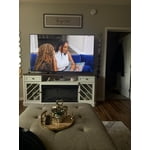
[This review was collected as part of a promotion.] Excellent quality and picture. The sound on this tv is vibrant. The quality of the picture is amazing. I own 4 tv's by Samsung and it has not disappointed me yet. The apps are easy to install if you have a Samsung account.

Review from Samsung US
Helpful?3X98WOQFG1UG16471557124
Jul 20, 2026
Reviewer name: Costco shopper
3 out of 5 stars
3 out of 5 stars review

the remote control is not good,

[This review was collected as part of a promotion.] The remote control of this tv is NOT GOOD. You must poinr the remote directly to cerftsin point on the TV to make it work, or it won't response, and there is no indication on the tv yo guide us, so lots of yime the remote is unresonsive, very frustrated !!!

Review from Samsung US
Helpful?3X98WOQFG1UG16471557124
reply from Samsung Advisor

Hi Costco shopper, Thank you for your feedback. If your remote isn’t responding, here are a few quick steps to help determine if it’s working correctly: 1. Check the batteries: Remove the back cover of your remote and replace the batteries with a fresh set, ensuring they are inserted in the correct direction. 2. Test for infrared signal: Point the front of the remote at your smartphone camera. While holding down any button, you should see a flashing light through the camera screen. (For iPhone users, the front-facing camera works best.) If you see the light, your remote is working and may need to be re-paired with your TV. 3. Point the remote correctly: Try pointing the remote directly at the TV from about 5-6 feet away. This can help ensure a clearer signal between the remote and the TV. If you still need assistance, please contact Samsung Support at 1-800-SAMSUNG 8AM – 9PM EST Mon – Fri, 8AM – 6PM Sat – Sun). LiveChat agents are also available through the ‘Support’ link on our website. ~ Samsung Advisor

Jul 20, 2026
Reviewer name: Blossoms dad
1 out of 5 stars
1 out of 5 stars review

Trouble with the sound since I purchased the TV

[This review was collected as part of a promotion.] I wanted to love this TV. Relatively easy set-up and the picture quality is excellent. The problem? I've had trouble with no sound almost since I purchased it. I was instructed by Samsung to turn it off/on again to solve the issue, which I have to do almost EVERY SINGLE TIME I TURN ON THE TV...sometimes for 10 minutes or more. I have a technician coming this week to look at it (since it's still under warranty). This should not be necessary. I purchased this TV to replace an LG which I had for 6 years; wish I had gotten another LG.

Review from Samsung US
Helpful?3X98WOQFG1UG16471557124
May 28, 2026
Reviewer name: Duckie
5 out of 5 stars
5 out of 5 stars review

Good

[This review was collected as part of a promotion.] Good, good size. Clear image. I like that it is a realy goog product. Thanks.

Review from Samsung US
Helpful?3X98WOQFG1UG16471557124
Aug 7, 2025
Reviewer name: Anonymous
5 out of 5 stars
5 out of 5 stars review

Verified Purchase

Samsung 55-in TV

We purchased a 55-in Samsung TV at Sam's and are very happy with the picture and price. We would recommend it.

Helpful?3X98WOQFG1UG16471557124
Jan 24, 2026
Reviewer name: JohnM
5 out of 5 stars
5 out of 5 stars review

Verified Purchase

Great value and awesome upgrade

This is a huge upgrade over a 5 year old Samsung smart TV. It starts faster, uses a new OS and has a beautiful and bright display. Very happy.

Helpful?3X98WOQFG1UG16471557124