Skip to Main Content
Sam's Club
Sam's Club
All Departments
All Services
Customer reviews for SAMSUNG 55" Class U7900F Series 4K Crystal UHD Smart TV for
SAMSUNG 55" Class U7900F Series 4K Crystal UHD Smart TV
4.5 out of 5 stars
stars
3,854 ratings3,754 reviews
  1. 5 stars74% (2,838)
  2. 4 stars15% (580)
  3. 3 stars6% (229)
  4. 2 stars2% (90)
  5. 1 star3% (117)

Member photos

  • +1477 images
Sort by |
Showing 2,851-2,860 of 3,754 reviews
Jun 5, 2026
Reviewer name: Dray
3 out of 5 stars
3 out of 5 stars review

Aight

[This review was collected as part of a promotion.] I wish my tv came with Alexa and it's not even an option to dowoad

Review from Samsung US
Helpful?3X98WOQFG1UG16471557124
reply from Samsung Advisor

Hi Dray, Thank you for sharing your review. Your TV Works With Alexa, meaning you’ll need to connect a standalone Alexa device such as an Echo speaker, to control compatible smart home devices and some experiences on your TV. Here are the steps: 1. Download both the Amazon Alexa and Samsung SmartThings apps, if you don't already have them. Both are available for iOS or Android devices. 2. Make sure your Alexa device and TV are both connected to the same Wi-Fi network. 3. Your TV must be enabled within the SmartThings app. If not, make sure you are signed in with your Samsung account on the TV: Settings > All Settings > Samsung Account 4. Log in to the SmartThings app with the same Samsung account. Tap Devices, and if your TV isn’t already shown, tap + to add it to the app. 5. In the Alexa app, enable the SmartThings skill and sign into your Samsung account. This will automatically connect your Samsung TV to Alexa and let you use voice commands to control your television. If you need more help, we’re here. Give us a call at 1-800-SAMSUNG (8AM – 9PM EST Mon – Fri, 8AM – 6PM Sat – Sun). You can also connect with a LiveChat agent through the Support link on our website. ~ Samsung Advisor

May 20, 2026
Reviewer name: Bobbob
5 out of 5 stars
5 out of 5 stars review

Excellent TV

[This review was collected as part of a promotion.] Great picture. Easy to navigate apps. The resolution is fantastic.

Review from Samsung US
Helpful?3X98WOQFG1UG16471557124
May 11, 2026
Reviewer name: Walkers
5 out of 5 stars
5 out of 5 stars review

Great picture!
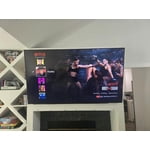
[This review was collected as part of a promotion.] Absolutely amazing graphic display and picture. My family loves our movie nights now !

Review from Samsung US
Helpful?3X98WOQFG1UG16471557124
Jun 1, 2026
Reviewer name: Holley
5 out of 5 stars
5 out of 5 stars review

Great features! Easy to set up and use

[This review was collected as part of a promotion.] great features and easy to use. Set up was easy too.

Review from Samsung US
Helpful?3X98WOQFG1UG16471557124
Jul 5, 2026
Reviewer name: Chrissy76
5 out of 5 stars
5 out of 5 stars review

Great color

[This review was collected as part of a promotion.] TV is very easy to set up and use your friendly color is very bright beautiful.

Review from Samsung US
Helpful?3X98WOQFG1UG16471557124
Jul 5, 2026
Reviewer name: Kettle Ann
5 out of 5 stars
5 out of 5 stars review

Beautiful clarity!
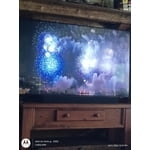
[This review was collected as part of a promotion.] Love this product... Never had a Samsung before, but so happy our friend bought us this great TV

Review from Samsung US
Helpful?3X98WOQFG1UG16471557124
Jul 5, 2026
Reviewer name: Anonymous
4 out of 5 stars
4 out of 5 stars review

Nice TV

[This review was collected as part of a promotion.] Only issue with TV is speakers on back of TV? Other than that it works fine

Review from Samsung US
Helpful?3X98WOQFG1UG16471557124
Jun 26, 2026
Reviewer name: EsMare
4 out of 5 stars
4 out of 5 stars review

Good TV

[This review was collected as part of a promotion.] Good TV! Some slight issues with Twitch app, but outside of that it's good and I'd reccomend.

Review from Samsung US
Helpful?3X98WOQFG1UG16471557124
Jul 5, 2026
Reviewer name: bell
2 out of 5 stars
2 out of 5 stars review

bad features

[This review was collected as part of a promotion.] The brightness and color are bad with this tv. Do not buy!

Review from Samsung US
Helpful?3X98WOQFG1UG16471557124
reply from Samsung Advisor

Hi bell, We’re sorry to hear you’re not fully satisfied with the picture quality on your Samsung U7900F TV. If the image appears too dark, we suggest disabling certain energy-saving features, which can automatically adjust brightness and affect how the screen looks. Go to: Settings > All Settings > General & Privacy > Power and Energy Saving, then turn off Brightness Optimization, Energy Saving Solution, Motion Lighting, and/or Contrast Enhancer. You can also adjust the Picture Mode to better suit your environment: Settings > All Settings > Picture > Picture Mode • Standard – Default mode for general viewing • Dynamic – Brighter and clearer, ideal for well-lit rooms • Movie – Best for dark room viewing • Eco – Energy-saving mode • Filmmaker Mode – Preserves content as intended by creators To fine-tune brightness, go to: Home > left directional key > Settings > All Settings > Picture > Expert Settings, then adjust the Brightness level (0–50) to your preference. Lastly, please make sure your TV is running the latest firmware: Home > Home > left directional key > Settings > Support > Software Update > Update Now We hope these tips help improve your viewing experience. If you need further support, feel free to contact us at 1-800-SAMSUNG, 8AM – 12AM EST, 7 days a week. LiveChat is also available via the ‘Support’ link on our website. ~ Samsung Advisor

Jun 22, 2026
Reviewer name: Jaydun970
4 out of 5 stars
4 out of 5 stars review

Good color

[This review was collected as part of a promotion.] THIS tv is works really good, and it's really colorful

Review from Samsung US
Helpful?3X98WOQFG1UG16471557124