Skip to Main Content
Sam's Club
Sam's Club
All Departments
All Services
Customer reviews for SAMSUNG 55" Class U7900F Series 4K Crystal UHD Smart TV for
SAMSUNG 55" Class U7900F Series 4K Crystal UHD Smart TV
4.5 out of 5 stars
stars
3,830 ratings3,730 reviews
  1. 5 stars74% (2,820)
  2. 4 stars15% (576)
  3. 3 stars6% (228)
  4. 2 stars2% (89)
  5. 1 star3% (117)

Member photos

  • +1467 images
Sort by |
Showing 171-180 of 3,730 reviews
Jul 5, 2026
Reviewer name: BLS70
5 out of 5 stars
5 out of 5 stars review

Excellent television
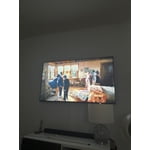
[This review was collected as part of a promotion.] Having upgraded to a Samsung 4K smart TV has been a game changer: the picture quality, brightness, vivid color contrast create an immersive watching experience. Samsung has made an upscale, affordable product. Works seamlessly with the samsung sound ar we already had. The only request would be having more ports to hook up dvd, blue ray players. If you are a technerd like my husband, having more ports would be favorable.

Review from Samsung US
Helpful?3X98WOQFG1UG16471557124
Jul 27, 2026
Reviewer name: ProjectX52
4 out of 5 stars
4 out of 5 stars review

Great for the average consumer not tinkerer
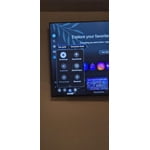
[This review was collected as part of a promotion.] Overall it's a great TV. It isn't difficult at all to go into setting and adjust the picture settings. I enjoy a lower brightness since I usually watching before I fall asleep and it was incredibly easy to turn down the backlight and brightness. The picture is great no matter if I'm gaming or watching movies or television it does a great job balance colors and contrast and has some premade profiles if you don't want to mess with it. The picture is crisp and clear even with older shows. It has VESA mounting points and I was able to hang it up with the same wall mount I've had for 6+ years. On the nerdier side of things it uses Samsungs own software TizenOS and is not running android. Due to this it has a ton of safety features (and bugs) that make it more difficult to side load apps. When I first bought it Jellyfin wasn't available in the app store and it was a pain to get it working (it has since been added and works great). For any fellow tinkerers out there make sure you are prepared to deal with TizenOS before purchasing.

Review from Samsung US
Helpful?3X98WOQFG1UG16471557124
Jul 20, 2026
Reviewer name: DaleK
5 out of 5 stars
5 out of 5 stars review

Very satisfied.

[This review was collected as part of a promotion.] The picture clarity is wonderful. However, I would have enjoyed a better speaker system. At times, depending on the channel, the sound had a bit of a "tinny" sound. The remote is very easy to use, not overloaded with buttons.

Review from Samsung US
Helpful?3X98WOQFG1UG16471557124
Jul 5, 2026
Reviewer name: SimplyBrooklyn
5 out of 5 stars
5 out of 5 stars review

Immaculate features
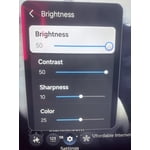
[This review was collected as part of a promotion.] I absolutely love the color this tv produces as well as the brightness. I'm not one with keeping my tv bright at night but it gives multiple different options of reducing that. Super easy to manage this TV. Every app is easily accessible as well as games. Definitely recommend this TV.

Review from Samsung US
Helpful?3X98WOQFG1UG16471557124
Jul 5, 2026
Reviewer name: Benji
3 out of 5 stars
3 out of 5 stars review

Samsung TV

[This review was collected as part of a promotion.] Its a nice tv, but for some reason it constantly loses Internet connection when I'm watching Samsung plus channels. It doesn't do that with any other app on the tv.. It takes a few minutes to use settings after turned on.. SLO response and I have fiber optic high speed.

Review from Samsung US
Helpful?3X98WOQFG1UG16471557124
reply from Samsung Advisor

Hi Benji, If your U7900F TV is freezing, lagging, or apps are slow: 1. Update firmware – Home > left directional key > Settings > Support > Software Update > Update Now 2. Run Device Care to boost performance – Home > left directional key > Settings > Support > Device Care > Start Device Care 3. Cold boot your TV – Hold the Power button on your remote for 5+ seconds until the TV restarts. If issues continue, contact Samsung Support at 1-800-SAMSUNG (8AM – 9PM EST Mon – Fri, 8AM – 6PM Sat – Sun). LiveChat is also available under the ‘Support’ link on our website. ~ Samsung Advisor

Jul 20, 2026
Reviewer name: LucyT
5 out of 5 stars
5 out of 5 stars review

Excellent TV and picture quality!

[This review was collected as part of a promotion.] Purchased this TV for our second home in NC. We got the TV for a phenomenal price and could not be happier with the picture quality and ease of setup! Definitely a good purchase and highly recommend Samsung televisions!

Review from Samsung US
Helpful?3X98WOQFG1UG16471557124
Jul 3, 2026
Reviewer name: SonyWalkman
2 out of 5 stars
2 out of 5 stars review

Faulty

[This review was collected as part of a promotion.] Really nice Television until the left side of the screen started having flickering light issues obscuring 1/3 of the screen. Where the menu happens to reside. Would not buy another Samsung TV. Television is only 6 months old. Yeah whatevers, gonna stick with Sony.

Review from Samsung US
Helpful?3X98WOQFG1UG16471557124
reply from Samsung Specialist

Thank you for your review. If there’s anything we can assist with, please don’t hesitate to call us at 1-800-SAMSUNG (8AM – 9PM EST Mon – Fri, 8AM – 6PM Sat – Sun), or reach us via text anytime. You can also visit ‘Support’ on our website for: • Live Chat • Manuals, Software, & Warranty Info ~ Samsung Specialist

Jul 20, 2026
Reviewer name: Cole518
1 out of 5 stars
1 out of 5 stars review

Poor connectivity

[This review was collected as part of a promotion.] The Wi-Fi connection to my TV continues to go in and out. I have to completely unplug it and leave it unplugged for at least five minutes or more for it to connect correctly back to my Wi-Fi. The remote control does not work a majority of the time. I can't pause or rewind properly. Tried to troubleshoot both these issues with no success.

Review from Samsung US
Helpful?3X98WOQFG1UG16471557124
reply from Samsung Advisor

Hi Cole518, Thank you for your feedback. If your TV is having trouble maintaining a wireless connection, please try the following: 1. Distance matters – Keep your TV within 50 feet of your router. Avoid placing the router behind walls, furniture, or electronic devices. 2. Minimize interference – Turn off nearby wireless devices that may disrupt the signal. 3. Power cycle both devices – Unplug the TV and router for 30 seconds, then plug them back in. 4. Run diagnostics: o Settings > Support > Device Care > Self Diagnosis > Smart Hub Connection Test o Settings > Support > Device Care > Self Diagnosis > Wi-Fi 5. Update firmware: Settings > Support > Software Update > Update Now 6. Factory reset (if needed): Settings > All Settings > General & Privacy > Reset > Factory Data Reset If you continue to experience issues, please contact Samsung Support at 1-800-SAMSUNG (8AM – 9PM EST Mon – Fri, 8AM – 6PM Sat – Sun). LiveChat agents are also available through the ‘Support’ link on our website. ~ Samsung Advisor

Jul 23, 2026
Reviewer name: GOD1Samsung4life
5 out of 5 stars
5 out of 5 stars review

Upgrade? YESSS!

[This review was collected as part of a promotion.] I had a Samsung 49"curved and a Q75" in the past. My 75" went out so I decided to buy a new model. That was a great decision because this TV is Amazing. Thank you for making such unmatched products. I also buy phones like the fold 7 and am interested in appliances in the future.

Review from Samsung US
Helpful?3X98WOQFG1UG16471557124
Jul 2, 2026
Reviewer name: Karenluke
2 out of 5 stars
2 out of 5 stars review

Terrible

[This review was collected as part of a promotion.] Volume is terrible, closed caption carries over to next screen, when it goes off line you have to go in and manually connect it Goes off automatically all the time worst tv I ever bought DO NOT BUY THIS

Review from Samsung US
Helpful?3X98WOQFG1UG16471557124
reply from Samsung Specialist

Thank you for your review. If there’s anything we can assist with, please don’t hesitate to call us at 1-800-SAMSUNG (8AM – 9PM EST Mon – Fri, 8AM – 6PM Sat – Sun), or reach us via text anytime. You can also visit ‘Support’ on our website for: • Live Chat • Manuals, Software, & Warranty Info ~ Samsung Specialist