Skip to Main Content
Sam's Club
Sam's Club
All Departments
All Services
Customer reviews for SAMSUNG 55" Class U7900F Series 4K Crystal UHD Smart TV for
SAMSUNG 55" Class U7900F Series 4K Crystal UHD Smart TV
4.5 out of 5 stars
stars
3,864 ratings3,764 reviews
  1. 5 stars74% (2,846)
  2. 4 stars15% (582)
  3. 3 stars6% (229)
  4. 2 stars2% (90)
  5. 1 star3% (117)

Member photos

  • +1481 images
Sort by |
Showing 1,371-1,380 of 3,764 reviews
Jul 6, 2026
Reviewer name: your nickname
2 out of 5 stars
2 out of 5 stars review

mediocre at best
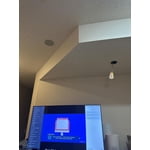
[This review was collected as part of a promotion.] I am experiencing noticeable lag when using the remote. The responsiveness is suboptimal; it connects quickly to Apple products but not to others.

Review from Samsung US
Helpful?3X98WOQFG1UG16471557124
reply from Samsung Advisor

Hi, Thank you for your feedback. If your remote isn’t responding, here are a few quick steps to help determine if it’s working correctly: 1. Check the batteries: Remove the back cover of your remote and replace the batteries with a fresh set, ensuring they are inserted in the correct direction. 2. Test for infrared signal: Point the front of the remote at your smartphone camera. While holding down any button, you should see a flashing light through the camera screen. (For iPhone users, the front-facing camera works best.) If you see the light, your remote is working and may need to be re-paired with your TV. 3. Point the remote correctly: Try pointing the remote directly at the TV from about 5-6 feet away. This can help ensure a clearer signal between the remote and the TV. 4. Clean the remote: Gently wipe the top edge of the remote (where the infrared sensor is located) with a soft, dry cloth to remove any dust or debris that could interfere with functionality. If you still need assistance, please contact Samsung Support at 1-800-SAMSUNG (8AM – 9PM EST Mon – Fri, 8AM – 6PM Sat – Sun), or visit the ‘Support’ link on our website to start a LiveChat session. ~ Samsung Advisor

Jun 23, 2026
Reviewer name: MIsoldier
4 out of 5 stars
4 out of 5 stars review

Great TV but too dark to use
[This review was collected as part of a promotion.] Everything great except setup at home. The automated " "not like in the store" screen setup walk through was a little convoluted. And the screen is too dark for many movies...

Review from Samsung US
Helpful?3X98WOQFG1UG16471557124
Jul 5, 2026
Reviewer name: Pamela
1 out of 5 stars
1 out of 5 stars review

Regret!

[This review was collected as part of a promotion.] I regret buying this model. It's okay for an entry-level TV at this price point, but otherwise, the screen quality is very poor. I wish I could exchange or return it to get a better one.

Review from Samsung US
Helpful?3X98WOQFG1UG16471557124
reply from Samsung Advisor

Hi Pamela, We appreciate your feedback on the picture quality of Samsung’s U7900F TV. If the image doesn’t quite match your preferences, there are several adjustments you can make to better suit your viewing environment and content type. First, please ensure your TV is running the latest firmware, as updates may include important picture quality enhancements. Go to: Home > Left directional button > Settings > Support > Software Update > Update Now To explore picture mode options, navigate to: Home > Left directional button > Settings > All Settings > Picture > Picture Mode. Options include: • Standard – Ideal for general viewing • Dynamic – Brighter and more vibrant for well-lit spaces • Eco – Optimized for energy efficiency • Movie – Best for viewing in low light • Filmmaker Mode – Preserves the content creator’s intent and disables motion smoothing for supported content You can further customize your image by going to: Settings > All Settings > Picture > Expert Settings, where you can adjust Brightness, Contrast, Color Tone, Sharpness, Contrast Enhancer and more. If you’d like help finding the best picture settings for your preferences, please don’t hesitate to contact Samsung Support at 1-800-SAMSUNG, available 8AM – 9PM EST Mon – Fri, 8AM – 6PM Sat – Sun. You can also LiveChat with an agent or explore additional resources on our website by clicking the ‘Support’ link. ~ Samsung Advisor

May 11, 2026
Reviewer name: Dfit
5 out of 5 stars
5 out of 5 stars review

Great picture

[This review was collected as part of a promotion.] beautiful picture love the programmable sleep timer I just wish the remote had an option for voice recognition

Review from Samsung US
Helpful?3X98WOQFG1UG16471557124
May 20, 2026
Reviewer name: Nasir
5 out of 5 stars
5 out of 5 stars review

Pure enjoyment.

[This review was collected as part of a promotion.] Everything is excellent . Enjoying 100%. Picture quality , sound, ease of remote control use and resolution. Best TV ever for me.

Review from Samsung US
Helpful?3X98WOQFG1UG16471557124
Jun 6, 2026
Reviewer name: Slayqueen
5 out of 5 stars
5 out of 5 stars review

Great screen

[This review was collected as part of a promotion.] I really like the resolution on the product, the UI is pretty slow but I use an Apple TV anyways so it's no big deal.

Review from Samsung US
Helpful?3X98WOQFG1UG16471557124
Jun 23, 2026
Reviewer name: Darkraiden
2 out of 5 stars
2 out of 5 stars review

Good for office, not good for movies nights.

[This review was collected as part of a promotion.] Not the best picture quality, but for price range great for office or for outdoor use if you are not worried about great colors or sharp images. Basic TV

Review from Samsung US
Helpful?3X98WOQFG1UG16471557124
reply from Samsung Advisor

Hi Darkraiden, We’re sorry to hear you’re not fully satisfied with the picture quality on your Samsung U7900F TV. If the image appears too dark, we suggest disabling certain energy-saving features, which can automatically adjust brightness and affect how the screen looks. Go to: Settings > All Settings > General & Privacy > Power and Energy Saving, then turn off Brightness Optimization, Energy Saving Solution, Motion Lighting, and/or Contrast Enhancer. You can also adjust the Picture Mode to better suit your environment: Settings > All Settings > Picture > Picture Mode • Standard – Default mode for general viewing • Dynamic – Brighter and clearer, ideal for well-lit rooms • Movie – Best for dark room viewing • Eco – Energy-saving mode • Filmmaker Mode – Preserves content as intended by creators To fine-tune brightness, go to: Home > left directional key > Settings > All Settings > Picture > Expert Settings, then adjust the Brightness level (0–50) to your preference. Lastly, please make sure your TV is running the latest firmware: Home > Home > left directional key > Settings > Support > Software Update > Update Now We hope these tips help improve your viewing experience. If you need further support, feel free to contact us at 1-800-SAMSUNG (8AM – 9PM EST Mon – Fri, 8AM – 6PM Sat – Sun). LiveChat is also available via the ‘Support’ link on our website. ~ Samsung Advisor

May 21, 2026
Reviewer name: Isaac
4 out of 5 stars
4 out of 5 stars review

Samsung TV

[This review was collected as part of a promotion.] So far it is working as expected! It has a beautiful image, good sound and I can manage it from my tablet and my celular phone.

Review from Samsung US
Helpful?3X98WOQFG1UG16471557124
May 20, 2026
Reviewer name: HubA
3 out of 5 stars
3 out of 5 stars review

Remote breaks

[This review was collected as part of a promotion.] Very happy with this tv. However, purchased 1/29 and the remote is already not working (yes, I changed the batteries).

Review from Samsung US
Helpful?3X98WOQFG1UG16471557124
reply from Samsung Advisor

Hi HubA, Thank you for reaching out to us. Please try the below troubleshooting steps: 1. Reset the remote: Press and hold the Return and Enter (center of navigation pad) buttons for more than 10 seconds. 2. Re-pair the remote: After resetting, stand within 1 foot of your TV and press Return and Play/Pause simultaneously for at least 5 seconds, or until a pairing message appears on your TV. 3. Check for firmware updates, as these can include both TV and remote optimizations: Settings > Support > Software Update > Update Now If you continue to have issues, please call us at 1-800-SAMSUNG (8AM – 9PM EST Mon – Fri, 8AM – 6PM Sat – Sun), or reach us via text anytime. You can also visit ‘Support’ on our website for: • Live Chat • Manuals, Software, & Warranty Info ~Samsung Advisor

May 30, 2026
Reviewer name: Nanny
4 out of 5 stars
4 out of 5 stars review

Great

[This review was collected as part of a promotion.] I think it's very it's been very helpful to me I'm constantly watching it it looks great receives a lot of compliments

Review from Samsung US
Helpful?3X98WOQFG1UG16471557124