Skip to Main Content
Sam's Club
Sam's Club
All Departments
All Services
Customer reviews for SAMSUNG 55" Class U7900F Series 4K Crystal UHD Smart TV for
SAMSUNG 55" Class U7900F Series 4K Crystal UHD Smart TV
4.5 out of 5 stars
stars
3,864 ratings3,764 reviews
  1. 5 stars74% (2,846)
  2. 4 stars15% (582)
  3. 3 stars6% (229)
  4. 2 stars2% (90)
  5. 1 star3% (117)

Member photos

  • +1481 images
Sort by |
Showing 1,141-1,150 of 3,764 reviews
Apr 20, 2026
Reviewer name: Ttgo
5 out of 5 stars
5 out of 5 stars review

Great

[This review was collected as part of a promotion.] Love this tv its fast working TV it's up to date HD it's thin I got a mountain on the wall and pushed out a little bit not too big of a remote if it's right on my wall perfectly thin TV not too thick around the edges is good the picture is excellent quality is good

Review from Samsung US
Helpful?3X98WOQFG1UG16471557124
Feb 17, 2026
Reviewer name: Pete
4 out of 5 stars
4 out of 5 stars review

Great features

[This review was collected as part of a promotion.] Very happy with this purchase! Didn't realize that it came with access to so many channels. Loved that for me Only con: i can't figure out to turn off the voice generated instruction feature. It announces all actions/functions

Review from Samsung US
Helpful?3X98WOQFG1UG16471557124
reply from Samsung Advisor

Hi Pete, Thank you for sharing your concerns. If your TV is announcing everything you do, the Voice Guide feature is likely turned on. This is an accessibility function designed to assist users who are visually impaired, and it may have been activated accidentally by holding down the Volume button on your remote. To turn off Voice Guide, go to: Home > left directional key > Settings > All Settings > General & Privacy > Accessibility > Voice Guide Settings > Voice Guide = OFF If there's anything else we can assist with, please don't hesitate to contact us at 1-800-SAMSUNG, 8AM – 12AM EST, 7 days a week. LiveChat agents are also available through the ‘Support’ link on our website. ~ Samsung Advisor

Feb 5, 2026
Reviewer name: Singinfill
5 out of 5 stars
5 out of 5 stars review

Great all around tv!

[This review was collected as part of a promotion.] The picture resolution is put of this world compared to the previous flat screen TV i had! It was a "dumb tv" and this one has all the bells and whistles! Colors are brighter and more vivid! The TV looks great in my living room and I feel great that you can add parental control to it for the kids!

Review from Samsung US
Helpful?3X98WOQFG1UG16471557124
Jan 20, 2026
Reviewer name: Cristian
2 out of 5 stars
2 out of 5 stars review

network issues and lag on two tvs

Replaced two TCL smart tvs with these and I was disappointed to say the least. There is hardly and storage space on there (less than 2gb free space with just the default apps). But thats not what bothered me. The real issue is the network connectivity error I get every other time I start the tv. It's infuriating and happens all the time. It must be an issue with this model because it happens on both my tvs, not just one. It takes several restarts and/or network configurations in settings before it starts workingn again. I never had connectivity issues with my old TCLs and no other device in my home has network connection issues. To add to this, the button lag is super slow, and the home screen interface isnt very convient to get to your streaming apps easily. I was expecting more from Samung but after these go I probably wont stick with their brand.

Review from Samsung US
Helpful?3X98WOQFG1UG16471557124
reply from Samsung Advisor

Hi Cristian, Thank you for your feedback. Please ensure you are running the latest Firmware Update 1132. To do so, go to Settings> Support> Software Update. If this firmware version is not yet available on your TV, you can download the update on a USB drive and manually update your TV: 1. On Samsung's website (upper right corner), go to: Support > Manual & Software > Find your TV model, and click on the Firmware – Upgrade File. 2. When the file has finished downloading, locate it and then unzip it. There is normally one folder inside but there may be multiple files. 3. Copy or move all of the files that were included in the zip file to a USB flash drive, but do not place them inside any other folders. If you place the software folders inside a folder on the USB flash drive, the TV or monitor will not find them. 4. Connect the USB drive containing the software upgrade into a USB port on your device. 5. Using your device's remote, navigate to and select Settings, then select All Settings, and then select Support. Select Software Update, select Update Now, and then select Yes if prompted. If you need additional support, Samsung is here to help. Please call us at 1-800-SAMSUNG, available daily from 8AM - 12AM EST. You can also chat with a LiveChat agent by clicking the ‘Support’ link on our website. ~ Samsung Advisor

Apr 20, 2026
Reviewer name: JaeD
4 out of 5 stars
4 out of 5 stars review

Excellent TV

[This review was collected as part of a promotion.] Great color and picture quality. It comes with a stand which makes it great when you can't hang your tv on the wall. The only reason I gave it 4 stars rather than 5, is that I can't connect it to Alexa or my household assistant. I believe this was remedied in later models though. The remote makes accessing streaming services beyond easy, and you can access your additional streaming subscriptions with the home button. The Samsung TV streaming that comes with the TV is prefect for cord cutters too.

Review from Samsung US
Helpful?3X98WOQFG1UG16471557124
Mar 23, 2026
Reviewer name: Bangbuck
5 out of 5 stars
5 out of 5 stars review

Great

[This review was collected as part of a promotion.] Fantastic piece of equipment. Couldn't ask for a better tv. Brightness is great color is amazing the aesthetics are perfect for the home. Resolution is great when I play game. The security can be confusing.

Review from Samsung US
Helpful?3X98WOQFG1UG16471557124
Mar 21, 2026
Reviewer name: Gimmieshelter
5 out of 5 stars
5 out of 5 stars review

Really Wonderful TV for the Price

[This review was collected as part of a promotion.] I am very happy with my purchase. The picture and sound are very very good. There are more expensive TVs by Samsung in this size and although this might be considered by some people as an entry-level model, I disagree. It is not expensive but the picture and the sound are great. I recommend this tv.

Review from Samsung US
Helpful?3X98WOQFG1UG16471557124
Mar 23, 2026
Reviewer name: Game4
5 out of 5 stars
5 out of 5 stars review

Great colors
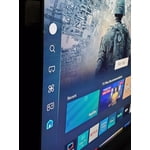
[This review was collected as part of a promotion.] Something that i really like about this tv is the colors how they look fantastic doesnt mater if you use it for watching a movie or playing video gases the color contrast,brightnes and resolution are incredible something else that i really like is how you can change the modes of the tv from movie mode to filmaker mode and game mode also the compatibility is really good giving me the option to connect my playstation,speakers.

Review from Samsung US
Helpful?3X98WOQFG1UG16471557124
Feb 17, 2026
Reviewer name: Lovely Rissa
5 out of 5 stars
5 out of 5 stars review

Great Features ,Great ,Great ,Great !

[This review was collected as part of a promotion.] The picture on the screen is so clear and I love how I can adjust the brightness to what is needed. Its also amazing I can make my phone a remote should such things happen to the remote temporarily. Connecting things to my tv is pretty much explanatory it guides me through things. This tv is my best purchase so far

Review from Samsung US
Helpful?3X98WOQFG1UG16471557124
Mar 30, 2026
Reviewer name: LewiMan21
5 out of 5 stars
5 out of 5 stars review

Great feautures

[This review was collected as part of a promotion.] Love everything about this tv! The color and resolution are fantastic! Use for shows and games and has an amazing "game mode" feature that automatically goes when playing. Favorite tv purchase ive made.

Review from Samsung US
Helpful?3X98WOQFG1UG16471557124