Skip to Main Content
Sam's Club
Sam's Club
All Departments
All Services
Customer reviews for SAMSUNG 58” Class U7900F Series 4K Crystal UHD Smart TV for
SAMSUNG 58” Class U7900F Series 4K Crystal UHD Smart TV
4.5 out of 5 stars
stars
3,758 ratings3,700 reviews
  1. 5 stars74% (2,766)
  2. 4 stars15% (576)
  3. 3 stars6% (219)
  4. 2 stars2% (89)
  5. 1 star3% (108)

Member photos

  • +1455 images
Sort by |
Showing 811-820 of 3,700 reviews
Jul 27, 2026
Reviewer name: Lady
4 out of 5 stars
4 out of 5 stars review

Lags

[This review was collected as part of a promotion.] It's got lag issues but it's still a nice tv. Color is nice. I had ty o me with the details for the contrast and brightness.. Actually the whole uniformity of the screen needed to be messed with

Review from Samsung US
Helpful?18J4E5E7OZVG16422722568
Jul 20, 2026
Reviewer name: Sheebs
3 out of 5 stars
3 out of 5 stars review

Some remote problems but otherwise we like the TV

[This review was collected as part of a promotion.] The TV picture is fine but the remote is difficult to use and flip from HDMI1 to 2, and we get frustrated. Got to figure out one remote for all.

Review from Samsung US
Helpful?18J4E5E7OZVG16422722568
reply from Samsung Advisor

Hi Sheebs, Thank you for sharing your review. Please know you can control your connected devices (like cable boxes, Blu-ray players, or game consoles) using your U7900FD TV’s remote by following these steps: 1. Connect & Power On the Device Connect the external device to one of your TV’s HDMI ports and power it on. Your TV may automatically detect the device and switch inputs. If it doesn’t, continue with the steps below. 2. Launch Universal Remote Setup. On your TV, navigate to: Home > left directional key > Connected Devices > Universal Remote Setup. When the connected device appears, select it to begin setup. 3. Start the Setup. Select Universal Remote on the Home screen, choose Start, and ensure your device is powered on. When your desired device appears, select it and follow the on-screen instructions. Setup may vary slightly based on device type. 4. Finalize and Test. Once complete, your Samsung TV and remote will remember the connected device and its HDMI port. If the device doesn’t respond after setup, you may need to re-register it or adjust its position for better signal reception. Helpful Tips: • If your external device is a Samsung product, Anynet+ (HDMI-CEC) may let you control it automatically using your TV remote with no extra setup. • Make sure nothing blocks the IR signal between your TV and external devices. • If you’re having difficulty, try adjusting the device’s position for better remote signal reception. • This feature may not be supported on all external devices or setups. For further support with setup or compatibility questions, please don’t hesitate to contact Samsung Customer Support at 1-800-SAMSUNG (8AM – 9PM EST Mon – Fri, 8AM – 6PM Sat – Sun). LiveChat agents are also available at the ‘Support’ link on our website. ~ Samsung Advisor

Jul 17, 2026
Reviewer name: Jkc191
4 out of 5 stars
4 out of 5 stars review

Great TV

[This review was collected as part of a promotion.] Screen has perfect brightness and color is amazing. Seems to be very good responsiveness when scrolling. Contrast and upscaling are as expected

Review from Samsung US
Helpful?18J4E5E7OZVG16422722568
Jul 20, 2026
Reviewer name: Sungod327
5 out of 5 stars
5 out of 5 stars review

Great Buy

[This review was collected as part of a promotion.] The tv has a sharp image and picture is bright and contrast is well portioned. The features are very user friendly. The TV compatible with sound bars. I recommend the TV.

Review from Samsung US
Helpful?18J4E5E7OZVG16422722568
Jul 27, 2026
Reviewer name: Bandyandy
5 out of 5 stars
5 out of 5 stars review

Everything about it is great

[This review was collected as part of a promotion.] the brightness is really good for at night time I like the contrast on it it's vibrancy I hate can't complain about nothing

Review from Samsung US
Helpful?18J4E5E7OZVG16422722568
Jul 5, 2026
Reviewer name: SloosieQ
5 out of 5 stars
5 out of 5 stars review

Happy consumer

[This review was collected as part of a promotion.] Not sure you could do any better for the price. Picture is clear and color is great. Remote is easy to operate and makes setup easy.

Review from Samsung US
Helpful?18J4E5E7OZVG16422722568
Jul 27, 2026
Reviewer name: Richie
5 out of 5 stars
5 out of 5 stars review

Great tv

[This review was collected as part of a promotion.] Works perfectly and samsung is always reliable.i had a tcl tv previously and it was dead after 1 year because of cheap components. I will always trust samsung for quality and reliability

Review from Samsung US
Helpful?18J4E5E7OZVG16422722568
Jul 5, 2026
Reviewer name: LarW
5 out of 5 stars
5 out of 5 stars review

Lots of extras
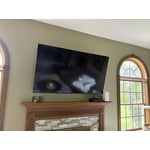
[This review was collected as part of a promotion.] The TV has many options and hooks up to Wi-Fi with so many channels through the Samsung app, and other apps can be loaded as well, Like Amazon prime movies.

Review from Samsung US
Helpful?18J4E5E7OZVG16422722568
Jul 5, 2026
Reviewer name: Swizzle
5 out of 5 stars
5 out of 5 stars review

Better than LG I had

[This review was collected as part of a promotion.] The color is great, it's a clear picture and there's not much else to say other than it works good.

Review from Samsung US
Helpful?18J4E5E7OZVG16422722568
Jul 5, 2026
Reviewer name: Charlieb505
5 out of 5 stars
5 out of 5 stars review

Awesome picture!
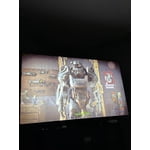
[This review was collected as part of a promotion.] The TV is an amazing TV with bright colors and the contrast is amazing The 4K resolution is very good as wellI really like the buttery smoothness when I'm playing my Xbox series X on it.

Review from Samsung US
Helpful?18J4E5E7OZVG16422722568