Skip to Main Content
Sam's Club
Sam's Club
All Departments
All Services
Customer reviews for SAMSUNG 58” Class U7900F Series 4K Crystal UHD Smart TV for
SAMSUNG 58” Class U7900F Series 4K Crystal UHD Smart TV
4.5 out of 5 stars
stars
3,734 ratings3,676 reviews
  1. 5 stars74% (2,747)
  2. 4 stars15% (572)
  3. 3 stars6% (219)
  4. 2 stars2% (88)
  5. 1 star3% (108)

Member photos

  • +1445 images
Sort by |
Showing 2,371-2,380 of 3,676 reviews
Aug 5, 2026
Reviewer name: QW Mike
3 out of 5 stars
3 out of 5 stars review

TV is great, remote is useless!!!
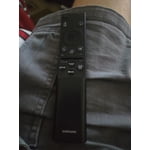
The remote that came with the TV was a joke, not very useful!

Review from Samsung US
Helpful?18J4E5E7OZVG16422722568
reply from Samsung Advisor

Hi QW Mike, We appreciate you sharing your user experience. To help you get the most from your TV, you can download the full e-Manual and more by visiting Samsung’s website then navigating to: Support > Manual & Software > TVs & Home Theater. From there, you can search for and select your U7900F TV model to view or download the available guides. The e-Manual and Remote Control Guide are also conveniently built into your TV: Settings > Support > Tips and User Guides We hope these tips are helpful. If you need additional assistance, feel free to reach Samsung Customer Support at 1-800-SAMSUNG (8AM – 9PM EST Mon – Fri, 8AM – 6PM Sat – Sun). You can also LiveChat with an agent or explore more resources under the Support link on our website. ~Samsung Advisor

Aug 10, 2026
Reviewer name: Crystal TV
5 out of 5 stars
5 out of 5 stars review

Tv Review

GOOD TV FOR A AFFORDABLE PRICE! Best for your money. I will buy again if I need to.

Review from Samsung US
Helpful?18J4E5E7OZVG16422722568
Aug 18, 2026
Reviewer name: Hurricane Sarah
5 out of 5 stars
5 out of 5 stars review

The best

Best brightness Best contrast Best responsiveness Best uniformity Best upscaling

Review from Samsung US
Helpful?18J4E5E7OZVG16422722568
Aug 5, 2026
Reviewer name: Scorpiochild
5 out of 5 stars
5 out of 5 stars review

Nice fit

Viewing quality is very clear. But it should had digital audio connection..

Review from Samsung US
Helpful?18J4E5E7OZVG16422722568
Aug 6, 2026
Reviewer name: Go Rays
4 out of 5 stars
4 out of 5 stars review

Nice pic

not a user friendly remote to hard to get channels you want

Review from Samsung US
Helpful?18J4E5E7OZVG16422722568
Aug 20, 2026
Reviewer name: shewarrior64
5 out of 5 stars
5 out of 5 stars review

Love the features!

Love the picture and the ease of setting it up on my WIFI network!

Review from Samsung US
Helpful?18J4E5E7OZVG16422722568
Aug 5, 2026
Reviewer name: Bonnie
5 out of 5 stars
5 out of 5 stars review

Picture Clarity
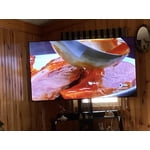
Great TV. Still learning everything it is capable of. Clarity is amazing.

Review from Samsung US
Helpful?18J4E5E7OZVG16422722568
Aug 5, 2026
Reviewer name: Favss
5 out of 5 stars
5 out of 5 stars review

Awesome TV

So ice and healthy seeing! Control system is nice.

Review from Samsung US
Helpful?18J4E5E7OZVG16422722568
Aug 5, 2026
Reviewer name: PEANUT 67
5 out of 5 stars
5 out of 5 stars review

Easy to setup

Great Contrast overall and resolution is outstanding

Review from Samsung US
Helpful?18J4E5E7OZVG16422722568
Aug 5, 2026
Reviewer name: Cbrown1573
3 out of 5 stars
3 out of 5 stars review

Samsung TV

The TV has contrast issues. No vibrancy to the screen.

Review from Samsung US
Helpful?18J4E5E7OZVG16422722568
reply from Samsung Advisor

Hi Cbrown1573, Thank you for your feedback on the Samsung U7900F TV. If the picture appears unclear, dull, or lacks definition, there are several settings you can adjust to improve clarity and overall image quality. Go to: Settings > All Settings > Picture > Expert Settings, and review these key settings: Picture Clarity Settings: While originally intended for motion handling, these can also impact overall clarity • Off: Disables motion enhancements • Auto: Automatically adjusts based on content • Custom: Lets you fine-tune: o Judder Reduction – Helps smooth out uneven motion o LED Clear Motion – Boosts sharpness in fast-moving content o Noise Reduction – Reduces distortion and enhances detail in lower-resolution sources Core Picture Settings • Brightness – Controls overall screen brightness • Contrast – Enhances the difference between bright and dark areas • Sharpness – Adjusts edge definition; closer to 20 increases detail • Color – Enhances depth and intensity of colors And don’t forget to check for the latest firmware, which may improve performance: Settings > Support > Software Update > Update Now These adjustments can make a noticeable difference in overall clarity. If you need further help tailoring the settings to your preferences or environment, please contact Samsung Support at 1-800-SAMSUNG (8AM – 9PM EST Mon – Fri, 8AM – 6PM Sat – Sun). LiveChat is also available via the ‘Support’ link on our website. ~ Samsung Advisor