Skip to Main Content
Sam's Club
Sam's Club
All Departments
All Services
Customer reviews for SAMSUNG 58” Class U7900F Series 4K Crystal UHD Smart TV for
SAMSUNG 58” Class U7900F Series 4K Crystal UHD Smart TV
4.5 out of 5 stars
stars
3,734 ratings3,676 reviews
  1. 5 stars74% (2,747)
  2. 4 stars15% (572)
  3. 3 stars6% (219)
  4. 2 stars2% (88)
  5. 1 star3% (108)

Member photos

  • +1445 images
Sort by |
Showing 1,401-1,410 of 3,676 reviews
May 3, 2026
Reviewer name: Bean13
3 out of 5 stars
3 out of 5 stars review

Id's & memory hold

[This review was collected as part of a promotion.] This TV is great, limited on the capabilities and the memory does not work well have to constantly put in password

Review from Samsung US
Helpful?18J4E5E7OZVG16422722568
reply from Samsung Advisor

Hi Bean13, Thank you for reaching out to us. Please ensure your TV is running the latest Firmware, version 1132.0. Go to Settings> Support> Software Update. If this firmware version is not yet available on your TV, you can download the update on a USB drive and manually update your TV: 1. On Samsung's website (upper right corner), go to: Support > Manual & Software > Find your TV model, and click on the Firmware – Upgrade File. 2. When the file has finished downloading, locate it and then unzip it. There is normally one folder inside but there may be multiple files. 3. Copy or move all of the files that were included in the zip file to a USB flash drive, but do not place them inside any other folders. If you place the software folders inside a folder on the USB flash drive, the TV or monitor will not find them. 4. Connect the USB drive containing the software upgrade into a USB port on your device. 5. Using your device's remote, navigate to and select Settings, then select All Settings, and then select Support. Select Software Update, select Update Now, and then select Yes if prompted. Your device will search the USB drive for update files. Follow the on-screen instructions to install the updated software. Updates usually take a few minutes; please do not turn off the TV until the update is complete. When the update is finished, it will restart automatically. If you need additional support, Samsung is here to help. Please call us at 1-800-SAMSUNG, available 8AM – 9PM EST Mon – Fri, 8AM – 6PM Sat – Sun. You can also chat with a LiveChat agent by clicking the ‘Support’ link on our website. ~Samsung Advisor

May 11, 2026
Reviewer name: Fridjr2012
5 out of 5 stars
5 out of 5 stars review

Great TV

[This review was collected as part of a promotion.] Great TV. Great clarity brightness and resolution. Picture colors are vibrant and realistic like they are in room with you. Gaming picture quality in it is great as well.

Review from Samsung US
Helpful?18J4E5E7OZVG16422722568
Jun 1, 2026
Reviewer name: Agranny
5 out of 5 stars
5 out of 5 stars review

Great tv

[This review was collected as part of a promotion.] This tv has a bright picture with vibrant color and resolution. It has parental controls and works well for our family.

Review from Samsung US
Helpful?18J4E5E7OZVG16422722568
Jun 20, 2026
Reviewer name: Luus
5 out of 5 stars
5 out of 5 stars review

Great

[This review was collected as part of a promotion.] Beautiful tv image is great and sounds it’s great ,the setting and menu’s are amazing. Bluetooth is great

Review from Samsung US
Helpful?18J4E5E7OZVG16422722568
Jun 20, 2026
Reviewer name: Prilly
5 out of 5 stars
5 out of 5 stars review

I’m obsessed

[This review was collected as part of a promotion.] The picture is absolutely beautiful I was completely floored and totally wasn't expecting to see how Crystal clearThe picture was. amazing

Review from Samsung US
Helpful?18J4E5E7OZVG16422722568
Jun 20, 2026
Reviewer name: Neforpubl
5 out of 5 stars
5 out of 5 stars review

Great tv

[This review was collected as part of a promotion.] Workhorse TV. It runs all the time and has stood the test of time in my house. Picture is clear, bright, and quality. What more could you ask for?

Review from Samsung US
Helpful?18J4E5E7OZVG16422722568
Jun 5, 2026
Reviewer name: Rowdy
5 out of 5 stars
5 out of 5 stars review

Great TV

[This review was collected as part of a promotion.] The Samsung 65 inch smart tv has an excellent picture quality Simple to set up. Easy to maneuver through apps. Highly recommended.

Review from Samsung US
Helpful?18J4E5E7OZVG16422722568
May 20, 2026
Reviewer name: Mouse
4 out of 5 stars
4 out of 5 stars review

Great picture

[This review was collected as part of a promotion.] Great size picture. Only 2 HDMI ports, my old Samsung had 3 ports. Do not like the new remote, my old one had numeric characters.

Review from Samsung US
Helpful?18J4E5E7OZVG16422722568
Jun 5, 2026
Reviewer name: barnie72
5 out of 5 stars
5 out of 5 stars review

great features

[This review was collected as part of a promotion.] I love it it was easy to set up and start the programming i wanted. It has a really easy set up to begin setting the tv up

Review from Samsung US
Helpful?18J4E5E7OZVG16422722568
Jun 20, 2026
Reviewer name: SS4L
5 out of 5 stars
5 out of 5 stars review

Great color, sound, good quality TV
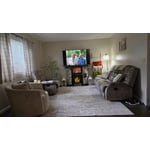
[This review was collected as part of a promotion.] This is the second 65 inch Samsung TV I've bought. Both ( 1 in family room, 1 in the living room) are great! Great sound, picture quality, color, and resolution. Highly recommend.

Review from Samsung US
Helpful?18J4E5E7OZVG16422722568