Skip to Main Content
Sam's Club
Sam's Club
All Departments
All Services
Customer reviews for SAMSUNG 85" Class U8000F Series 4K Crystal UHD Smart TV for
SAMSUNG 85" Class U8000F Series 4K Crystal UHD Smart TV
4.5 out of 5 stars
stars
3,307 ratings3,275 reviews
  1. 5 stars71% (2,353)
  2. 4 stars16% (517)
  3. 3 stars7% (218)
  4. 2 stars3% (100)
  5. 1 star4% (119)

Member photos

  • +1030 images
Sort by |
Showing 701-710 of 3,275 reviews
Jun 22, 2026
Reviewer name: Jay f
5 out of 5 stars
5 out of 5 stars review

What an awesome TV!
[This review was collected as part of a promotion.] The display quality, encompassing both brightness and contrast, is exceptional. The aesthetic appeal is further enhanced by the remarkably slender bezel. I wholeheartedly endorse this television to all prospective buyers.

Review from Samsung US
Helpful?3CTS2O15ZY1416007408101
Jun 6, 2026
Reviewer name: Nisey
2 out of 5 stars
2 out of 5 stars review

Good features poor connectivity

[This review was collected as part of a promotion.] The picture quality is terrific and the Samsung television channels do provide some good viewing programs. My biggest complaint is its inability to sync properly with my cable box and the television will not allow me to connect my Roku streaming device. If I could return this television for another I would, but I've held on to it too long.

Review from Samsung US
Helpful?3CTS2O15ZY1416007408101
reply from Samsung Advisor

Hi Nisey, We appreciate you sharing the issues you’re experiencing when connecting your U8000FD TV to your cable box. To ensure everything is set up correctly, we recommend using the Connection Guide, which provides step-by-step instructions for connecting external devices. Navigate to: Home > left directional key > Connected Devices > Connection Guide Also, please double-check that your cable box is powered on and that the HDMI cable is securely connected. To change input sources, go to: Connected Devices > Sources You can also run HDMI Troubleshooting, which checks the connection between your TV, HDMI cable, and external device. This takes approximately 2 minutes and can be found under: Connected Devices > Connection Guide > Video Device > HDMI Troubleshooting Finally, please ensure that the broadcast signal or network your cable box is connected to is functioning properly. If you continue to experience issues, don’t hesitate to reach out to Samsung Support at 1-800-SAMSUNG (8AM – 9PM EST Mon – Fri, 8AM – 6PM Sat – Sun), or reach us via text 24/7. You can also visit ‘Support’ on our website for: • Live Chat • Manuals, Software, & Warranty Info ~ Samsung Advisor

Jul 11, 2026
Reviewer name: Manny89
5 out of 5 stars
5 out of 5 stars review

Best tv I've ever purchased
[This review was collected as part of a promotion.] Awsome tv what else can I say when I watch sports or play video games the picture is amazing high definition and since I have a samsung phone I can control it with my phone and so many other things that I can do with it. I highly recommend you get a samsung tv or product love it

Review from Samsung US
Helpful?3CTS2O15ZY1416007408101
Jun 29, 2026
Reviewer name: MJMC
2 out of 5 stars
2 out of 5 stars review

Inconsistent

[This review was collected as part of a promotion.] I currently have two, the oldest is fantastic, the newest is always starting on the China screen of teens dancing and singing. And it is so difficult to get it back on my MS Now channel with Direct TV! It is a crazy waste of time trying to get it back to the screen I last watched!!! And it is sooooooooo loud on the dancing/singing channel in Chinese language...

Review from Samsung US
Helpful?3CTS2O15ZY1416007408101
reply from Samsung Advisor

Hi MJMC, Thank you for your review. While your U8000F TV may currently default to Samsung TV Plus when powered on, you can customize what your TV does at startup by adjusting the Start Screen Options. To do this, navigate to: Settings > All Settings > Advanced Features > Start Screen Option and choose from the following: 1. Start with Smart Hub Home – Automatically launches Smart Hub when the TV is turned on. You can enable or disable this option based on your preference. 2. Autorun Multi View Casting – If you cast YouTube content from your mobile device, the TV will automatically display the content using Multi View. 3. Autorun Multi View Mirroring – When you screen mirror your mobile device, Multi View will automatically open to show your device’s screen. If you need help adjusting these settings or have any other questions, please contact Samsung Support at 1-800-SAMSUNG (8AM – 9PM EST Mon – Fri, 8AM – 6PM Sat – Sun). LiveChat agents are also available by clicking on the ‘Support’ link on our website. ~ Samsung Advisor

Jul 3, 2026
Reviewer name: RealReviewer
2 out of 5 stars
2 out of 5 stars review

Could be better

[This review was collected as part of a promotion.] Honestly the TV is just ok. It does have a good picture but only when what you're watching is bright. If it's dark you ain't seeing anything. Also this TV is sooo slow. It does cloud gaming pretty good. In my opinion the tizen os is just not as good as android TV they should've went with that.

Review from Samsung US
Helpful?3CTS2O15ZY1416007408101
Jun 5, 2026
Reviewer name: Shaner
1 out of 5 stars
1 out of 5 stars review

Resolution same as 10 year old 65”

[This review was collected as part of a promotion.] I bought a 50” for the bedroom and it has an amazing clear picture. Loved it, so went for the exact same brand and model for my 75”. It's not even close to the same resolution. The 75” resolution is comparable to my 10 year old UHD 65”. If you're buying for picture quality, skip this one in the 75”. It's just an “ok” big tv.

Review from Samsung US
Helpful?3CTS2O15ZY1416007408101
reply from Samsung Advisor

Hi Shaner, Thank you for your feedback on the Samsung U8000F TV. If the picture appears unclear, dull, or lacks definition, there are several settings you can adjust to improve clarity and overall image quality. Go to: Settings > All Settings > Picture > Expert Settings, and review these key settings: Picture Clarity Settings: While originally intended for motion handling, these can also impact overall clarity • Off: Disables motion enhancements • Auto: Automatically adjusts based on content • Custom: Lets you fine-tune: o Judder Reduction – Helps smooth out uneven motion o LED Clear Motion – Boosts sharpness in fast-moving content o Noise Reduction – Reduces distortion and enhances detail in lower-resolution sources Core Picture Settings • Brightness – Controls overall screen brightness • Contrast – Enhances the difference between bright and dark areas • Sharpness – Adjusts edge definition; closer to 20 increases detail • Color – Enhances depth and intensity of colors And don’t forget to check for the latest firmware, which may improve performance: Settings > Support > Software Update > Update Now These adjustments can make a noticeable difference in overall clarity. If you need further help tailoring the settings to your preferences or environment, please contact Samsung Support at 1-800-SAMSUNG (8AM – 9PM EST Mon – Fri, 8AM – 6PM Sat – Sun). LiveChat is also available via the ‘Support’ link on our website. ~ Samsung Advisor

Jul 5, 2026
Reviewer name: Cmaf70
5 out of 5 stars
5 out of 5 stars review

Great features!!
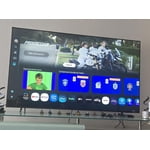
[This review was collected as part of a promotion.] Excellent quality and performanceI am very satisfied with my purchase. This Samsung TV offers impressive image quality with vivid colors and excellent contrast. The interface is fast, intuitive, and easy to use. Additionally, the design is sleek and blends perfectly with any space. Without a doubt, a 100% recommended investment if you are looking for the best visual experience.

Review from Samsung US
Helpful?3CTS2O15ZY1416007408101
Jun 22, 2026
Reviewer name: Halobmg
5 out of 5 stars
5 out of 5 stars review

Great Overall TV

[This review was collected as part of a promotion.] This TV is great for all applications. Great responsiveness for console gaming. Great picture clarity for watching 4k videos on streaming. Also works great with my external audio card using SPDIF connection.

Review from Samsung US
Helpful?3CTS2O15ZY1416007408101
Jun 1, 2026
Reviewer name: DragonQT
5 out of 5 stars
5 out of 5 stars review

This TV rules the family room!
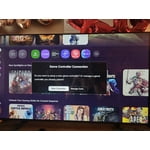
[This review was collected as part of a promotion.] I got this TV to play Minecraft on my new desktop. The colors are bright and beautiful and the speakers make the sound effects and music dominate the room, as it should. Very pleased also with the smart TV aspects and internet though I rarely use them. But it's nice to know they are there in case I just want to watch a show.

Review from Samsung US
Helpful?3CTS2O15ZY1416007408101
Jun 5, 2026
Reviewer name: Jerry
5 out of 5 stars
5 out of 5 stars review

I love the 4K video and watching movies are great.

[This review was collected as part of a promotion.] I enjoy my tv so much it was a great has good performance and the Home Screen is amazing and the 4K is amazing the brightness is amazing the contrast is amazing the interface is amazing the refresh is beautiful

Review from Samsung US
Helpful?3CTS2O15ZY1416007408101