Skip to Main Content
Sam's Club
Sam's Club
All Departments
All Services
Customer reviews for SAMSUNG 85" Class U8000F Series 4K Crystal UHD Smart TV for
SAMSUNG 85" Class U8000F Series 4K Crystal UHD Smart TV
4.5 out of 5 stars
stars
3,307 ratings3,275 reviews
  1. 5 stars71% (2,353)
  2. 4 stars16% (517)
  3. 3 stars7% (218)
  4. 2 stars3% (100)
  5. 1 star4% (119)

Member photos

  • +1030 images
Sort by |
Showing 681-690 of 3,275 reviews
Jul 20, 2026
Reviewer name: Eroti39
5 out of 5 stars
5 out of 5 stars review

This tv is the best a ever seee

[This review was collected as part of a promotion.] This tv is easy to used the controller have comandas and the brightness is the best in this tv And the contrast have the best one upscalling and uniform is have the best design a ver see a recomendé

Review from Samsung US
Helpful?3CTS2O15ZY1416007408101
Jun 20, 2026
Reviewer name: Judi
3 out of 5 stars
3 out of 5 stars review

Unhappy with volume and color

[This review was collected as part of a promotion.] I am happy with the size of the TV. Unfortunately, the color is not the same on all stations. Also the volume Is very low and I have to consistently have it in the 40 to 50 range in order to even hear the TV. I was happy with the price of the TV however I expected more from the Samsung unit

Review from Samsung US
Helpful?3CTS2O15ZY1416007408101
reply from Samsung Advisor

Hi Judi, Thank you for purchasing Samsung’s U8000F TV and for sharing your feedback regarding low volume. To start, we recommend making sure your TV is running the latest firmware, as updates can include improvements to sound performance: Home > left directional key > Settings > Support > Software Update If volume levels still seem too low, you can improve sound performance by adjusting a few key settings: Sound Mode: Navigate to: Settings > All Settings > Sound > Sound Mode • Standard: Balanced for everyday viewing • Optimized: Enhances effects and creates a more spacious sound • Amplify: Boosts mid and high tones, especially helpful if dialogue is difficult to hear Auto Volume: This feature helps maintain consistent volume levels across content and input sources. Turn it on under: Settings > All Settings > Sound > Expert Settings > Auto Volume = On You can also explore Expert Settings to fine-tune sound output with adjustments for Balance, Equalizer, and more. If you’re considering enhancing your setup, Samsung’s Q- and S-Series Soundbars feature Q-Symphony, which syncs your TV and soundbar speakers for a fuller, more immersive sound experience. For personalized support with these settings or selecting a soundbar to complement your setup, contact Samsung Support at 1-800-SAMSUNG (8AM – 9PM EST Mon – Fri, 8AM – 6PM Sat – Sun) or use LiveChat via the ‘Support’ link on our website. ~ Samsung Advisor

Jun 20, 2026
Reviewer name: Sdafox
5 out of 5 stars
5 out of 5 stars review

3 TV

[This review was collected as part of a promotion.] I now own three Samsung TVs I feel they have good color balance, reasonably good speakers although I have replaced the speakers on my older set after eight years the controls are intuitive and over the years. The features on the newer sets have improved. I definitely would buy another one when needed.

Review from Samsung US
Helpful?3CTS2O15ZY1416007408101
Jul 8, 2026
Reviewer name: Samsung forever
5 out of 5 stars
5 out of 5 stars review

Best TV live how I hook my speakers my phone to it
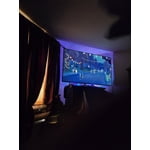
[This review was collected as part of a promotion.] The brightness and contrast is the next I've ever had from all of my tvs over the years. I love how I'm able to quickly hook it up to my phone. My laptop. My speakers. Love how quickly the response to everything is is . Smooth fast and clear The contrast color sound etc stays the same over time never wears out . Over the 2 years I've had it is still the same as the day I bought it. Over 25 years I've bought nothing but Samsung and for the next 25 years I'm still only going to buy Samsung It's the best TV out there you get high quality without paying how prices. I recommend Samsung all day long

Review from Samsung US
Helpful?3CTS2O15ZY1416007408101
Jun 5, 2026
Reviewer name: JD 2
5 out of 5 stars
5 out of 5 stars review

Great TV

[This review was collected as part of a promotion.] I have had the tv for about a month now and everything is great. Good picture and quality. I also didn't realize you get Samsung tv for free which is a nice bonus. Altogether a very good tv for the money. Very reasonably priced and great quality.

Review from Samsung US
Helpful?3CTS2O15ZY1416007408101
Jul 11, 2026
Reviewer name: Blue1027
4 out of 5 stars
4 out of 5 stars review

Good TV

[This review was collected as part of a promotion.] This is a good tv and at a good price point. I like the clarity of the image and the responsiveness and connectivity with the remote control. The image can be adjusted to enhance the brightness and contrast of the picture. One thing that I wish that it had which my 65” has (this was the upgrade for it) is the talk to text mic on the remote.

Review from Samsung US
Helpful?3CTS2O15ZY1416007408101
Jun 7, 2026
Reviewer name: 10 Samsungs
4 out of 5 stars
4 out of 5 stars review

Picture very good. Remote is just fair.

[This review was collected as part of a promotion.] Appears to be have very good resolution and color. In large family room and comfortable to view screen from about 15 feet. Remote overall good but moving icon to the menu bar appears to be impossible. Older Samsung TV remotes more functional.

Review from Samsung US
Helpful?3CTS2O15ZY1416007408101
Jun 8, 2026
Reviewer name: Leo 3
2 out of 5 stars
2 out of 5 stars review

Good product…except…

[This review was collected as part of a promotion.] Tv itself is great. The channel changer controller is uncooperative and i can never seem to get the screen to the channel i want.The controller is much to small and I often tap the button i did not want. It then takes three or four more confusing steps to return to the screen where i was. Wretched set up. Price was good though.

Review from Samsung US
Helpful?3CTS2O15ZY1416007408101
reply from Samsung Advisor

Hi Leo 3, Thanks for your review. While Samsung remotes are designed for ease and versatility, universal remotes can also be used to control your TV. If you're using a third-party remote, please refer to its manufacturer guide for the correct Samsung code and setup process. If you run into any trouble or have compatibility questions, Samsung Support is happy to help. You can reach us at 1-800-SAMSUNG (8AM – 9PM EST Mon – Fri, 8AM – 6PM Sat – Sun). LiveChat agents are also available at the ‘Support’ link on our website. ~ Samsung Advisor

Jun 1, 2026
Reviewer name: Omar
4 out of 5 stars
4 out of 5 stars review

Good resolutionnfor the price

[This review was collected as part of a promotion.] Honestly i have a bit okder model the 2024 one. But i believe its a great tv i was used to my mothers tv that i was able to have the bluetooth + tv speaker. Which mine didnt have that features. The resolution and brightness seems perfect for our eyes(mine and family's).

Review from Samsung US
Helpful?3CTS2O15ZY1416007408101
Jul 27, 2026
Reviewer name: Tone269
4 out of 5 stars
4 out of 5 stars review

Amazing tv

[This review was collected as part of a promotion.] it it's a great TV for the price the pictures the UHD scale is amazing it still works great to this day I I have yet to have a problem with it if I did Samsung care took care of me right away I don't use any other TV besides Samsung I believe you get what you pay for

Review from Samsung US
Helpful?3CTS2O15ZY1416007408101