Skip to Main Content
Sam's Club
Sam's Club
All Departments
All Services
Customer reviews for SAMSUNG 85" Class U8000F Series 4K Crystal UHD Smart TV for
SAMSUNG 85" Class U8000F Series 4K Crystal UHD Smart TV
4.5 out of 5 stars
stars
3,309 ratings3,277 reviews
  1. 5 stars71% (2,355)
  2. 4 stars16% (517)
  3. 3 stars7% (218)
  4. 2 stars3% (100)
  5. 1 star4% (119)

Member photos

  • +1031 images
Sort by |
Showing 2,091-2,100 of 3,277 reviews
Jul 20, 2026
Reviewer name: Jeff
5 out of 5 stars
5 out of 5 stars review

Great features
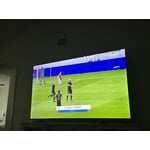
[This review was collected as part of a promotion.] Very good product , the contrast is perfect ! Brighness, uniformity at its top,

Review from Samsung US
Helpful?3CTS2O15ZY1416007408101
Jun 23, 2026
Reviewer name: BeautifulDisaster52
1 out of 5 stars
1 out of 5 stars review

Sucks

[This review was collected as part of a promotion.] Already went out. Had for a very short time. Never purchased again

Review from Samsung US
Helpful?3CTS2O15ZY1416007408101
reply from Samsung Advisor

Hi, It’s unfortunate to hear about your experience with Samsung’s U8000FD TV. We’re committed to delivering quality, value, and the best possible product experience. This TV is backed by a 3-year limited manufacturer’s warranty, which includes authorized repair for eligible defects when purchased brand-new from an authorized retailer. To review full warranty terms, you can enter your model number here: https://www.samsung.com/us/support/warranty/ We’d appreciate the opportunity to assist further. Please contact Samsung Customer Support at 1-800-SAMSUNG (8AM – 9PM EST Mon – Fri, 8AM – 6PM Sat – Sun)or connect with a LiveChat agent by clicking the ‘Support’ link on our website. ~ Samsung Advisor

Jul 27, 2026
Reviewer name: Bubu
5 out of 5 stars
5 out of 5 stars review

Great tv

[This review was collected as part of a promotion.] Very clear picture and sound. Really user friendly

Review from Samsung US
Helpful?3CTS2O15ZY1416007408101
Jun 20, 2026
Reviewer name: Jude
5 out of 5 stars
5 out of 5 stars review

Great Features User Friendly
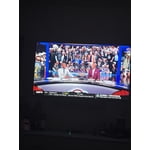
[This review was collected as part of a promotion.] Great picture and resolution. Great think frame. Colors are vibrant

Review from Samsung US
Helpful?3CTS2O15ZY1416007408101
Jul 5, 2026
Reviewer name: Savant
5 out of 5 stars
5 out of 5 stars review

Best in Quality

[This review was collected as part of a promotion.] Only the Very Best Quality Product allowed that also has internet app access.

Review from Samsung US
Helpful?3CTS2O15ZY1416007408101
Jun 27, 2026
Reviewer name: Twiitch13
5 out of 5 stars
5 out of 5 stars review

Good

[This review was collected as part of a promotion.] It's a great tv for sports and gaming, slap it in any room and you're good to go.

Review from Samsung US
Helpful?3CTS2O15ZY1416007408101
Jul 5, 2026
Reviewer name: homebody
5 out of 5 stars
5 out of 5 stars review

Lots of free channels.

[This review was collected as part of a promotion.] Clear picture! Looks good. Very happy with this TV.

Review from Samsung US
Helpful?3CTS2O15ZY1416007408101
Jun 1, 2026
Reviewer name: Television
3 out of 5 stars
3 out of 5 stars review

Samsung

[This review was collected as part of a promotion.] It was easy to connect to my phone. I wish it could have been more voice activated

Review from Samsung US
Helpful?3CTS2O15ZY1416007408101
reply from Samsung Advisor

Hi Television, Thank you for sharing your review. Your TV Works With Alexa, meaning you’ll need to connect a standalone Alexa device such as an Echo speaker, to control compatible smart home devices and some experiences on your TV. Here are the steps: 1. Download both the Amazon Alexa and Samsung SmartThings apps, if you don't already have them. Both are available for iOS or Android devices. 2. Make sure your Alexa device and TV are both connected to the same Wi-Fi network. 3. Your TV must be enabled within the SmartThings app. If not, make sure you are signed in with your Samsung account on the TV: Settings > All Settings > Samsung Account 4. Log in to the SmartThings app with the same Samsung account. Tap Devices, and if your TV isn’t already shown, tap + to add it to the app. 5. In the Alexa app, enable the SmartThings skill and sign into your Samsung account. This will automatically connect your Samsung TV to Alexa and let you use voice commands to control your television. If you need more help, we’re here. Give us a call at 1-800-SAMSUNG, available daily from 8AM - 9PM EST Monday - Friday, and 8AM - 6PM Saturday and Sunday. You can also visit the Samsung website and click on ‘Support’ for: • Live Chat • Manuals, Software, & Warranty Info ~Samsung Advisor

Jul 27, 2026
Reviewer name: Jadefader
5 out of 5 stars
5 out of 5 stars review

Best universal TV

[This review was collected as part of a promotion.] Best brightness and contrast also responsiveness and upsaling

Review from Samsung US
Helpful?3CTS2O15ZY1416007408101
Jul 21, 2026
Reviewer name: Marcelo
4 out of 5 stars
4 out of 5 stars review

Great feature

[This review was collected as part of a promotion.] Samsung is durable tv. I had one before and it lasted longer.

Review from Samsung US
Helpful?3CTS2O15ZY1416007408101